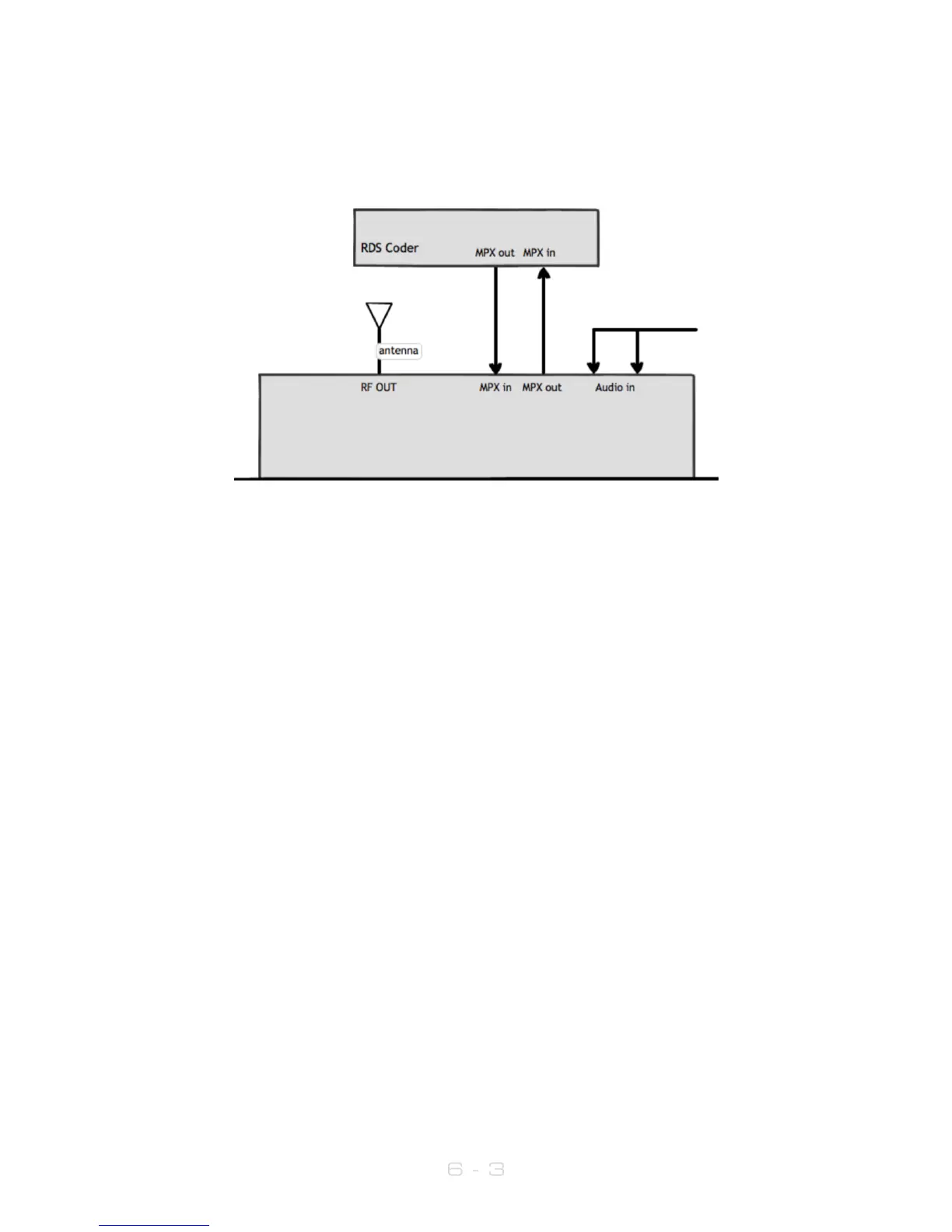
6.2 Examples of use
6.2.1 Transmitter with external RDS coder and internal audio processing
1. Place the transmitter in a well ventilated space.
2. Connect the antenna to the RF output connector on the back of the
transmitter.
3. Connect the left and right program audio signals to the XLR input
connectors on the back of the transmitter. If using AES/EBU digital, connect this
to ‘AES’ RJ45 connector.
4. Connect the MPX1 output on the back of the transmitter to the MPX input of the
RDS encoder.
5. Connect the MPX output of the RDS encoder to the MPX1 input on the back of
the transmitter.
6. Plug the power cord into the power supply module on the rear panel of the
transmitter.
7. Connect the required remote control / monitoring ports (Ethernet, RS232,
Alarms/Triggers Port).
8. In the Audio Settings menu, select the input source (analog/digital).
9. In the RF Settings menu, set MPX Source to MPX Input 1.
10. Once the transmitter is operating, set the correct carrier frequency and RF
power from the RF settings menu. Check reflected power is OK.
Check the documentation that came with your RDS encoder on how to set/check the
proper RDS injection level.
Note: If using the transmitter’s internal RDS coder, in RF Settings set MPX Source to
Internal.



 To Next Page