Electronic Instrumentation
UM3148 – DT5730/DT5725 User Manual rev. 2
At software level, CAEN manages the on command channel calibration in different readout software (please, refer the
relevant software User Manual for details).
➢ WaveDump
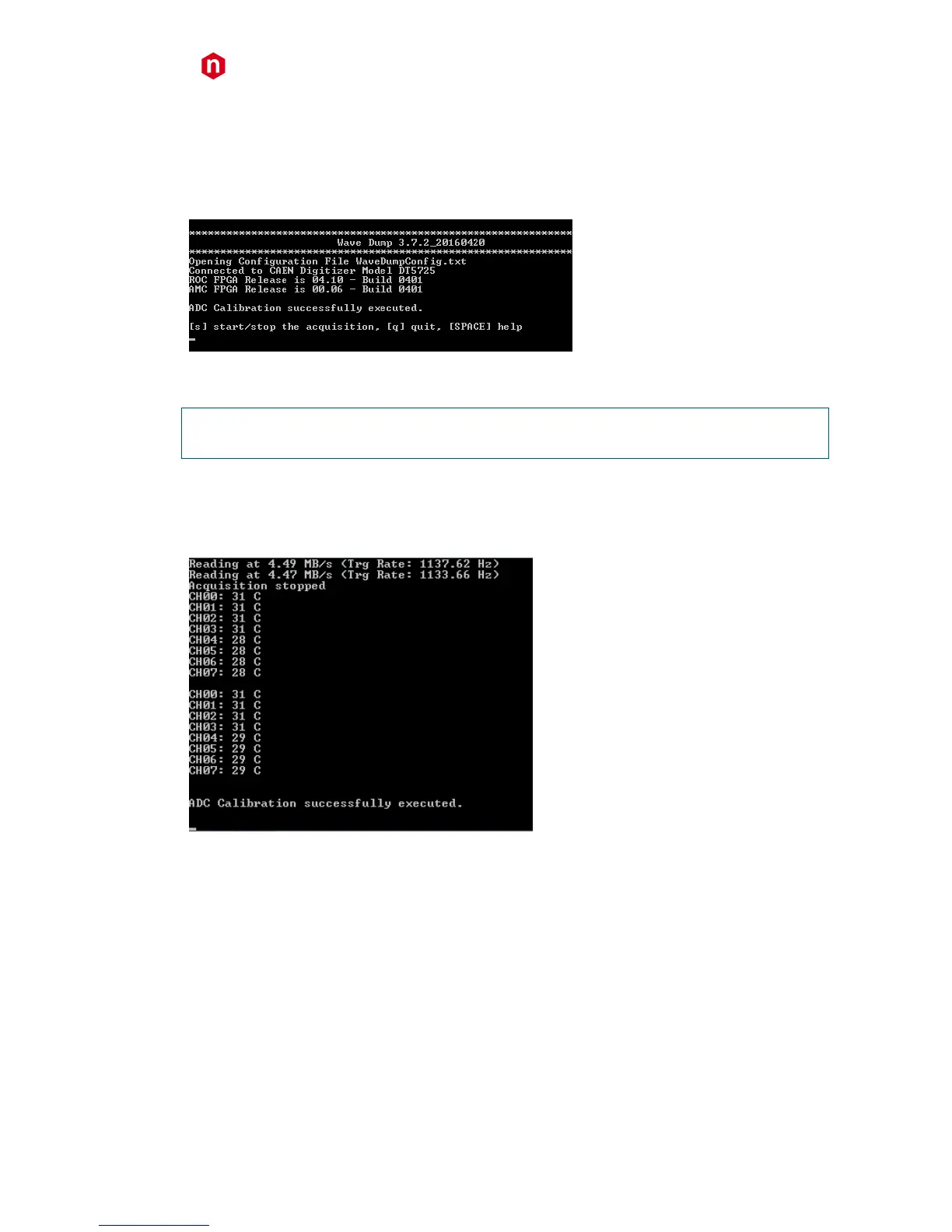
1. Lauch WaveDump. This software performs an automatic ADC calibration and displays a message when it is
completed (see Fig. 9.4).
Fig. 9.4: Automatic calibration at WaveDump first run
This allows the user to start using the program sure that the digitizer has been calibrated at least once.
NOTE THAT: If SKIP_STARTUP_CALIBRATION parameter is set to YES in WaveDump configuration file, the automatic
start-up calibration is not performed and no message is displayed
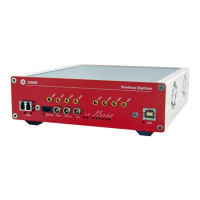
2. At any time, the user can check the channel temperatures (with the acquisition not running) by issuing multiple
“m” commands from the keyboard.
3. In case of significant variations, issuing a “c” command provokes a manual channel calibration to be executed
(see Fig. 9.5).
Fig. 9.5: Temperature monitoring with manual calibration in WaveDump software
4. A new acquisition can start.
Please, refer to WaveDump User Manual for complete software description ([RD6]).



 To Next Page