Electronic Instrumentation
UM3148 – DT5730/DT5725 User Manual rev. 2
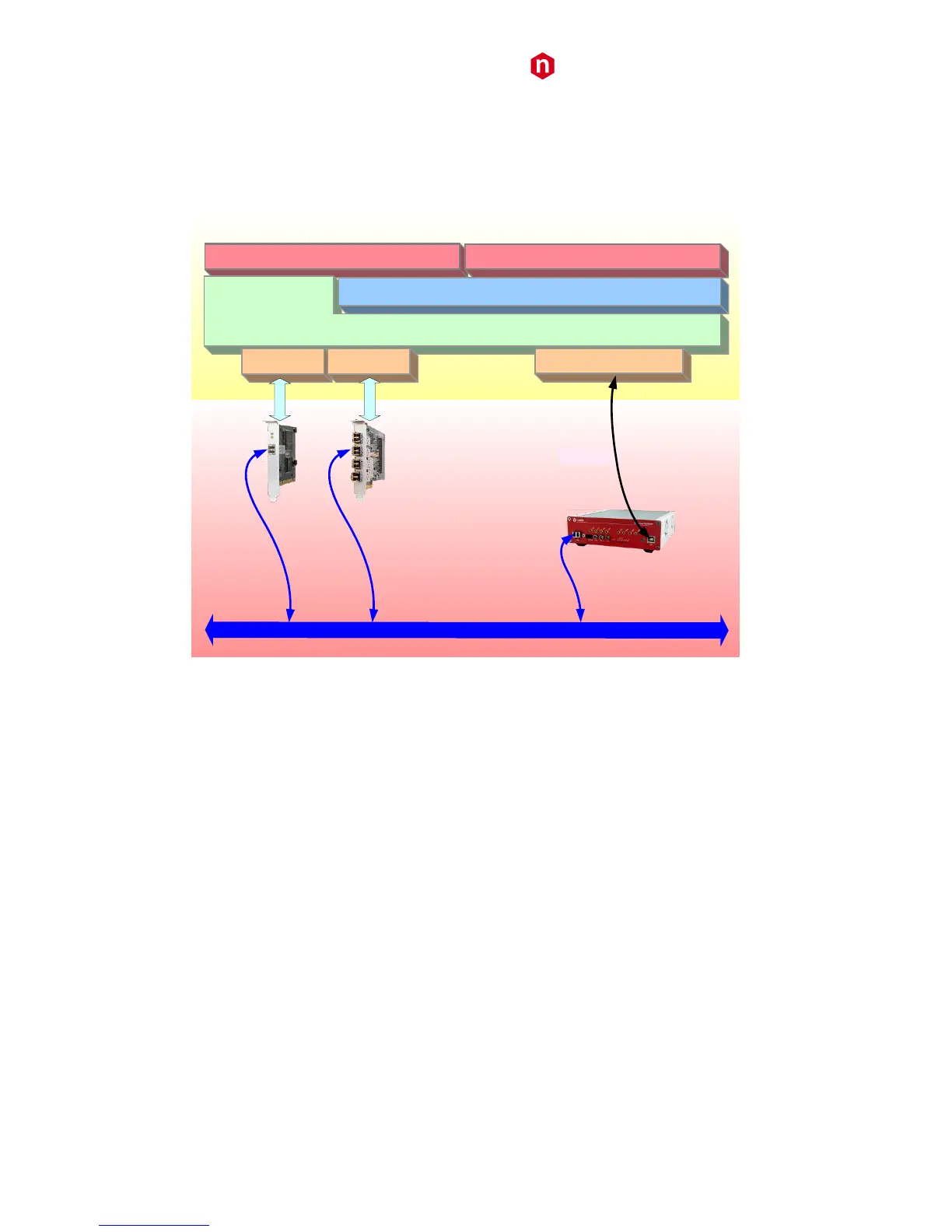
The CAENComm (and so the CAENDigitizer) supports the following communication channels:
PC → USB → DT5730/DT5725
PC → PCI (A2818) → CONET → DT5730/DT5725
PC → PCIe (A3818) → CONET → DT5730/DT5725
CONET
2
(
Optical Link
)
A2818 A3818
CAEN SW Tools
USB 2.0
User’s own SW
DT5730/DT5725
CAENComm
CAENDigitizer Library
A2818 driver A3818 driver
USB driver
PCI
PCIe
Fig. 10.1: Required libraries and drivers
If required to be installed apart by the user (see § 11), CAEN Libraries are available for download on CAEN web site
(www.caen.it) in the “Download” tab at the library web page:
Home / Products / Firmware/Software / Digitizer Software / Software Libraries / <CAEN Library>
Install first CAENVMELib, then CAENComm library, finally CAENDigitizer library.



 To Next Page