Electronic Instrumentation
UM3148 – DT5730/DT5725 User Manual rev. 2
➢ DPP-PSD Control Software
1. Launch DPP-PSD Control Software
2. Connect to the digitizer
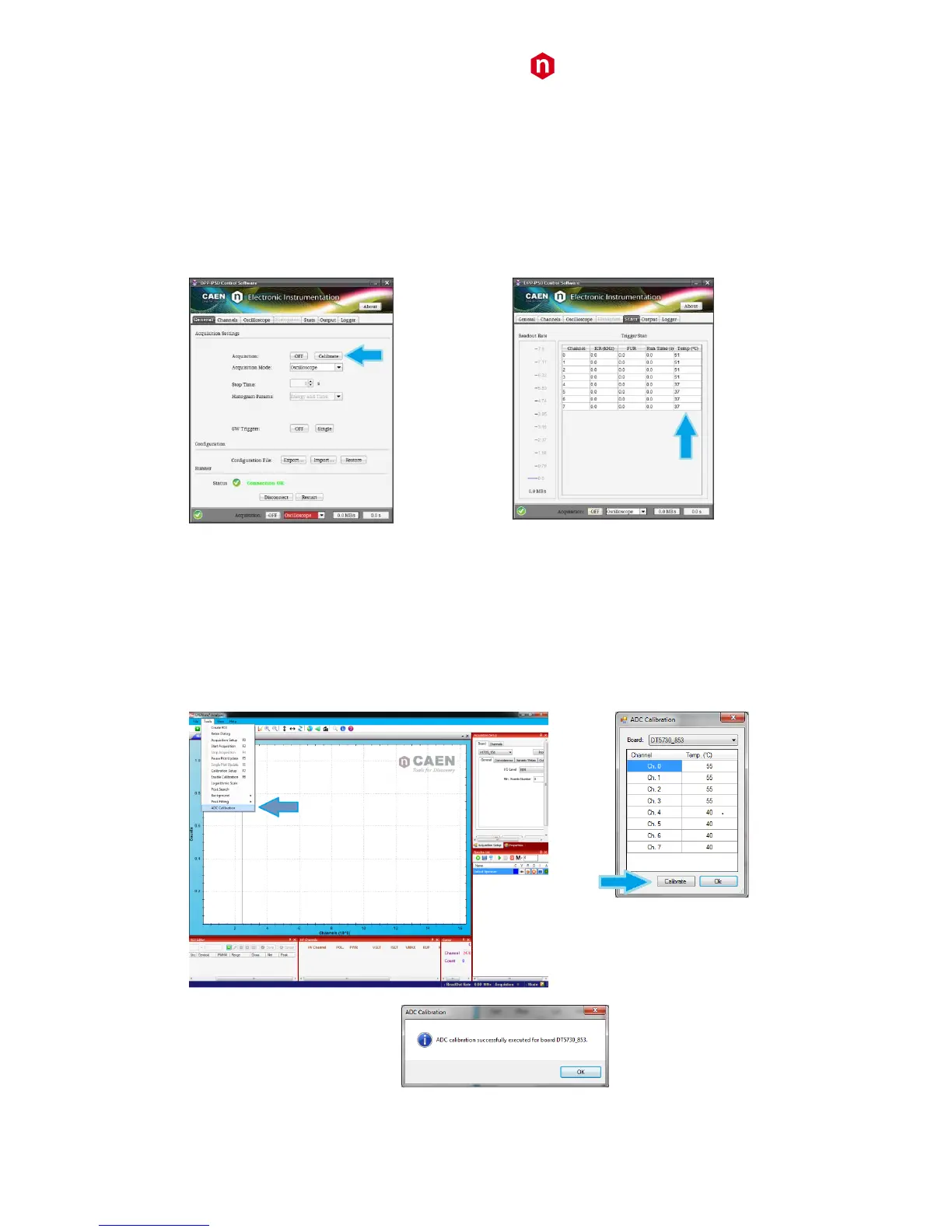
3. Before to start the acquisition, go to the “Stats” tab and monitor the channel temperatures displayed in the
relevant column until you see they don’t vary significantly
4. Go to the “General” tab and press the “Calibrate” button
5. Start the acquisition
Fig. 9.6: Channel calibration in DPP-PSD Control Software
➢ MC
2
Analyzer
1. Launch MC
2
A
2. Connect to the digitizer
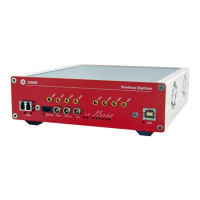
3. Before to start the acquisition, monitor the channel temperatures in Tools->ADC calibration
4. Press “Calibrate” button to perform the calibration
5. Start the acquisition
Fig. 9.7: Channel calibration in MC
2
Analyzer software



 To Next Page