User Manual AMETEK Programmable Power
BPS Series 65
5.2 Menu Structure
The next few pages show a map of the available menus in the BPS Series. There are three main level
(level 1) menus from which all other menus can be reached. Frequently used (level 2) menus have a short
cut key that provides direct access. Examples of such menus are Program, Measurements, and Waveform.
In any case, there are never more than three levels of menus although some menus may be spread across
more than one screen.
Note: Not all features and options shown are available on the BTS Series product. Please consult the
date sheet for further information and the availability of upgrades.
5.2.1 MAIN Menus
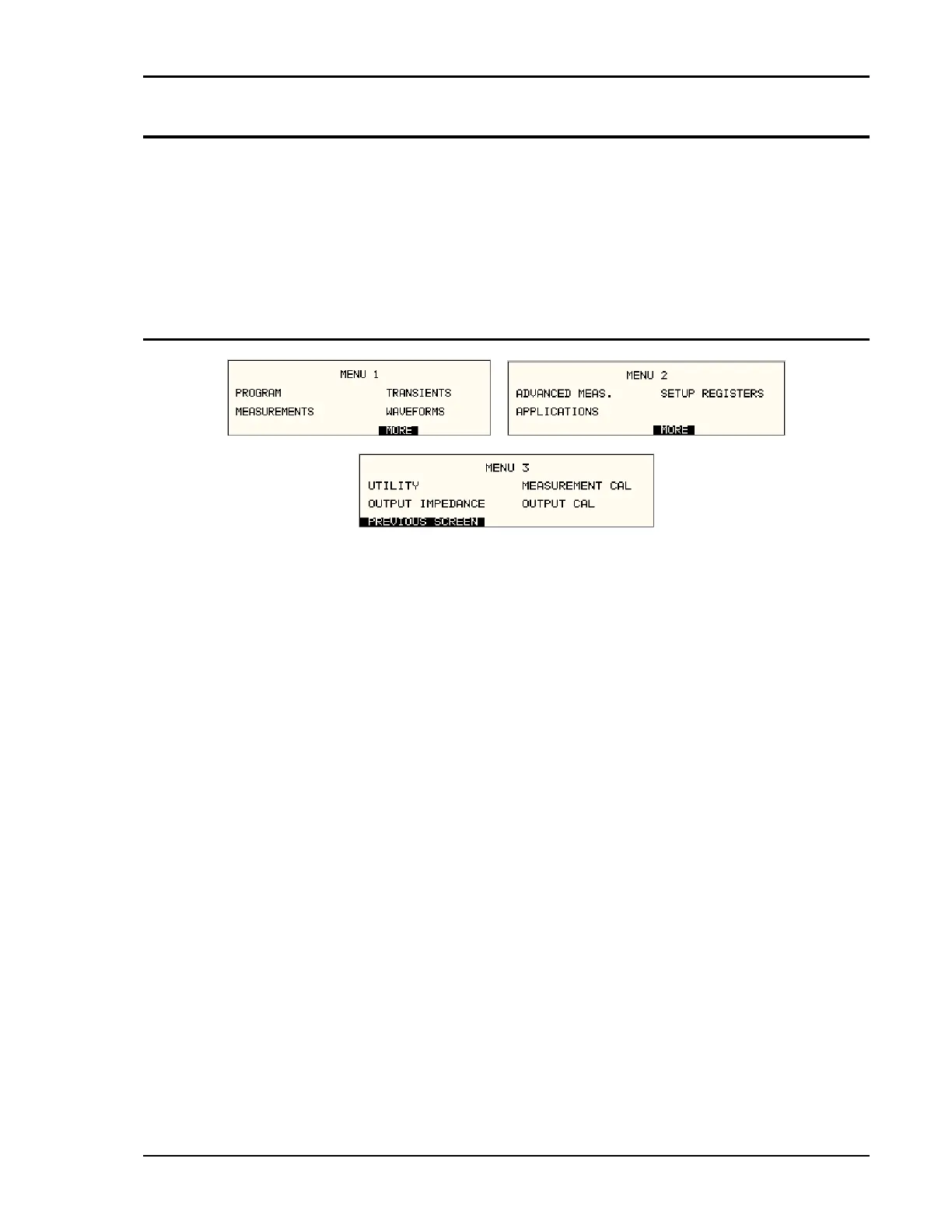
Figure 5-7: Menu 1 through 3
The top-level menu is split in three parts, MENU 1 through MENU 3 to allow spacing between menu
entries. MENU 2 and 3 can be reached from MENU 1 by selecting the MORE entry or by pressing the
MENU key repeatedly, which will toggle from MENU 1 to 2 to 3 and back to 1. The division of menu
choices between the two screens is graphically illustrated in 5.2.2 by the boxes in level 1. Each box
represents one screen. Subsequent screens can be reached using the MORE entry.



 To Next Page