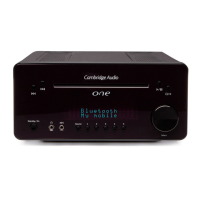
USB input
The USB socket is suitable for playing MP3 and WMA music files contained on USB
memory devices.
Note: Use only simple file storage (flash drive) USB devices, USB drives which contain
operating or other backup software or which are designed to be used in conjunction
with a computer running proprietary software may not work. (E.g. SanDisk Cruzer™).
This unit has been tested with USB devices to a capacity of up to 8GB.
MP3 input
This input allows you to connect the audio outputs of a portable audio device such as
an MP3 player, connected to the front panel 3.5mm stereo-jack input. Press the
Source button and select AUX1/MP3 mode to select this input.
Note: When a device is plugged into the MP3 socket, any input on the Aux 1 rear
terminal is over-ridden for as long as the plug is inserted.
CD Disc slot
Supports Audio CD’s (CD-DA), MP3 files and WMA files played from CD, CD-R or CD-RW
discs. Disc can be inserted into the unit in any mode but not in Standby mode.
Display
LCD used to display functions, sources, settings etc. Refer to ‘Operating instructions’
for more information.
Shift/Presets
One+ can store up to 10 presets for each of the DAB and FM bands. The Shift button
alternates accessing presets 1-5 and 6-10. In CD/USB/SD mode when Program
function is not selected, these buttons can be used to select track numbers (e.g Track
1 play by pressing 1). Pressing the Shift button will cycle between 1-5 and 6-10.
7
11
10
9
8
11
ENGLISH
FM mode – RDS/RBDS (Radio Data System/Radio Broadcast Data System) station
name, time/date, program type, audio mode, alarm status, sleep status and clock
status.
Note: RDS/RBDS information may not work if the FM signal is too weak or the station
does not have any of these services available.
CD mode – elapsed track time, remaining track time, alarm status, sleep status and
clock time.
iPod mode – alarm status, sleep status and clock time.
USB mode – album number, artist name, filename, alarm status, sleep status and
clock status.
SD Card mode – album number, filename, artist name, alarm status, sleep status and
clock time.
SD card slot
Insert an SD card containing MP3/WMA music files for playback.
Note: It is recommended to use a card no greater than 8GB in file size with a FAT (e.g
FAT16, FAT32) file format.
It is not possible to guarantee playback from all card manufacturers. Always use a
high quality brand. One+ is compatible with both standard SD and high capacity SDHC
cards of up to 8GB.
Infrared sensor
Receives IR commands from the supplied remote control. A clear unobstructed line of
sight between the remote control and the sensor is required.
Phones
Allows for the connection of stereo headphones with a 3.5mm jack plug. Headphones
with an impedance of between 32 and 600 ohms are recommended.
Note: Plugging in headphones will automatically mute the loudspeaker output.
6
5
4





 To Next Page