Installation
6
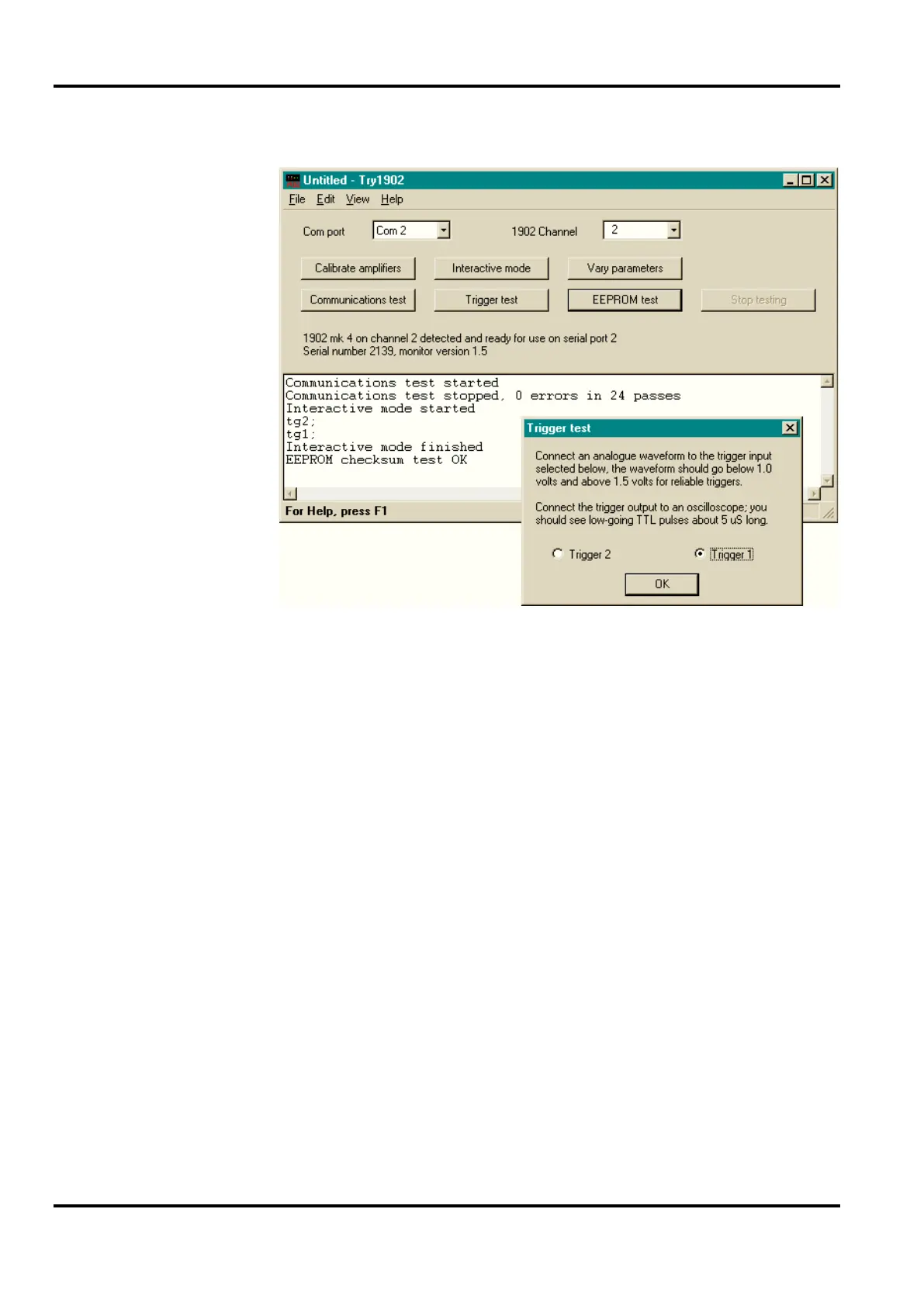
Try1902 with Trigger test prompt
Pressing
Trigger test opens a small window that invites you to
test the trigger inputs with a signal generator and oscilloscope.
However, just toggling the two radio buttons will change which
of the yellow
Gate LEDs is lit on the front panel.
EEPROM test checks the validity of data in a part of the flash
ROM that is equivalent to the EEPROM of earlier 1902s. This
stores information that is specific to the 1902 in question, such
as its serial number and daughterboard configuration. The test
takes a few seconds, and reports either success or failure.
If you are familiar with the 1902 command set (documented in
the 1902 Technical Manual), you can send command strings to
the 1902 by selecting
Interactive mode. Vary parameters
allows you to set the high- and low-pass filters, the notch filter,
and AC coupling, as well as input mode, gain and offset.
Calibrate amplifiers opens the calibration procedure; this is
dealt with below (see page 46.)


 To Next Page