Application software
20
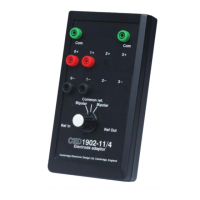
The 1902 is supplied with Try1902, a test and calibration
program, which is referred to throughout this manual. Also
supplied is Ctl1902, a stand-alone applet for users who wish to
run the 1902 as a simple electronic box. In effect, it supplies the
knobs and switches of a logical front panel. A similar applet is
invoked by CED’s principal software packages, Spike2 and
Signal, to provide full operational control of the 1902.
More details of Try1902 are given in the Help sections and in
Maintenance & Calibration.
Whatever the application, all communication with the 1902 is,
ultimately, in the form of short ASCII strings. A full description
of these is provided in the 1902 Technical Manual.
Open the Control Panel by selecting
Start, Programs, 1902
Support, Ctl1902
. A window opens holding the 1902 controls.
These comprise dropdown lists and check boxes. The contents
and ranges on offer depend on the 1902. Ctl1902 interrogates
the 1902 to see which options to display. For example, the
notch filter check box will display either ‘50 Hz’ or ‘60 Hz’.
Here, briefly, are the controls:
This is the 1902 channel number. For use with just one 1902, it
is greyed out.
This selects waveform input from the transducer or the isolation
amplifier. It sets the various operating modes, such as single-
ended or differential for the transducer, or various clamp delays
on the isolation amplifier.
This is the voltage gain of the input selected. It may not go
down to unity: some inputs have minimum gains of 100× or
1000×. Rather than use the dropdown list, the spin controls to
the right may be used.
This is a fixed DC voltage summed with the input, to centre the
signal about zero; a positive or negative value (in millivolts)
may be entered by keyboard, or the spin controls can be used
for steps of 5%.
supplied with the
Note: 1902 ASCII
commands
The Stand-alone
Control Panel


 To Next Page