The hardware
15
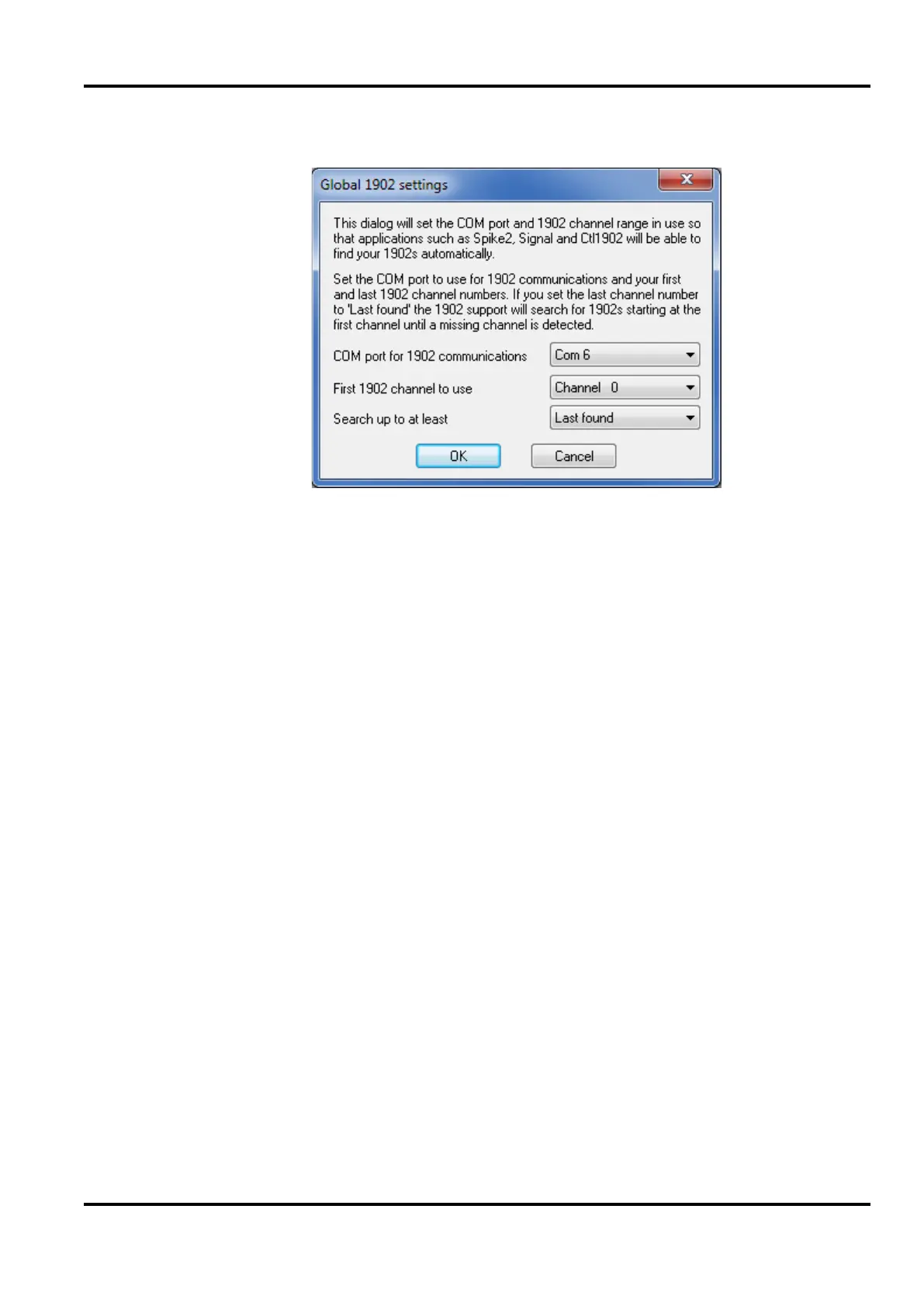
1902 communications dialog box
This sets the com port (serial line) used to communicate with
your 1902s. Try1902 will set this field automatically so you
should not need to change this.
This sets the channel number used to start the search for 1902s.
Set this value to the lowest-numbered channel that you are
using. 1902 channel numbers normally start at zero.
The search for 1902s starts at the first 1902 channel specified,
and continues until a missing 1902 is detected after the channel
specified in this field. So if there is a gap in your 1902 channel
numbers, you can use this field to force the search to cross the
gap by setting it to your highest 1902 channel number.
Normally 1902 channel numbers are contiguous and you would
leave this field set to
Last found.
Once the settings are correct hit OK to save them to the
Windows registry. Once this is done, all software using the
1902, either within a CED application or as stand-alone
support, will be able to find and use your 1902s. If you change
the com port or the 1902 channel numbers you should use this
Try1902 dialog to adjust your settings to match the new
arrangements.
COM port for 1902
communications
First 1902 channel
to use


 To Next Page