EasyManua.ls Logo

CAME ZE5 - Code Memorisation; Memorising Transmitter Code

CAME ZE5
24 pages
Print Icon
To Next Page IconTo Next Page
To Previous Page IconTo Previous Page
Loading...
!##%3
,).%
!#4
%.#
ï ï ï ïï ïïïï ï
ïïïïïïïïï
666
:%
ïïïï ï
/0#,
#/.42/,
!
#"/!2$
!
ïïïïï
#(/0
ïï ï
#,/3%
"/!2$
M!
ï ï
V
W
U
E1
E3
10 11 12357C1 FA
CLOSE
CH1/OP
OP/CL
!##%3
,).%
!#4
%.#
ï ï ï ïï ïïïï ï
ïïïïïïïïï
666
:%
ïïïï ï
/0#,
#/.42/,
!
#"/!2$
!
ïïïïï
#(/0
ïï ï
#,/3%
"/!2$
M!
ï ï
V
W
U
E1
E3
10 11 12357C1 FA
CLOSE
CH1/OP
OP/CL
The data and information reported in this installation manual are susceptible to change at any time and without obligation to notify users.
Pag.
22
22 - Manual code:
319T92
319T92 ver.
2.0
2.0 11/2012 © CAME cancelli automatici s.p.a.
EN
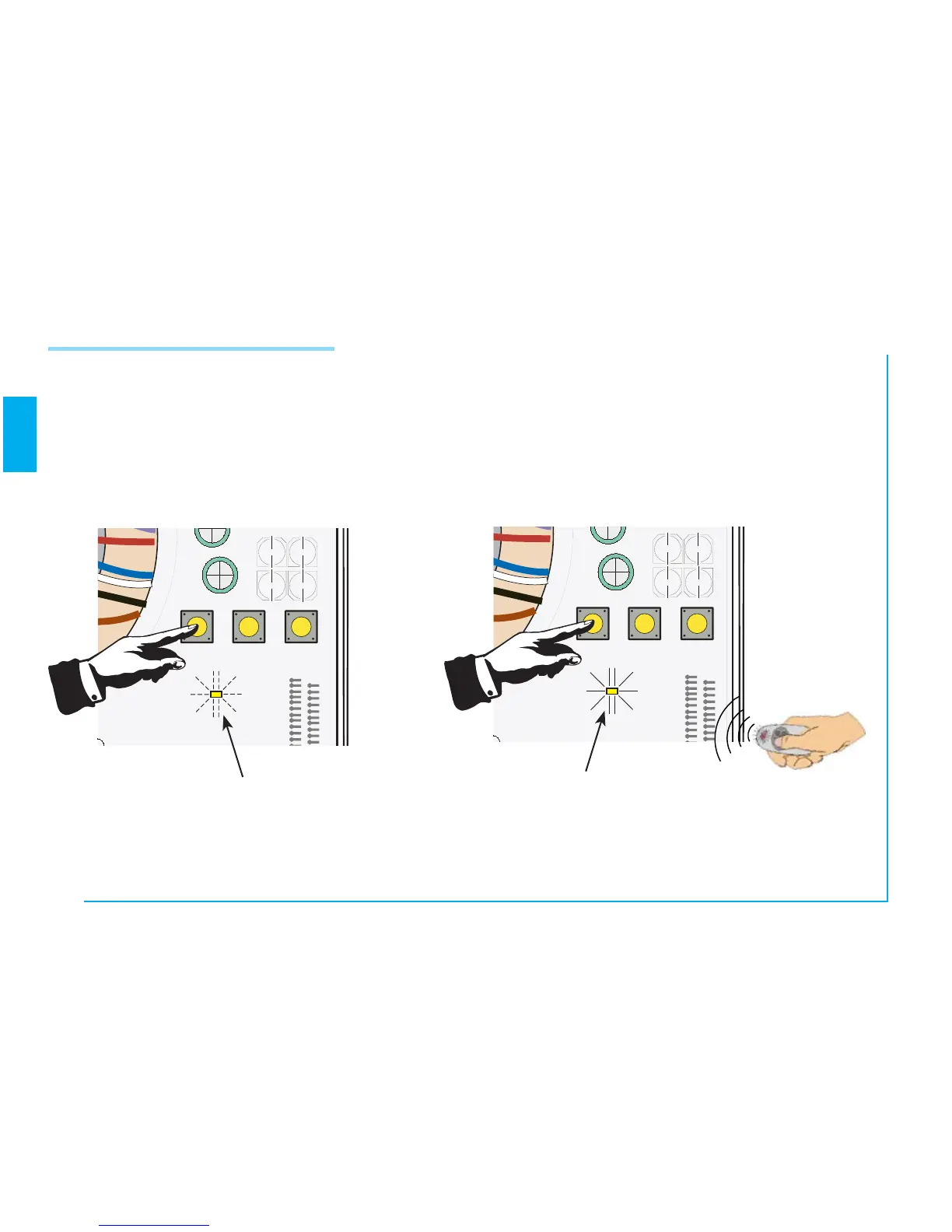
Keep the “CH1/OP” key pressed down
on the control board (the LED indicator
flashes);
Code Memorisation
LED indicator flashes
the code is sent by means of a transmitter key,
and the LED indicator will remain lighted to signal
that that memorisation has taken place.
LED indicator is lit
N.B.: if you later wish to change code, repeat the sequence described.

Related product manuals