EasyManua.ls Logo

Canon EOS 100D - A Picture Style; Q Quick Control

Canon EOS 100D
533 pages
Print Icon
To Next Page IconTo Next Page
To Previous Page IconTo Previous Page
Loading...
Quick Reference Guide
372
Q
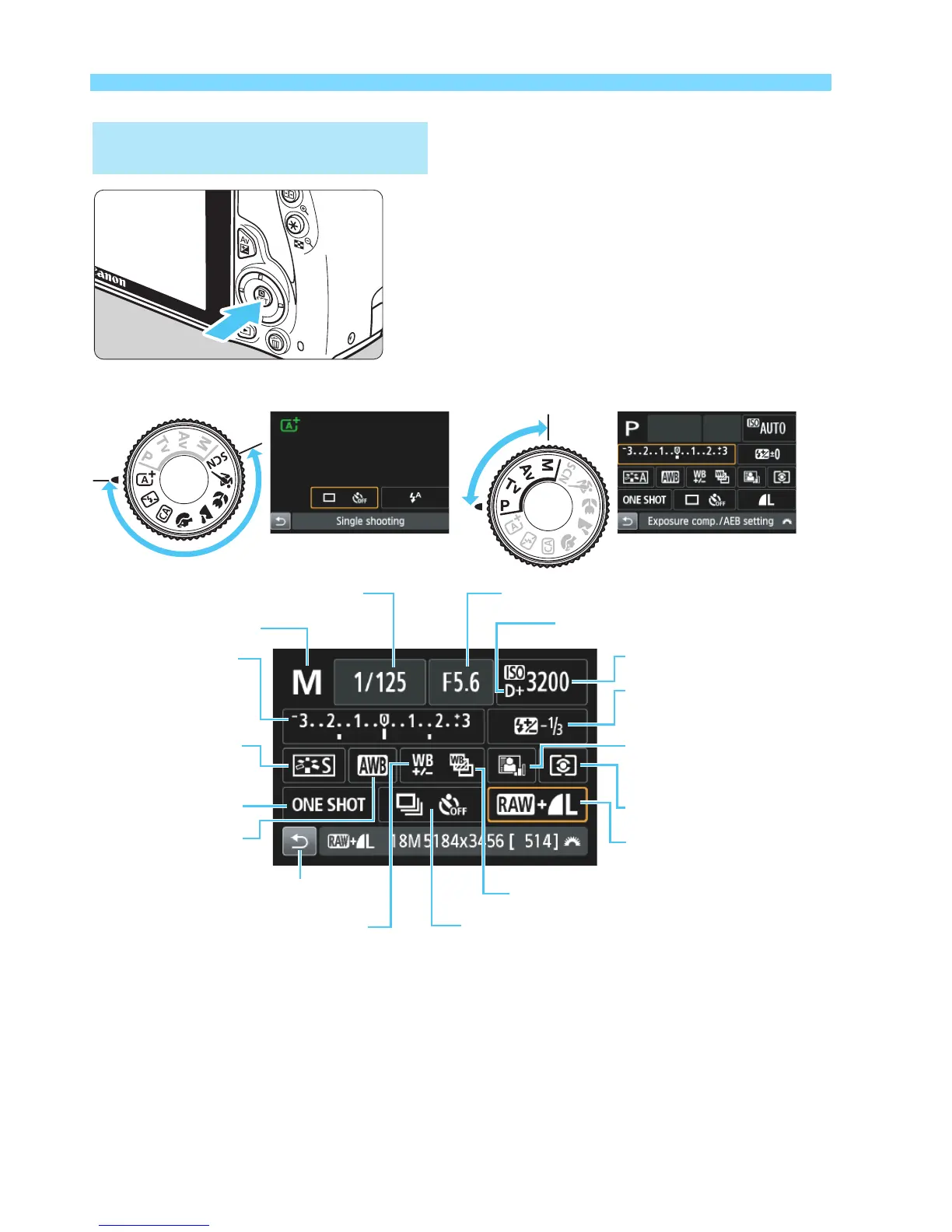
Quick Control
Basic Zone Modes Creative Zone Modes
o
Press the
Q
>button.
The Quick Control screen will
appear.
o
In Basic Zone modes, the settable functions differ
depending on the shooting mode.
o
Press the <
S
>crosskeystoselectafunction,thenturn
the <
6
>dialtosetit.
Shutter speed
Aperture
Highlight tone priority
ISO speed
Picture Style
Exposure
compensation/
AEB setting
Shooting mode
Flash exposure
compensation
White
balance
Drive/self timer
Return
White balance correction
Auto Lighting
Optimizer
AF operation
Metering mode
White balance bracketing
Image recording
quality
<

Table of Contents

Other manuals for Canon EOS 100D

Related product manuals