79
Using AF to Focus (AF Method)
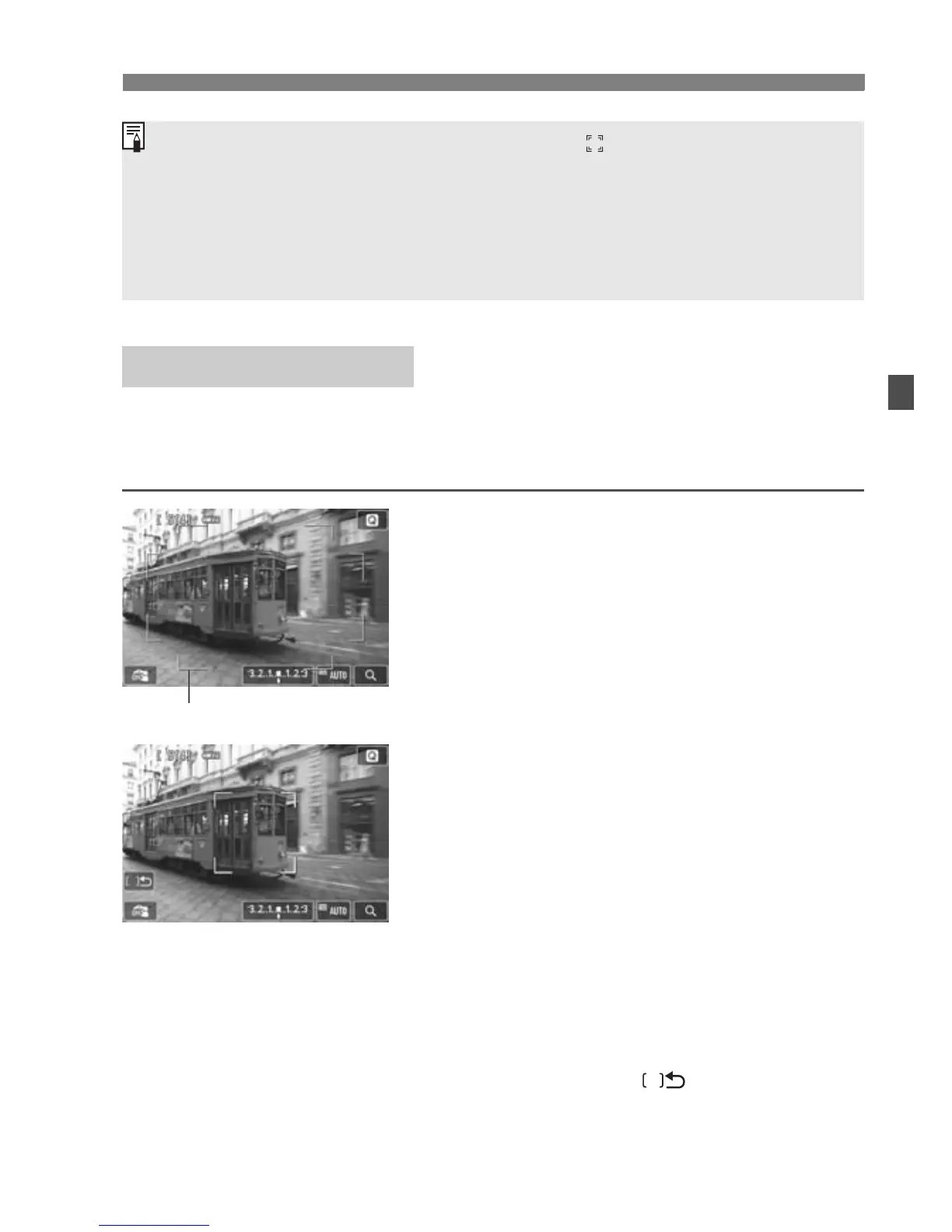
You can use up to 31 AF points for wide-area focusing (automatic
selection). This wide area can also be divided into 9 zones for focusing
(zone selection).
1
Display the Live View image.
Press the <A> button.
X The Live View image will appear on
the LCD monitor.
2
Select the AF point.N
Pressing the <L> button will toggle
between automatic selection and
zone selection. In Basic Zone modes,
automatic selection is set
automatically.
Use the <S> cross keys to select a
zone. To return to the center zone,
press the <L> button again.
You can also tap the LCD monitor
screen to select a zone. When a zone
is selected, tap [ ] on the screen
to switch to automatic selection.
FlexiZone - Multi:
o
If you press the <L> button, he AF point < > will appear at the center
and you can use the <S> cross keys to move the AF point.
Since AF is not possible with a face detected near he edge of the
picture, the <p> will be grayed out. If you press the shutter button
halfway, the subject will be focused in FlexiZone - Multi method with
automatic selection.
Area frame



 To Next Page