Using AF to Focus (AF Method)
82
The dedicated AF sensor is used to focus in One-Shot AF mode, using
the same AF method as with viewfinder shooting.
Although you can focus the target subject quickly, the Live View image
will be interrupted momentarily during the AF operation.
You can use nine AF points to focus (automatic selection). You can also
select one AF point to focus and focus only the area covered by that AF
point (manual selection).
1
Display the Live View image.
Press the <A> button.
X The Live View image will appear on
the LCD monitor.
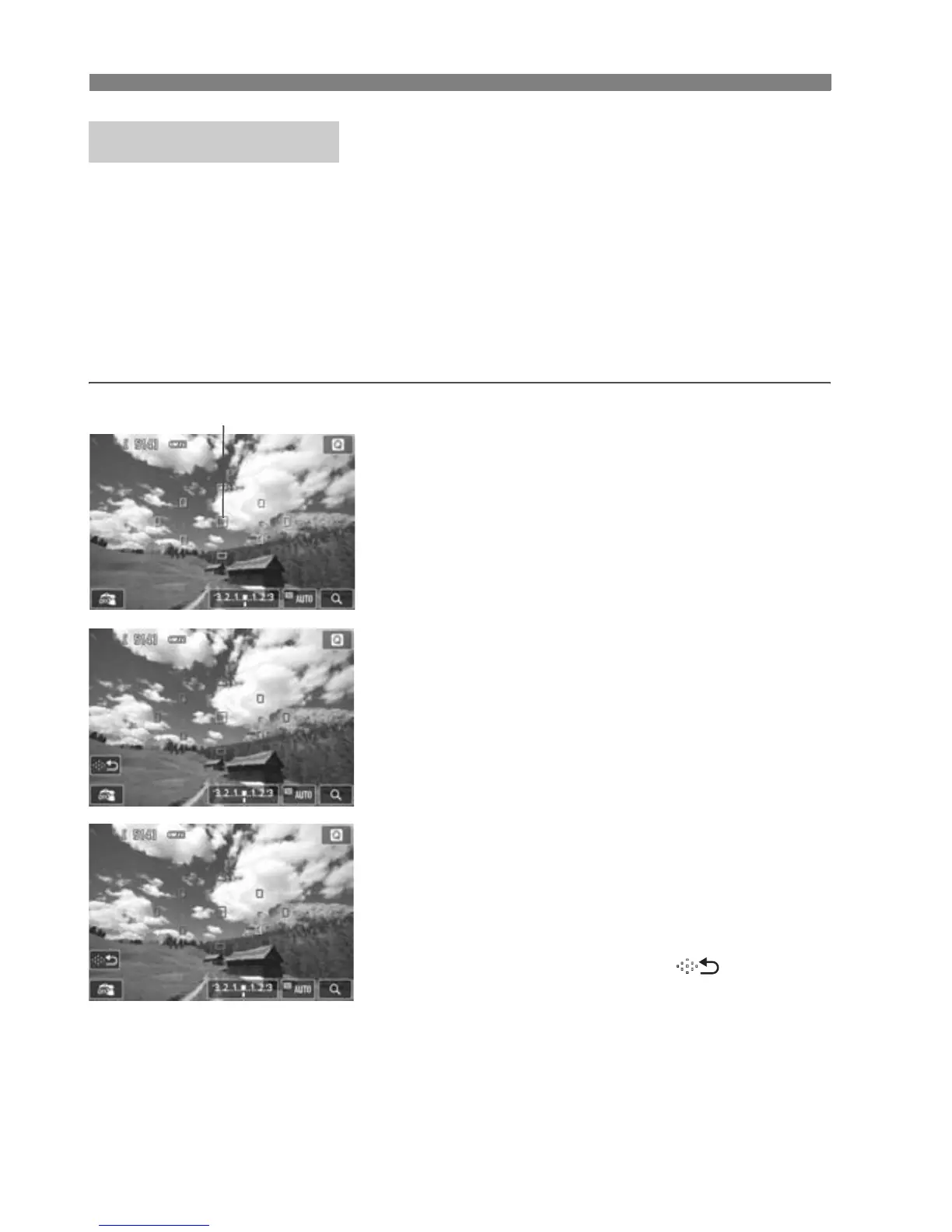
The small boxes are the AF points.
2
Select the AF point.N
Pressing the <L> button will toggle
between automatic selection and
manual selection. In Basic Zone
modes, automatic selection is set
automatically.
Use the <S> cross keys to select an
AF point. To return the AF point to the
center, press the <L> button again.
You can also tap the LCD monitor
screen to select the AF point. During
manual selection, tap ] on the
screen to switch to automatic
selection.
Quick Mode:
f
AF point



 To Next Page