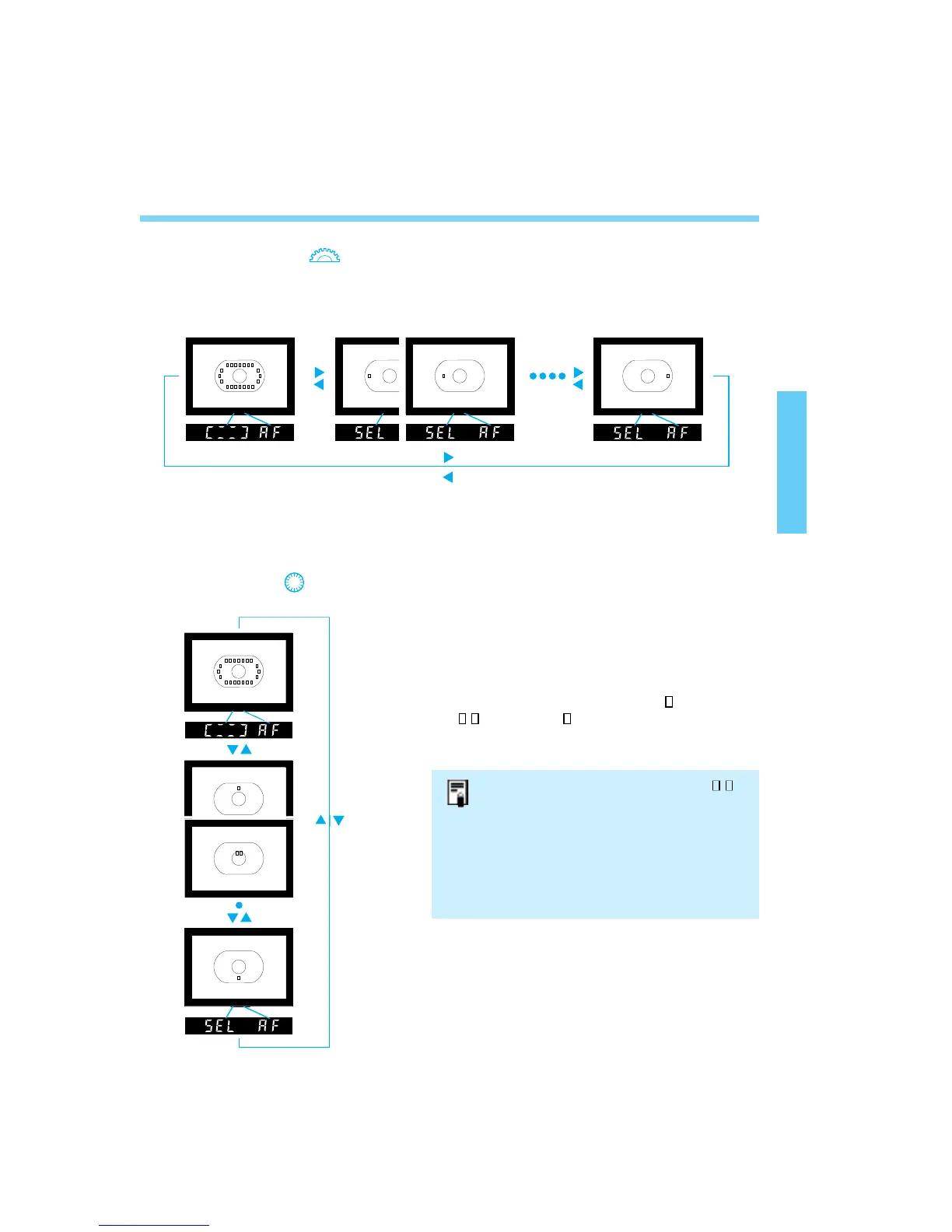
Focusing Point Selection
• When the dial is turned, the selected focusing
point shifts in the following loop: Automatic
selection ↔ Up ↔ Center ↔ Down ↔
Automatic selection.
• As shown in the figures, the focusing point
selection shifts from single ( ) to double
()to single ( ) focusing point(s).
• This loop applies to all focusing point columns.
39
● Using the < > dial to select a left or right
focusing point
Automatic Selection
• When the dial is turned, the selected focusing point shifts in the following loop: Automatic
selection ↔ Left ↔ Center ↔ Right ↔ Automatic selection.
• This loop applies to all focusing point rows.
●
Using the
<>
dial to select an upper or lower focusing point.
• When double focusing points ( )
are selected, focusing point
selection will be automatic.
• When double focusing points have
been selected and a left or right
focusing point is selected, only one
focusing point at a time will be
selected.
04. C836-E (33~) 28-01-2003 11:10 Pagina 39



 To Next Page