Shutter Speed-Priority AE (Tv): You Set the Shutter Speed
64
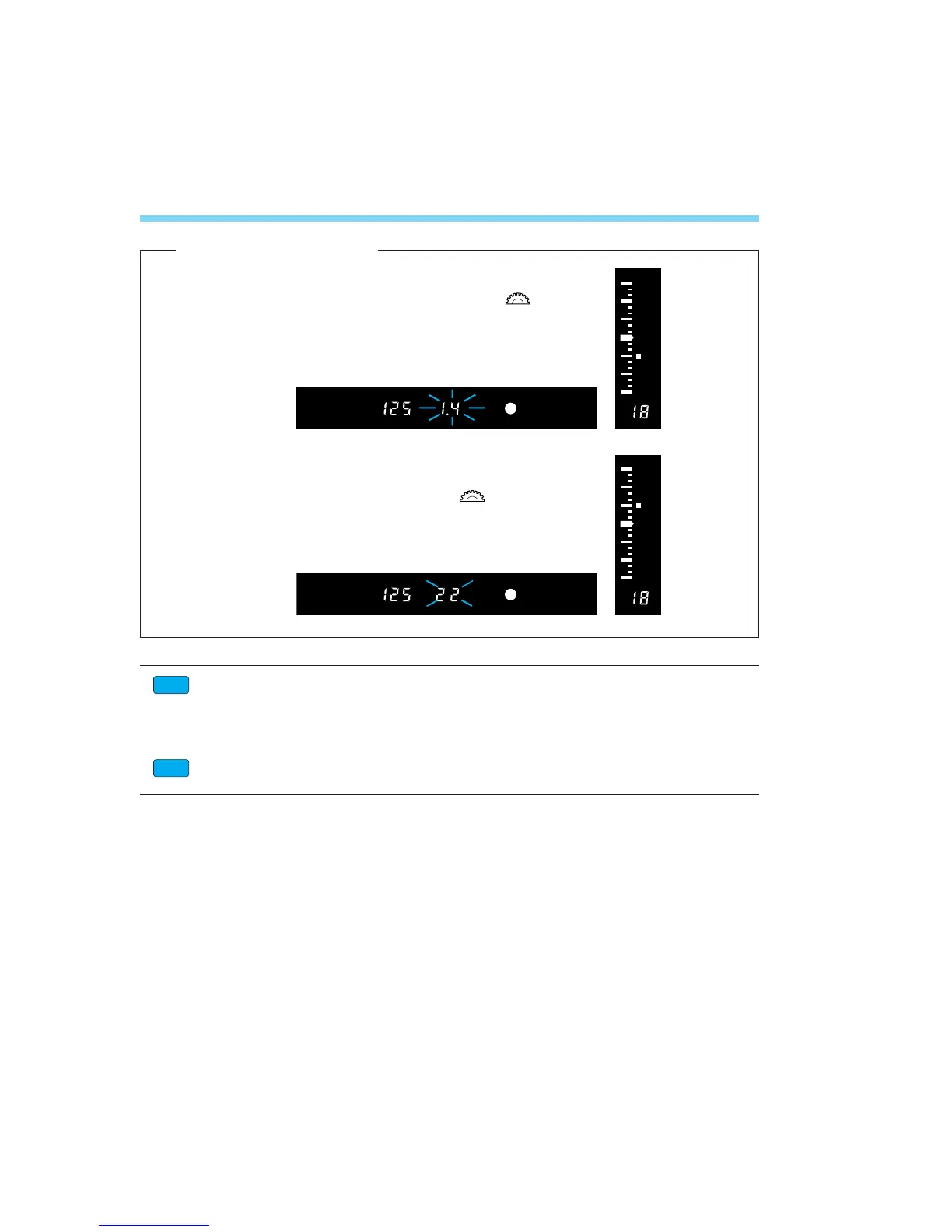
• If the lens’ maximum aperture (smallest F-number like
f/1.4) blinks, it indicates underexposure. Turn the < >
dial to set a slower shutter speed until the aperture stops
blinking.
• If the lens’ minimum aperture (largest F-number like f/22)
blinks, it indicates overexposure. Turn the < > dial to
set a faster shutter speed until the aperture stops
blinking.
Custom Function CF-16 (see page 120) can enable the safety shift feature:
If a standard exposure cannot be obtained in the shutter speed-priority AE mode
with any aperture set by the camera, the camera automatically sets a faster or
slower shutter speed. This feature is called safety shift.
Custom Function CF-6 enables the shutter speed to be set in full-stop or half-stop
increments instead of the standard 1/3-stop increments. See page 112.
CF
CF
[Exposure Warnings]
06. C836-E (61~) 28-01-2003 11:48 Pagina 64



 To Next Page