3-2
Copying
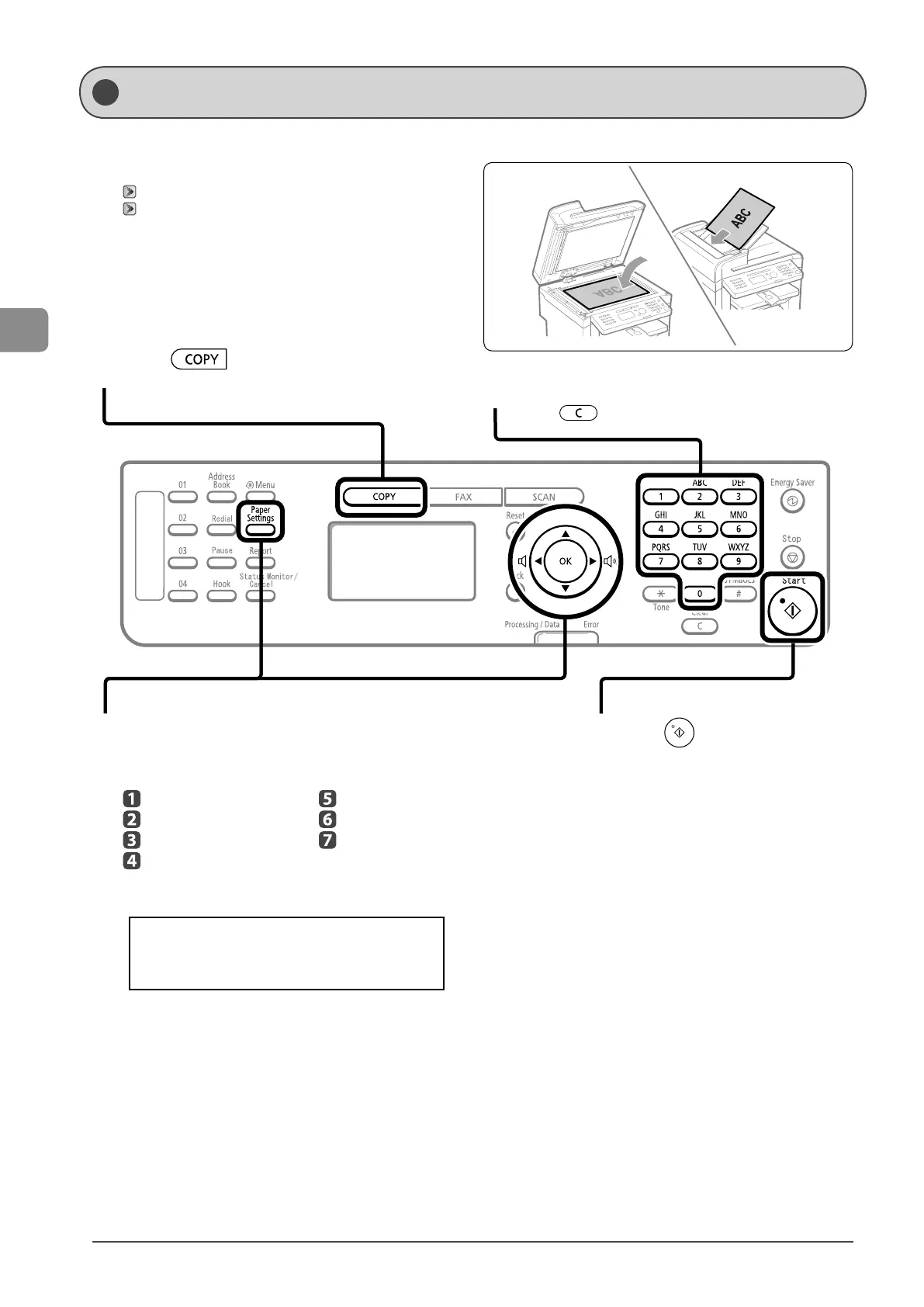
This section describes the basic procedure for copying.
1
Place documents.
“Placing Documents” (→P.2-4)
“Document Requirements ” (→P.2-2)
* A maximum of 35 pages can be loaded into the feeder.
2
Press [ ].
3
Specify the copy settings as needed.
You can specify up to 7 items.
(for details, see P.3-3 to P.3-6 .)
Density
Image quality
2-Sided (MF4570dn only)
Enlarged/reduced
Reduced layout
Collating
Sharpness
The settings that are specified here apply only to
copy operation which you are currently performing.
To apply the valid settings for all copy operations, see
“Changing the Default Values” (→P.3-9).
4
Use numeric keys to enter the desired copy
quantity (1 to 99).
* Press [ ] (Clear) to delete a number.
5
Press [ ] (Start).
Basic Copying Method










 To Next Page