5-8
Registering Destinations in the Address Book
Registering and Editing a coded Dial Code
via the Remote UI (MF4570dn Only)
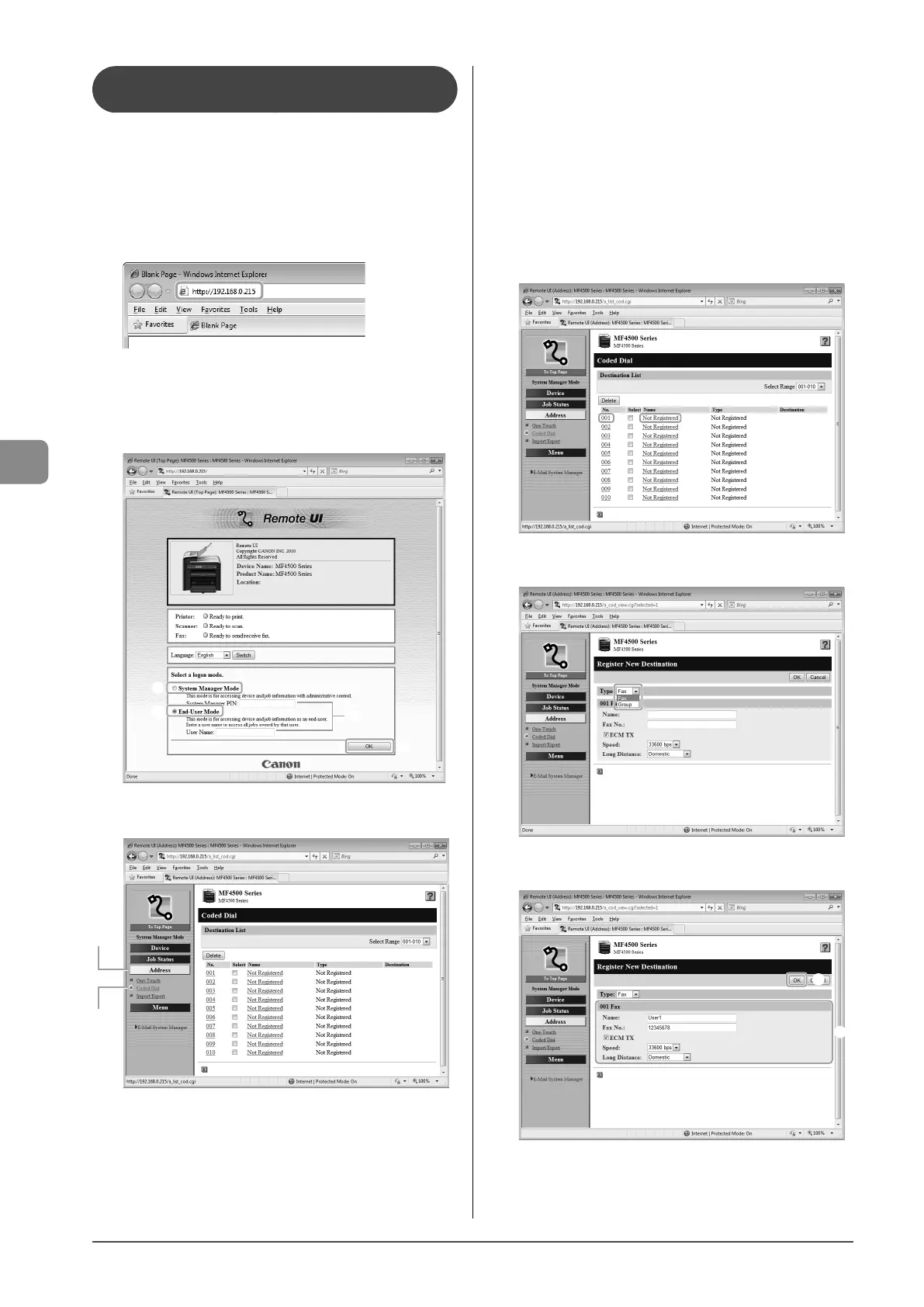
1 Start the web browser.
2 Enter “http://<the IP address of the machine>/” in
the address field, and then press the [ENTER] key
on your keyboard.
Input Example: “http://192.168.0.215/”
3 Log on to the Remote UI.
(1) Select [System Manager Mode].
(2) Enter [System Manager PIN].
(3) Click [OK].
(1)
(1)
(2)
(3)
4 Click [Address] →[Coded Dial].
(1)
(2)
● Storing a coded dial code newly
Proceed to Step 5.
● Editing a coded dial code
(1) Click the number or name.
(2) Click [Edit].
(3) Specify the required settings in the edit screen for
destinations, and then click [OK].
● Deleting a coded dial code
(1) Select the check box for which you want to delete the
number, and then click [Delete].
5 Click [Not Registered] or the number which is not
registered.
6 Select [Fax] from the drop-down list.
7 Specify the required settings, and then click [OK].
(1)
(2)









 To Next Page