5-3
Registering Destinations in the Address Book
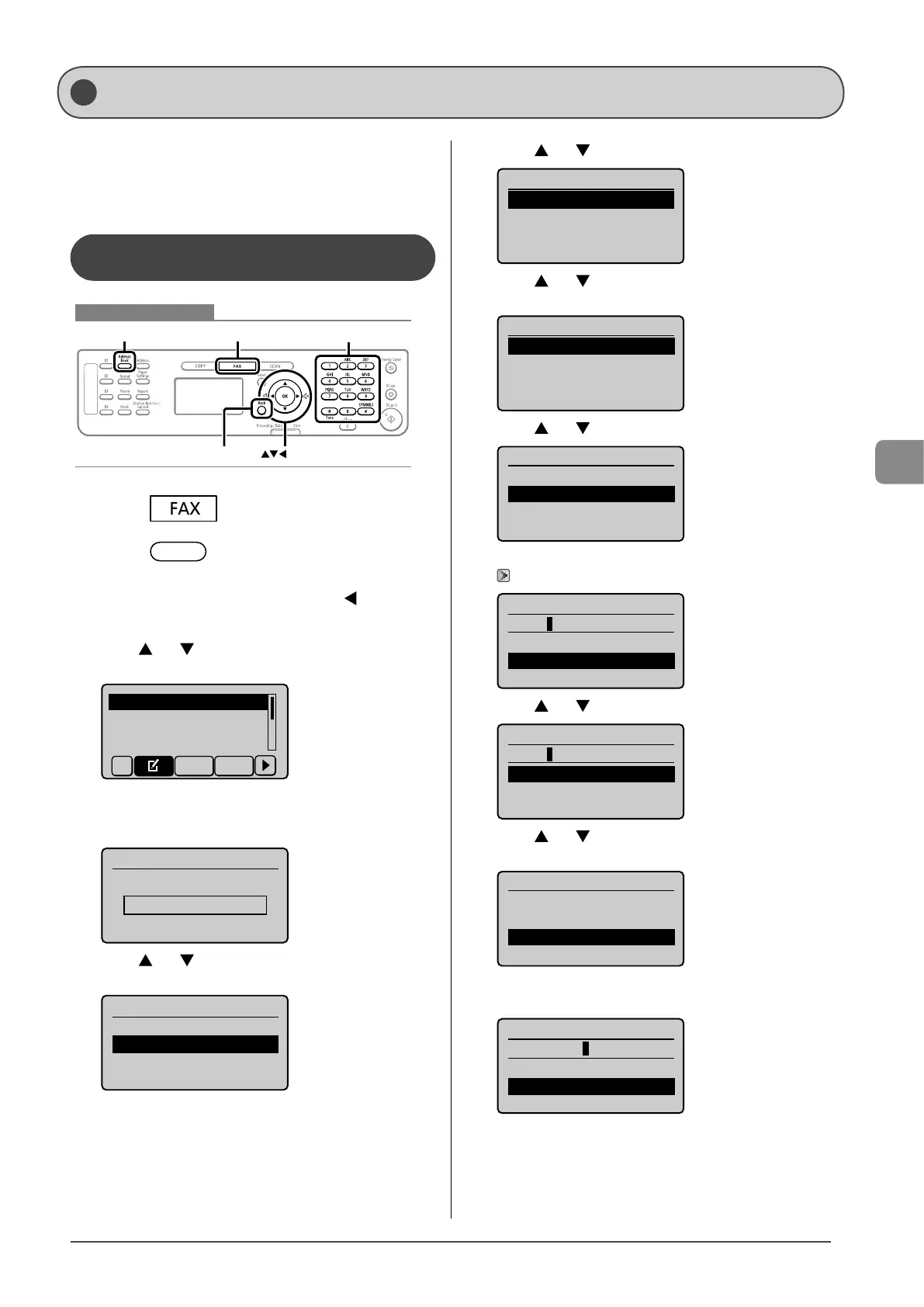
This section describes the following procedure.
• Storing one-touch keys
• Editing one-touch keys
• Deleting one-touch keys
Registering and Editing via the
Operation Panel
Keys to be used for this operation
OK
FAX
Address Book
Back
Tone, Numeric keys
1 Press [ ].
2 Press [ ] (Address Book).
● When storing a one-touch key newly
(1) If there are destinations registered, press [ ].
If you are registering a destination for the first time,
proceed to step (2).
(2) Press [ ] or [ ] to select <Register New Destination to
Address Book>, and then press [OK].
Register New Destina
Edit Address Book
Address Book Details
All A-Z
When the address book PIN is specified
Use the numeric keys to enter the PIN, and then press
[OK].
Address Book PIN
(Apply: Press OK)
*******
(3) Press [ ] or [ ] to select <One-Touch>, and then press
[OK].
Register Location
Coded Dial
One-Touch
(4) Press [
] or [ ] to select <Fax>, and then press [OK].
Destination Type
Fax
Group
(5) Press [ ] or [ ] to select the number to be registered,
and then press [OK].
Enter Registration No.
01 Not Registered
02 Not Registered
03 Not Registered
04 Not Registered
(6) Press [ ] or [ ] to select <Name>, and then press [OK].
Fax
<Apply>
Name:
Destination:
One-Touch: 01
(7) Use the numeric keys to specify <Name>.
“Text Input Method” (→P.1-9)
Name (Max 16 char.)
CANON
<Apply>
Entry Mode: A
(8) Press [ ] or [ ] to select <Apply>, and then press [OK].
Name (Max 16 char.)
CANON
<Apply>
Entry Mode: A
(9) Press [ ] or [ ] to select <Destination>, and then press
[OK].
Fax
<Apply>
Name: CANON
Destination:
One-Touch: 01
(10) Use the numeric keys to specify <Destination>.
Press [OK] to specify <Settings> as needed.
Destination (Max 40)
0123456789
<Apply>
Settings
Registering and Editing One-Touch Keys









 To Next Page