6-5
Using the Fax Functions
Specifying Destinations
Specifying Destinations Using Group Dialing
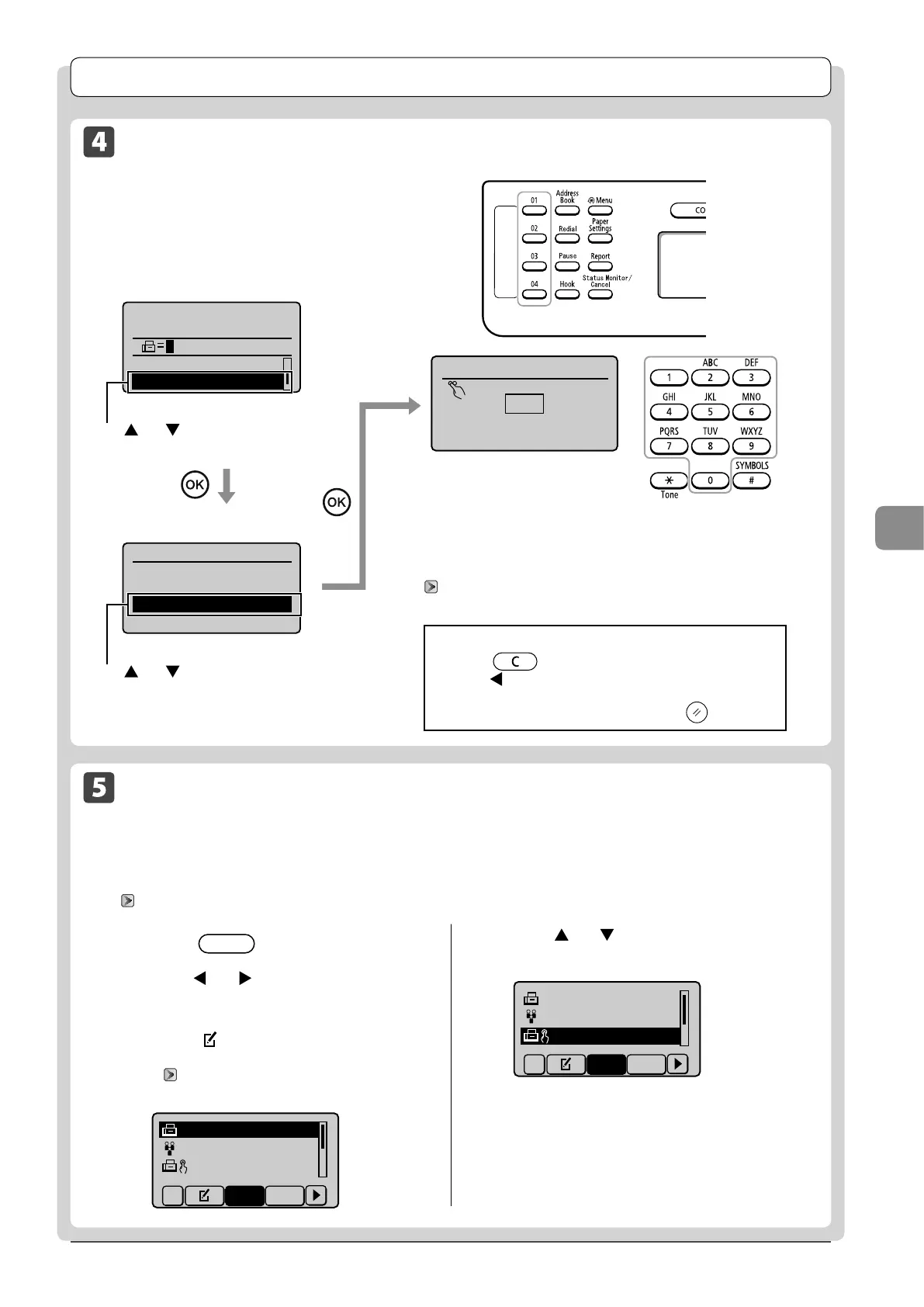
● When the numbers are registered in a one-touch key
Press the one-touch key (01 to 04) assigned to the group.
● When the numbers are registered in a coded dial code
Fax mode screen
Specify destination.
01/01/2011 12:52AM
Sharpness: 0
Specify Destination
+
-
Setting screen
Specify Destination
Fax (New)
Address Book
Coded Dial
Enter the three-digit registration number (001 to 100) with
the numeric keys.
To use this feature, you need to pre-register destinations in
coded dials.
“ Registering and Editing Recipients for Group Dialing”
(→P.5-9)
Enter coded dial no.
*001
*
Press [ ] or [ ] to select <Specify
Destination>.
Press [
] or [ ] to select <Coded
Dial>.
If you press an incorrect key
(1) Press [ ] (Clear).
(2) Press [ ] to select <Yes>, and then press [OK].
* If you want to repeat the procedure from specifying the
settings for the document scanning, press [ ] (Reset).
Specifying Destinations Using the Address Book
After entering the characters from the operation panel and searching the abbreviation of destinations from the
registered address book (one-touch keys, coded dial, or group dialing), the destinations to be specified appear on the
display. You can specify the displayed address as a destination.
To use this feature, you need to pre-register destinations in the address book.
“Registering Destinations in the Address Book” (→P.5-1)
1 Press [ ] (Address Book).
2 Press [ ] or [ ] to select search for the
recipient.
• Select <All> to displays all the recipients.
• Select < > at the bottom left of the screen to add or
edit recipients.
“ Registering Destinations in the Address Book”
(→P.5-1)
CANON 0123456789
GroupA 2 Destin
...
User01 01234567
...
All A-Z
3 Press [ ] or [ ] to select a recipient, and
then press [OK].
CANON 0123456789
GroupA 2 Destin
...
User01 012345678
All A-Z









 To Next Page