11-23
Troubleshooting
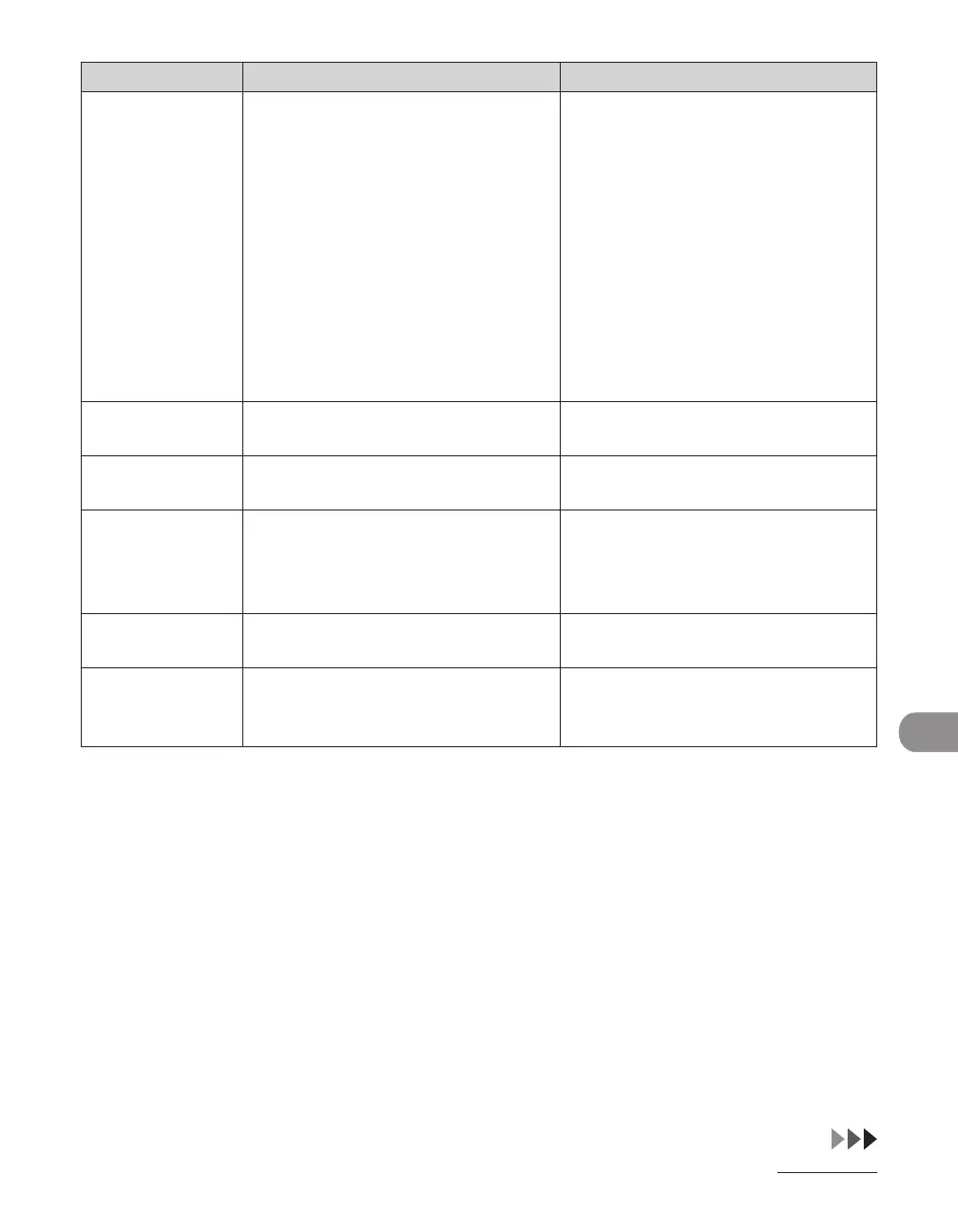
Error Code Description Action
#0005 The other fax machine did not
respond within 35 seconds.
– Send the document again. Contact
the other party and have them
check their fax machine. If you
are making an overseas call, add a
pause to the number.
–
The other party may not be using a
G3 fax machine.
– Check with the other party and
send the document to a G3 fax
machine. If the other party does
not have a G3 fax machine, try
sending your document using
a transmission mode the other
party's fax machine supports.
–
#0009 The paper has run out or the paper
cassette is not set properly.
Load the paper or reset the paper
cassette properly.
#0012 You could not send because the other
party's fax machine is out of paper.
Contact the other party and ask them
to load the paper.
#0018 There is no reply when you redial.
You could not send, because your fax
signal was not returned as the other
party's line was engaged.
Check that the other party's line is
not engaged and try again from the
beginning.
#0037 The memory is full. Print, send, or delete any documents
stored in memory.
#0401 The USB memory is full of data or the
number of file limit has reached.
Get enough space in the USB memory
or organize your destination folder
from your computer.










 To Next Page