108
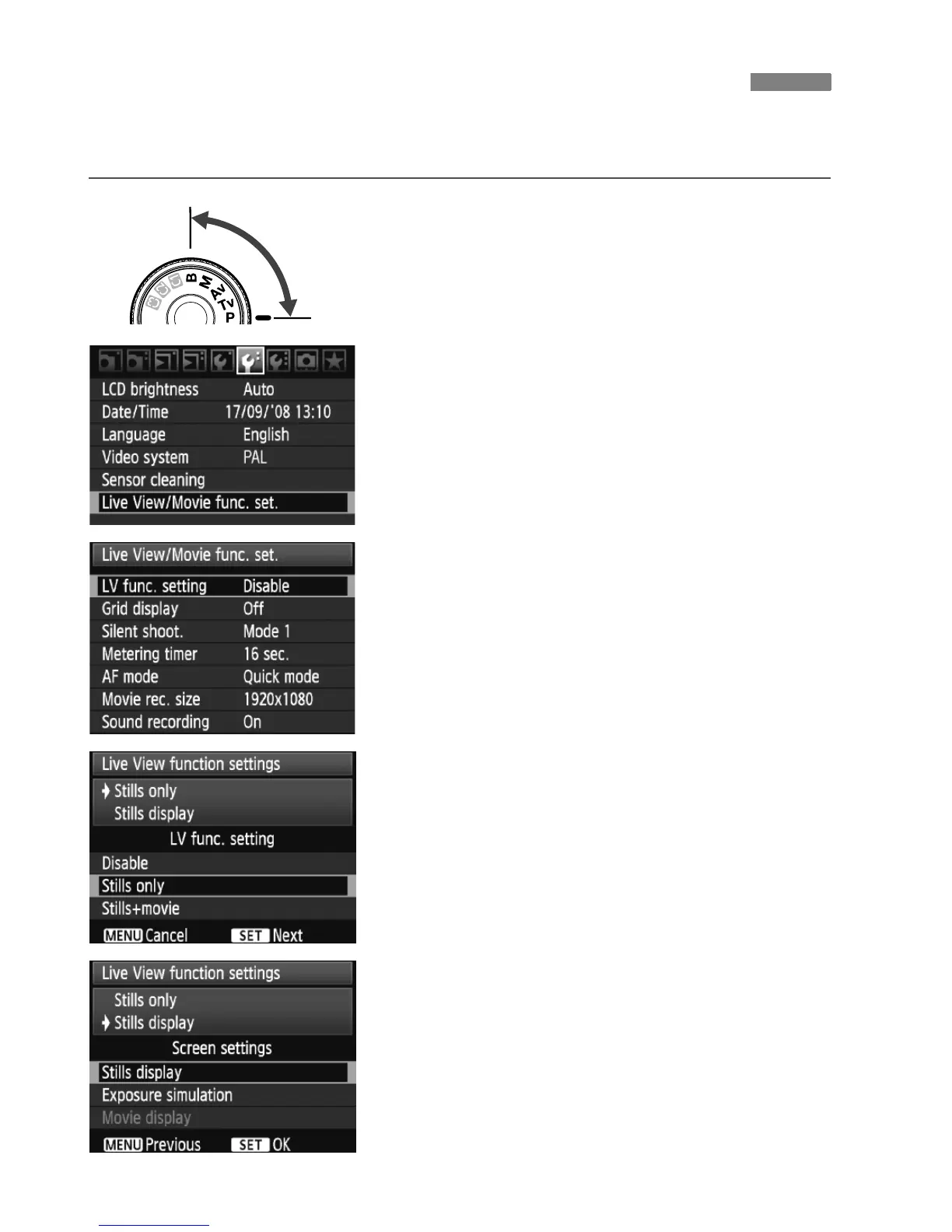
This sets the camera for Live View shooting of still photos. To shoot
movies, see page 121.
1
Set the shooting mode.
Select one of the following modes:
d
/
s
/
f
/
a
/
F.
2
Select [Live View/Movie func.
set.].
Under the [6] tab, select [Live View/
Movie func. set.], then press <0>.
3
Select [LV func. setting].
Turn the <5> dial to select [LV func.
setting], then press <0>.
“LV” stands for Live View.
4
Select the [Live View function
settings] type.
Turn the <5> dial to select [Stills
only], then press <0>.
For details on [Stills+movie], see
page 121.
5
Select the [Screen settings] type.
Turn the <5> dial to select [Stills
display], then press <0>.
X The screen for step 3 will reappear.
For details about this function, see
the next page.
A Preparing for Live View ShootingN















 To Next Page