196
With the AC Adapter Kit ACK-E6 (sold separately), you can connect the
camera to a household power outlet and not worry about the battery
level.
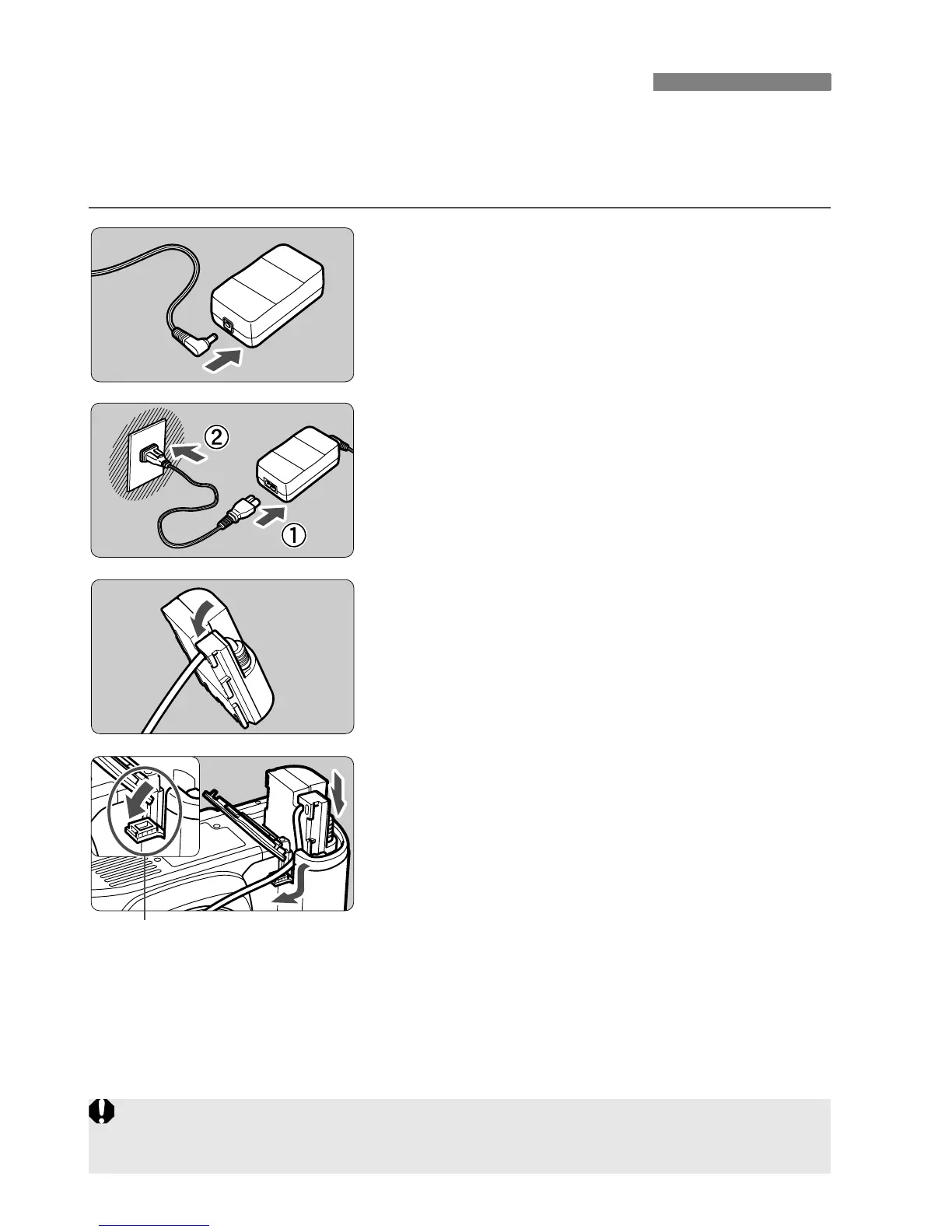
1
Connect the DC plug.
Connect the DC Coupler’s plug to the
AC adapter’s socket.
2
Connect the power cord.
Connect the power cord as shown in
the illustration.
After using the camera, unplug the
power plug from the power outlet.
3
Place the cord in the groove.
Insert the cord carefully without
damaging the cord.
4
Insert the DC Coupler.
Open the battery compartment cover
and open the DC Coupler cord notch
cover.
Insert the DC Coupler securely until it
locks and put the cord through the
notch.
Close the cover.
Using a Household Power Outlet
DC coupler cord hole
Do not connect or disconnect the power cord while the camera’s power
switch is set to <1> or <
J>.















 To Next Page