193
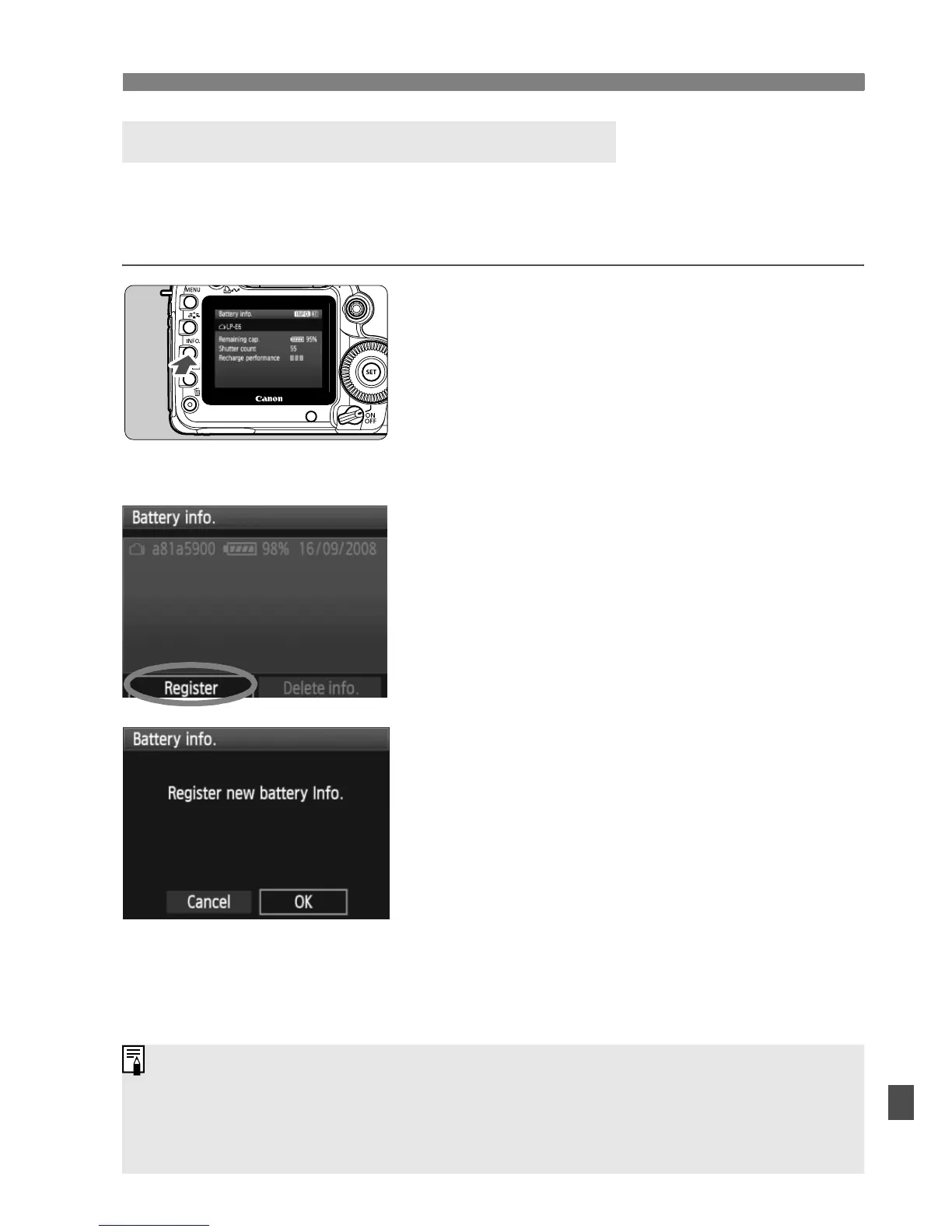
3 Checking the Battery Information
You can register up to six Battery Pack LP-E6’s to the camera. To
register multiple battery packs to the camera, do the procedure below
for each battery pack.
1
Press the <B> button.
With the Battery info. screen
displayed, press the <B> button.
X The battery history screen will
appear.
X If the battery has not been registered,
it will be grayed out.
2
Select [Register].
Turn the <5> dial to select
[Register], then press <0>.
X The confirmation dialog will appear.
3
Select [OK].
Turn the <5> dial to select [OK],
then press <0>.
X The battery pack will be registered,
and the battery history screen will
reappear.
X The grayed out battery will now be
displayed in white letters.
Press the <M> button. The
Battery info. screen will reappear.
Registering the Battery to the Camera
Battery registration is not possible if size-AA/LR6 batteries are in the
Battery Grip BG-E6 or if you use the AC Adapter Kit ACK-E6.
If six battery packs have already been registered, [Register] cannot be
selected. To delete unnecessary battery information, refer to page 195.















 To Next Page