D. Pick-Up Operation
1. Operation
When an original is placed on the origi-
nal tray and the Copy Start key is pressed,
the following sequence of operations takes
place:
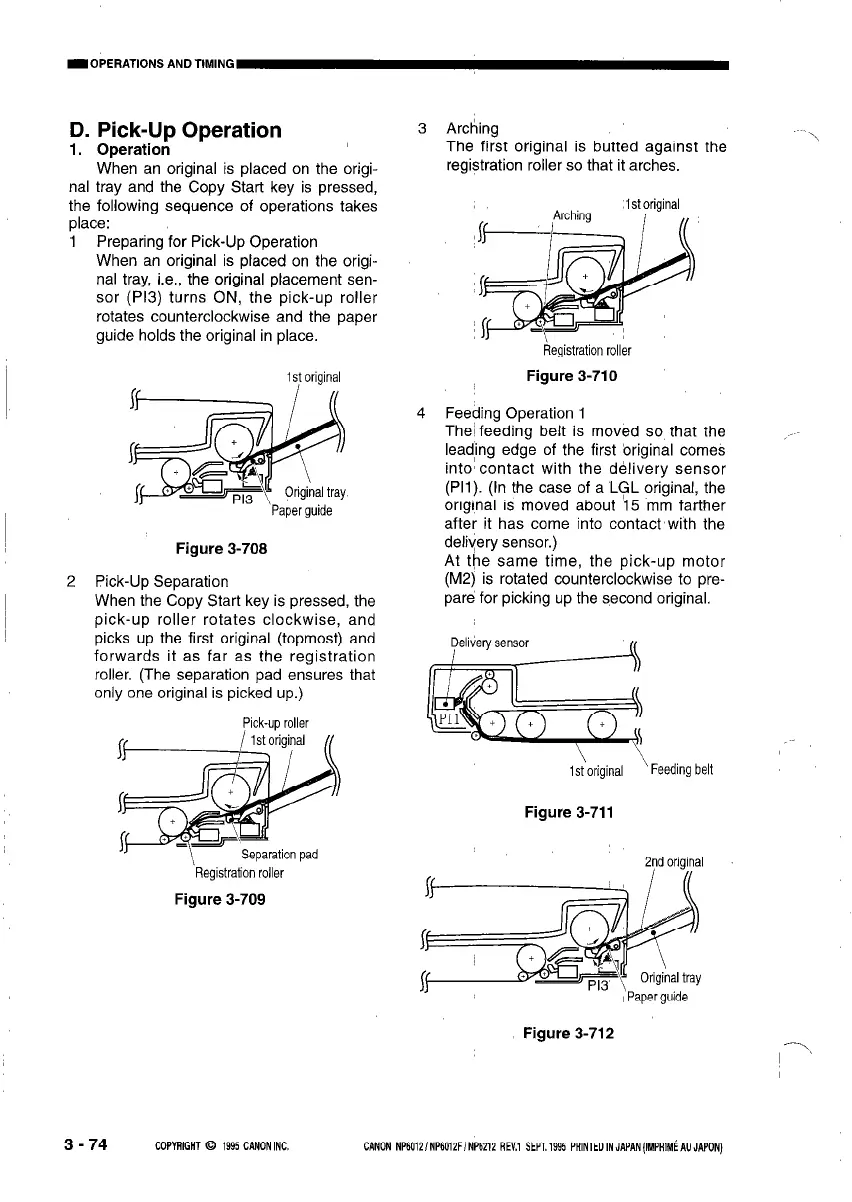
1 Preparing for Pick-Up Operation
When an original is placed on the origi-
nal tray, i.e., the original placement sen-
sor (P13) turns ON, the pick-up roller
rotates counterclockwise and the paper
guide holds the original in place.
~
2
1 s! original
Figure 3-710
..-
Paper guide
Figure 3-708
Pick-Up Separation
When the Copy Start key is pressed, the
pick-up roller rotates clockwise, and
picks up the first original (topmost) and
forwards it as far as the registration
roller. (The separation pad ensures that
only one original is picked up.)
Pick-up roller
Registration roller
Figure 3-709
3 Arching
The first original is butted against the
registration roller so that it arches.
Registration roller
4 Feeding Operation 1
The1 feeding belt is moved so that the
lead,ing edge of the first ‘original comes
into’ contact with the delivery sensor
(Pll). (In the case of a LGL original, the
original is moved about \5 mm farther
after it has come into contact with the
deliyery sensor.)
At the same time, the pick-up motor
(M2) is rotated counterclockwise to pre-
pare for picking up the second original.
IsToriginal
'Feeding belt
Figure 3-711
2nd original
Figure 3-712
3 - 74
COPYRIGHT 0 1995 CANONINC.
CANON NP6012/NP6012F/NP6212 REV.1 SEPT.1995 PRlNTEDINJAPAN(IMPAIM~AUJAPON)



 To Next Page