D. Controlling the Scanning
Lamp
1. Outline
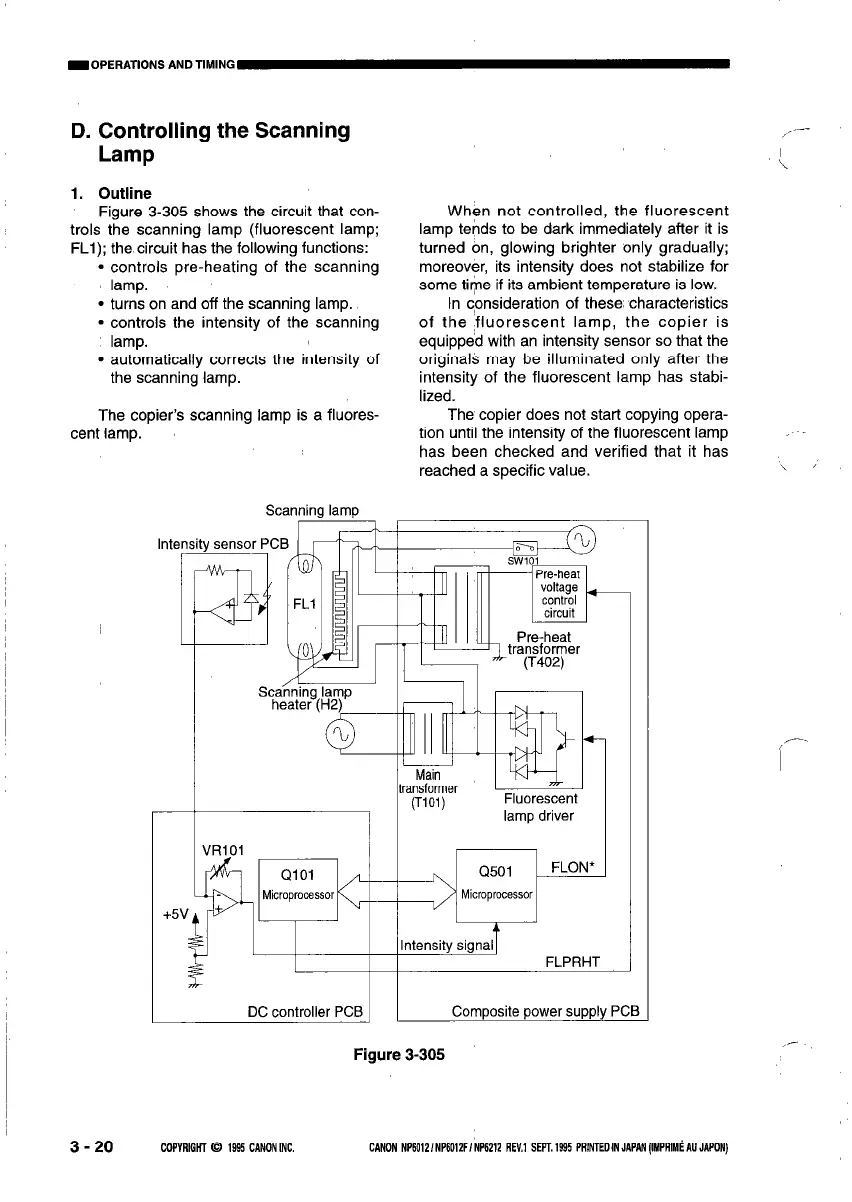
Figure 3-305 shows the circuit that con-
trols the scanning lamp (fluorescent lamp:
FLl); the circuit has the following functions:
l controls pre-heating of the scanning
lamp.
l turns on and off the scanning lamp.
l controls the intensity of the scanning
lamp.
l automatically corrects the intensity of
the scanning lamp.
The copier’s scanning lamp is a fluores-
cent lamp.
_,--
When not controlled. the fluorescent
lamp tends to be dark immediately after it is
turned on, glowing brighter only gradually;
moreover, its intensity does not stabilize for
some time if its ambient temperature is low.
In consideration of these, characteristics
of the fluorescent lamp, the copier is
equipped with an intensity sensor so that the
originals may be illuminated only after the
intensity of the fluorescent lamp has stabi-
lized.
The copier does not start copying opera-
tion until the intensity of the fluorescent lamp
has been checked and verified that it has
reached a specific value.
Scanning lamp
Intensity sensor PC
P
/ /
Main
transformer
(TiOl)
Fluorescent
lamp driver
Intensity signal1
FLPRHT
DC controller PCS 1
1
Composite power supply PCB
Figure 3-305
3 - 20
COPYRIGHT 0 1995 CANONilK
CANON NP6012/NP6012F/NP6212 REV.1 SEPT.1935 PRlNTEDINJAP~(IMPRIMCAUJAPON)



 To Next Page