,/-.._
C. Main Motor/Main Drive
Assembly
For instructions on removing the ADF,
see IX. “ADF.”
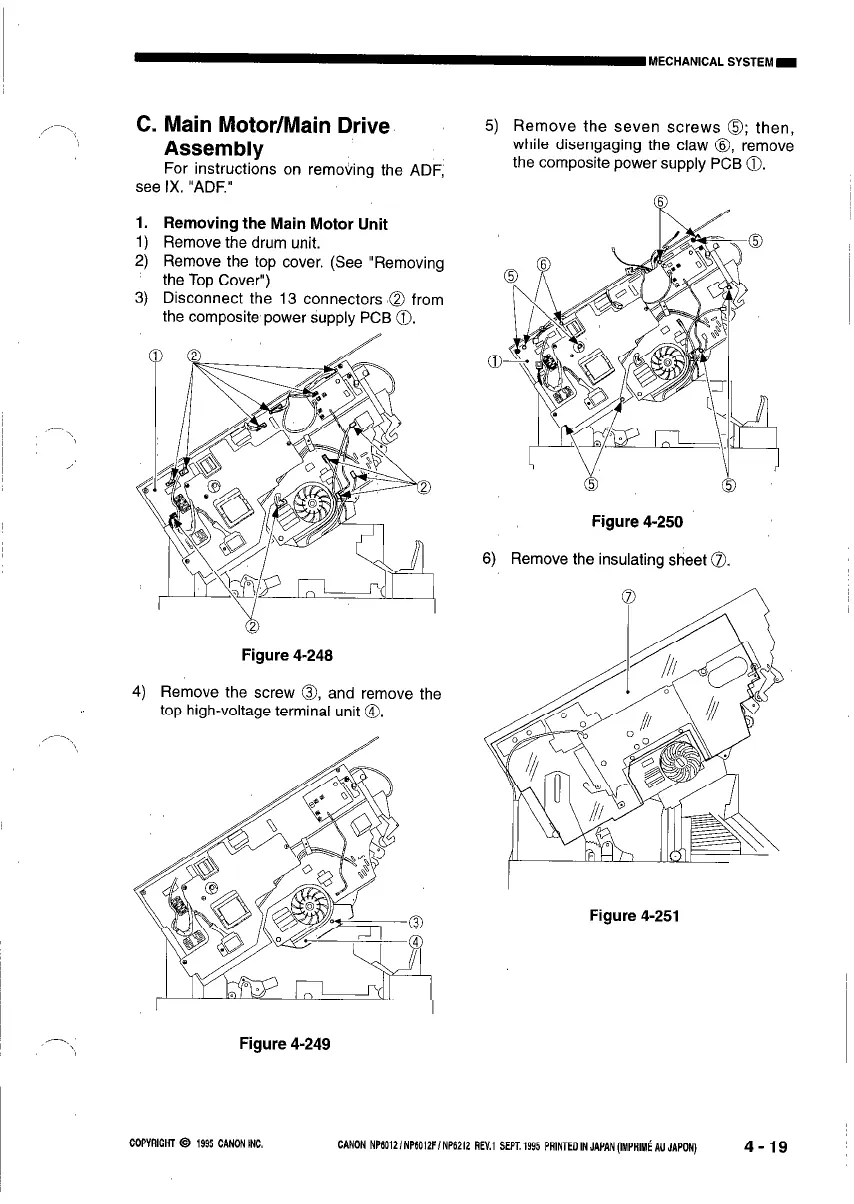
1. Removing the Main Motor Unit
1) Remove the drum unit.
2) Remove the top cover. (See “Removing
the Top Cover”)
3) Disconnect the 13 connectors ‘0 from
the composite power supply PCB 0.
&
Figure 4-248
4) Remove the screw 0, and remove the
top high-voltage terminal unit @I.
-.\ Figure 4-249
5) Remove the seven screws 0; then,
while disengaging the claw 8, remove
the composite power supply PCB 0.
Figure 4-250
6)
Remove the insulating sheet 0.
Figure 4-251
COPYRIGHT 0 1995 CANONINC.
CANON NP6012/NP6012F/NP6212 REV.1 SEPT.1995 PRlNTEDINJAPAN(IMPAIM~AUJAPON)
4-19



 To Next Page