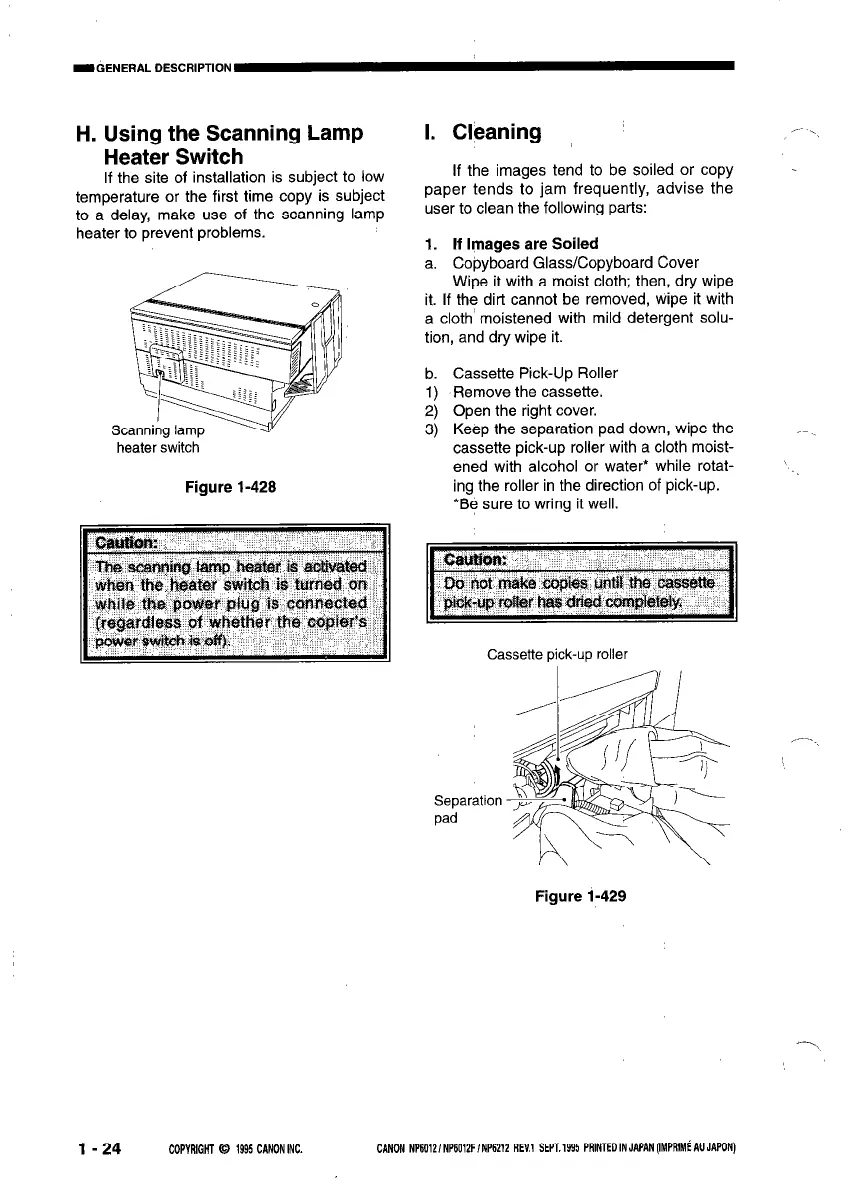
H. Using the Scanning Lamp
Heater Switch
If the site of installation is subject to low
temperature or the first time copy is subject
to a delay, make use of the scanning lamp
heater to prevent problems.
heater switch
Figure l-428
l-24
COPYRIGHT 0 199.5 CANONINC. CANON NP6012/NP6012FfNP6212 REV1 SEPT.1995 PAlNTEDINJAPAN(IYPRIMiAUJAPON)
I. Cleaning
If the images tend to be soiled or copy
paper tends to jam frequently, advise the
user to clean the following parts:
I ‘- ‘I
.
1. If Images are Soiled
a. Copyboard Glass/Copyboard Cover
Wipe it with a moist cloth; then, dry wipe
it. If the dirt cannot be removed, wipe it with
a cloth moistened with mild detergent solu-
tion, and dry wipe it.
b.
1)
2)
3)
Cassette Pick-Up Roller
Remove the cassette.
Open the right cover.
Keep the separation pad down, wipe the
cassette pick-up roller with a cloth moist-
ened with alcohol or water* while rotat-
ing the roller in the direction of pick-up.
*Be sure to wring it well.
’
Cassette pick-up roller
,--_
Separation
pad
Figure l-429



 To Next Page