IOPERATIONS AND TIMING
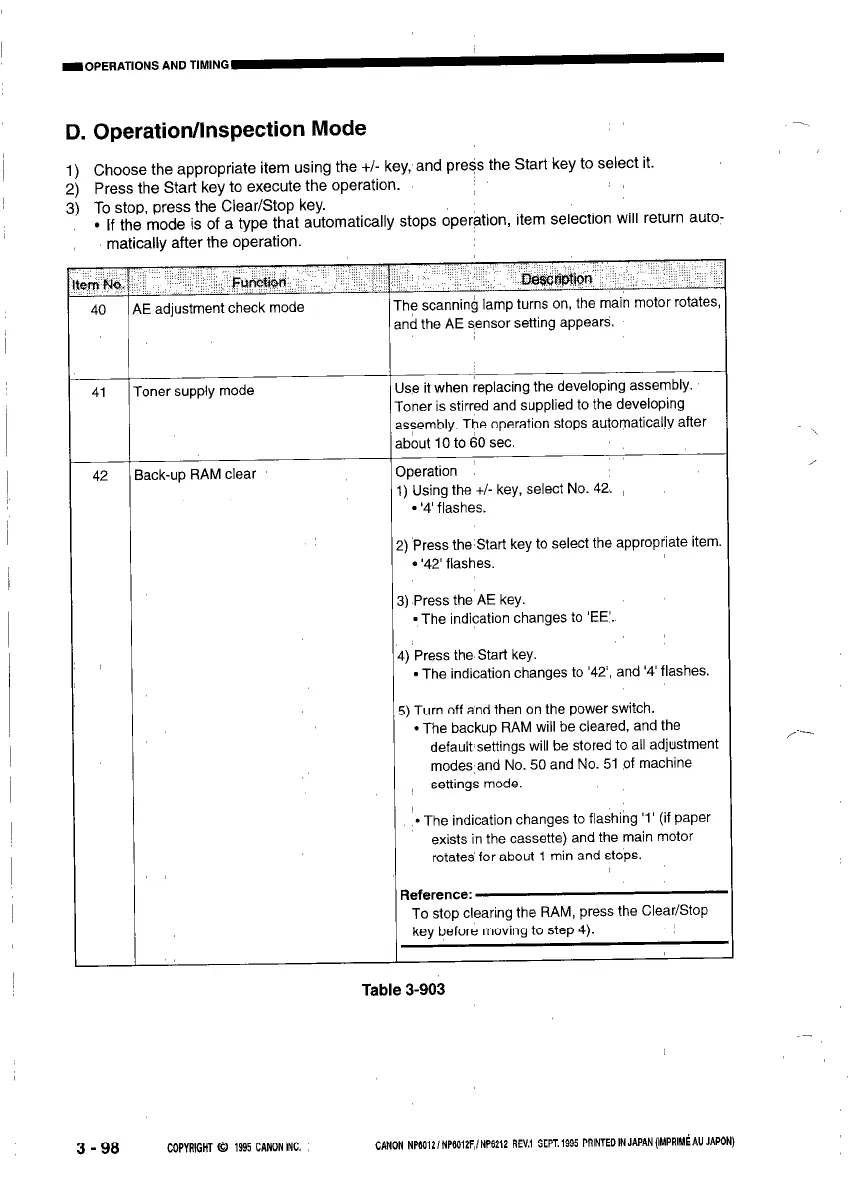
D. Operation/Inspection Mode
-_
1
1) Choose the appropriate item using the +/- key, and pre?s the Start key to select it.
2) Press the Start key to execute the operation.
3) To stop, press the Clear/Stop key.
l If the mode is of a type that automatically stops operation, item selection will return auto-
matically after the operation
rm No,
40
oner supply mode
ack-up RAM clear
lwvmrl
E adjustment check mode
Tl
al
he scanning lamp turns on, the main motor rotates
id the AE sensor setting appears.
se it when replacing the developing assembly.
oner is stirred and supplied to the developing
ssembly. The operation stops automatically after
bout IO to 60 sec.
rperation
) Using the +/- key, select No. 42.
- ‘4’ flashes.
) Press the Start key to select the appropriate item
l ‘42’ flashes.
) Press the AE key.
-The indication changes to ‘EE’.
) Press the Start key.
l The indication changes to ‘42, and ‘4’ flashes.
;) Turn off and then on the power switch.
l The backup RAM will be cleared, and the
default settings will be stored to all adjustment
modes and No. 50 and No. 51 of machine
settings mode.
l The indication changes to flashing ‘1’ (if paper
exists in the cassette) and the main motor
rotates for about 1 min and stops.
To stop clearing the RAM, press the Clear/Stop
key before moving to step 4).
Table 3-903
3 - 98
COPYRIGHT 0 1995 CANON INC.
CANON NP6012lNP6012F,/NP6212 REV.1 SEPT. 1995 PRINTEO IN JAPAN (IMPRIM~ AU JAPON)








 To Next Page