E. Detecting Jams
The copier is equipped with two copy paper sensors to check the presence/absence of
copy paper and whether it is moving normally.
l pre-registration roller paper sensor (0751)
l delivery sensor (PS3)
The presence/absence of copy paper or a jam is checked in reference to the
presence/absence of copy paper at the respective sensors at such times as stored in the micro-
processor in advance.
The copier keeps a record of the remaining number of copies to make or the copy mode
effective at time of a jam. The microprocessor has the following five ‘no paper/jam’ detection
sequences, and it also identifies a jam if any of the sensor detects copy paper at power-on.
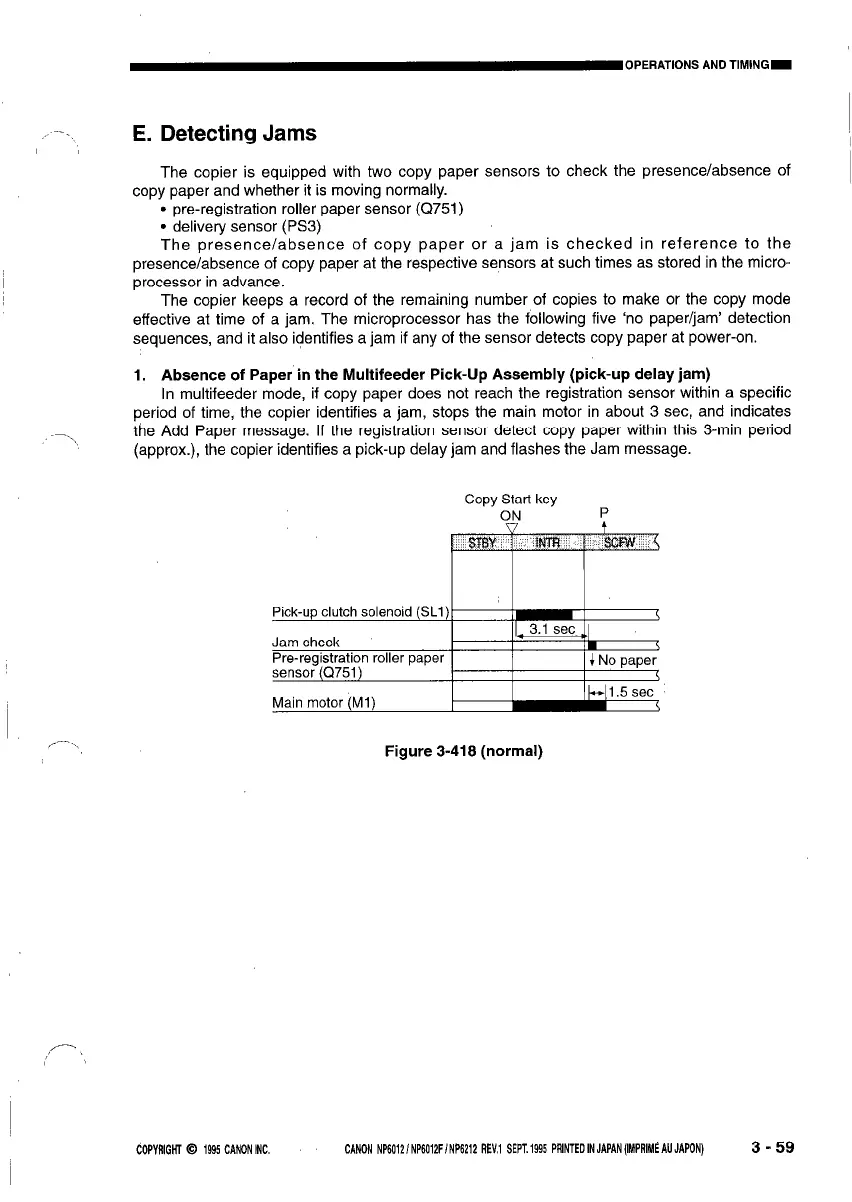
1. Absence of Paper in the Multifeeder Pick-Up Assembly (pick-up delay jam)
In multifeeder mode, if copy paper does not reach the registration sensor within a specific
period of time, the copier identifies a jam, stops the main motor in about 3 set, and indicates
\
the Add Paper message. If the registration sensor detect copy paper within this 3-min period
(approx.), the copier identifies a pick-up delay jam and flashes the Jam message.
Copy Stan key
ON
P
Figure 3-418 (normal)
dOPVAlGHl 0 1995 CANON INC. CANON NP6012/NP6Q12F/NP6212 REV.1 SEPT.1995 PRlNTEDINJAPAN(I%PRIM~AUJAPON)
3-59








 To Next Page