C. User Mode
1. Outline
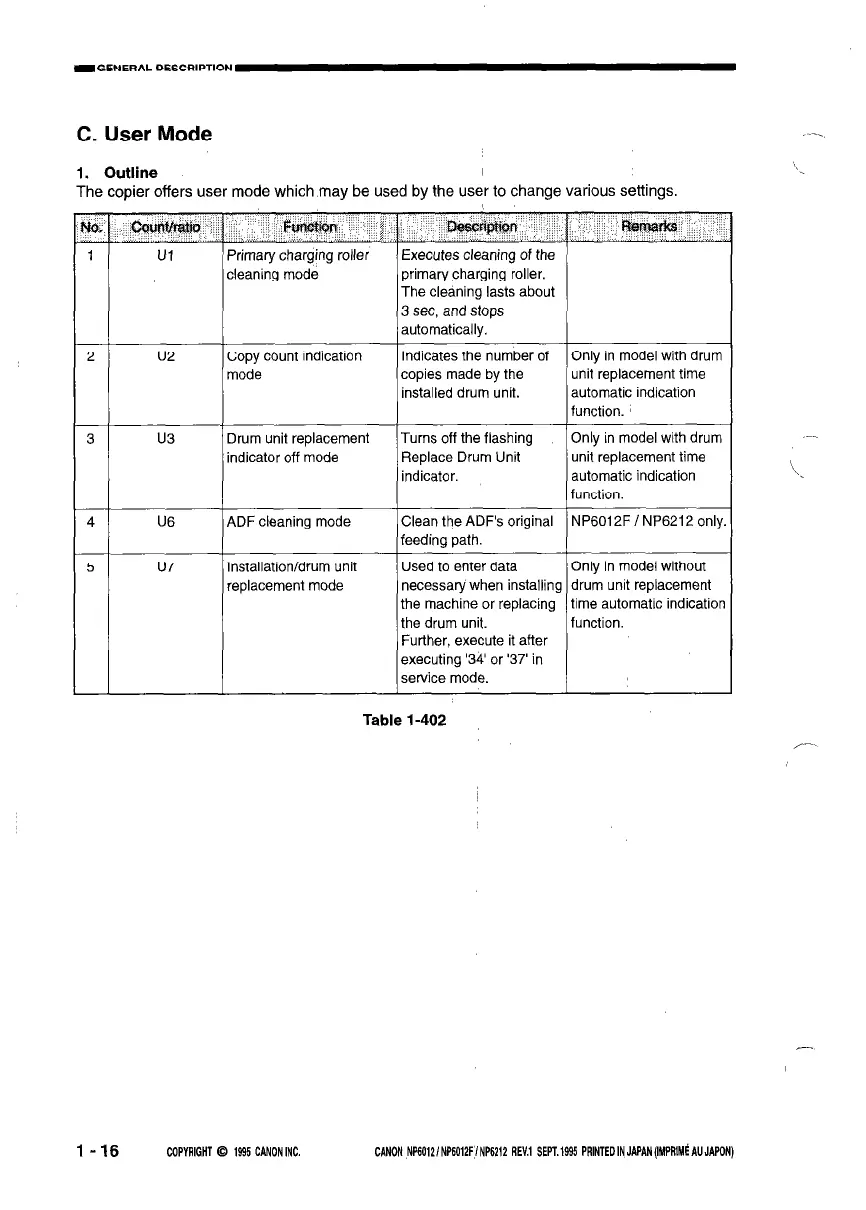
The copier offers user mode which may be used by the user to change various settings.
-E
a
r
2
3
4
5
-
Ul
Primary charging roller
cleaning mode
Executes cleaning of the
primary charging roller.
The cleaning lasts about
3 set, and stops
automatically.
u2 Copy count indication
mode
Indicates the number of
Only in model with dr
copies made by the
unit replacement time
installed drum unit.
automatic indication
function.
Only in model with dr
unit replacement timf
automatic indication
u3
Drum unit replacement
indicator off mode
Turns off the flashing
Replace Drum Unit
indicator.
U6 ADF cleaning mode
Clean the ADF’s original
feeding path.
u7 Installation/drum unit
replacement mode
Used to enter data Only in model withou
necessary when installing drum unit replacemel
the machine or replacing
time automatic indica
the drum unit.
function.
Further, execute it after
executing ‘34’ or ‘37’ in
service mode.
‘urn
urn
)nly.
t
It
tion
Table l-402
l-16
CGPYRIGHT 0 1995 CANON INC.
-
CANON NP60121 NP6012F I NP6212 REV.1 SEPT. 1995 PRINTED IN JAPAN (IMPRIMS AU JAPON)



 To Next Page