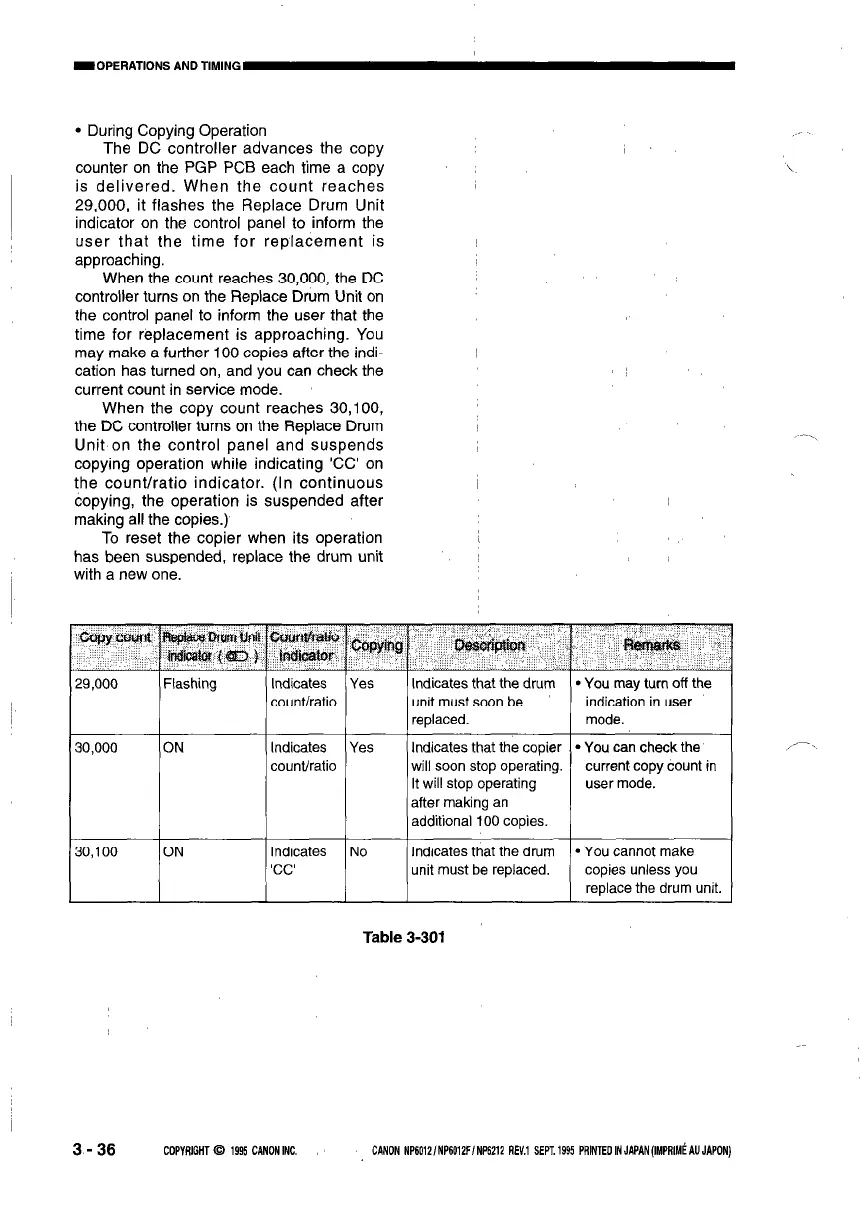
l During Copying Operation
The DC controller advances the copy
counter on the PGP PCB each time a copy
is delivered. When the count reaches
29,000, it flashes the Replace Drum Unit
indicator on the control panel to inform the
user that the time for replacement is
approaching.
When the count reaches 30,000, the DC
controller turns on the Replace Drum Unit on
the control panel to inform the user that the
time for replacement is approaching. You
may make a further 100 copies after the indi-
cation has turned on, and you can check the
current count in service mode.
When the copy count reaches 30,100,
the DC controller turns on the Replace Drum
Unit on the control panel and suspends
copying operation while indicating ‘CC’ on
the count/ratio indicator. (In continuous
copying, the operation is suspended after
making all the copies.)
To reset the copier when its operation
has been suspended, replace the drum unit
with a new one.
29,000
Flashing Indicates Yes Indicates that the drum l You may turn off the
30,000
1
30,100
ON
count/ratio unit must soon be
indication in user
replaced.
mode.
Indicates Yes Indicates that the copier l You can check the
count/ratio will soon stop operating. current copy count in
It will stop operating user mode.
after making an
additional 100 copies.
ON Indicates No
‘CC’
Indicates that the drum l You cannot make
unit must be replaced.
copies unless you
replace the drum unit.
,‘-
Table 3-301
3-36
COPYRIGHT 93 1995 CANON INC. CANON NP6012/NP6012FINP6212 REV.1 SEPT. 1995 PRINTED IN JAPAN (IMPRIMS AU JAPON)



 To Next Page