PC-D320/PC-D340/FAX-L400 Chapter 3: Assembly and Disassembly
3-8
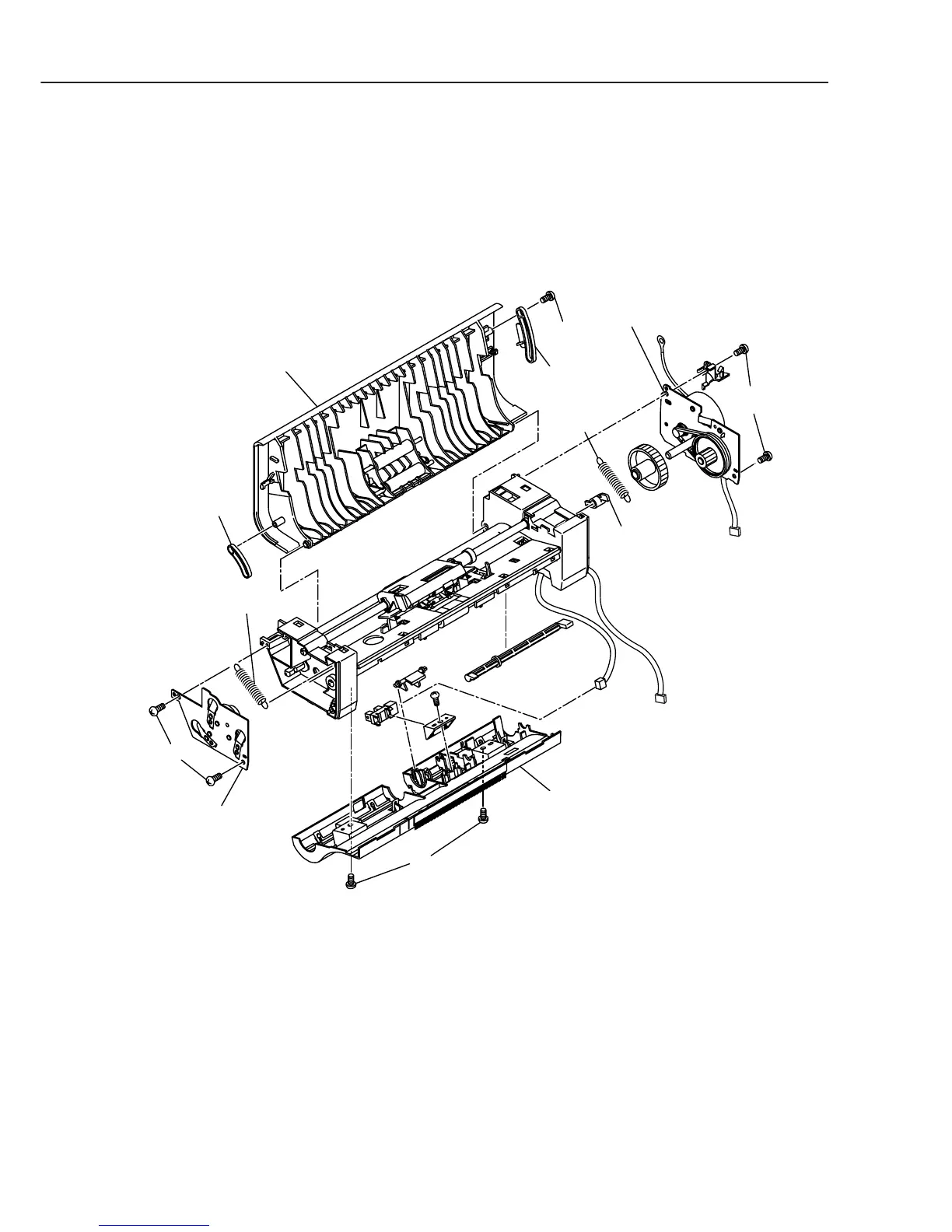
(9) Remove the 2 screws (d), and detach the document feed gear ass’y.
(10) Remove the 2 screws (e), and detach the document feed motor ass’y.
(11) Remove the springs (front and rear) from the hooks of the upper document feed ass’y.
(12) Remove the screw (f), and detach the stoppers (front and rear) and the turning lever.
(13) Remove the upper document feed ass’y while bending.
(14) Remove the 2 screws (g), and detach the lower document feed ass’y while
disconnecting the connector of the sensor.
Figure 3-7 Document Feed Section 6
Document feed
gear ass'y
Document feed
motor ass'y
Stopper
Upper document feed ass'y
Spring
Spring
Turning lever
d
Stopper
e
f
Lower document feed ass'y
g



 To Next Page