Components Guide
12
Getting Started
Controls
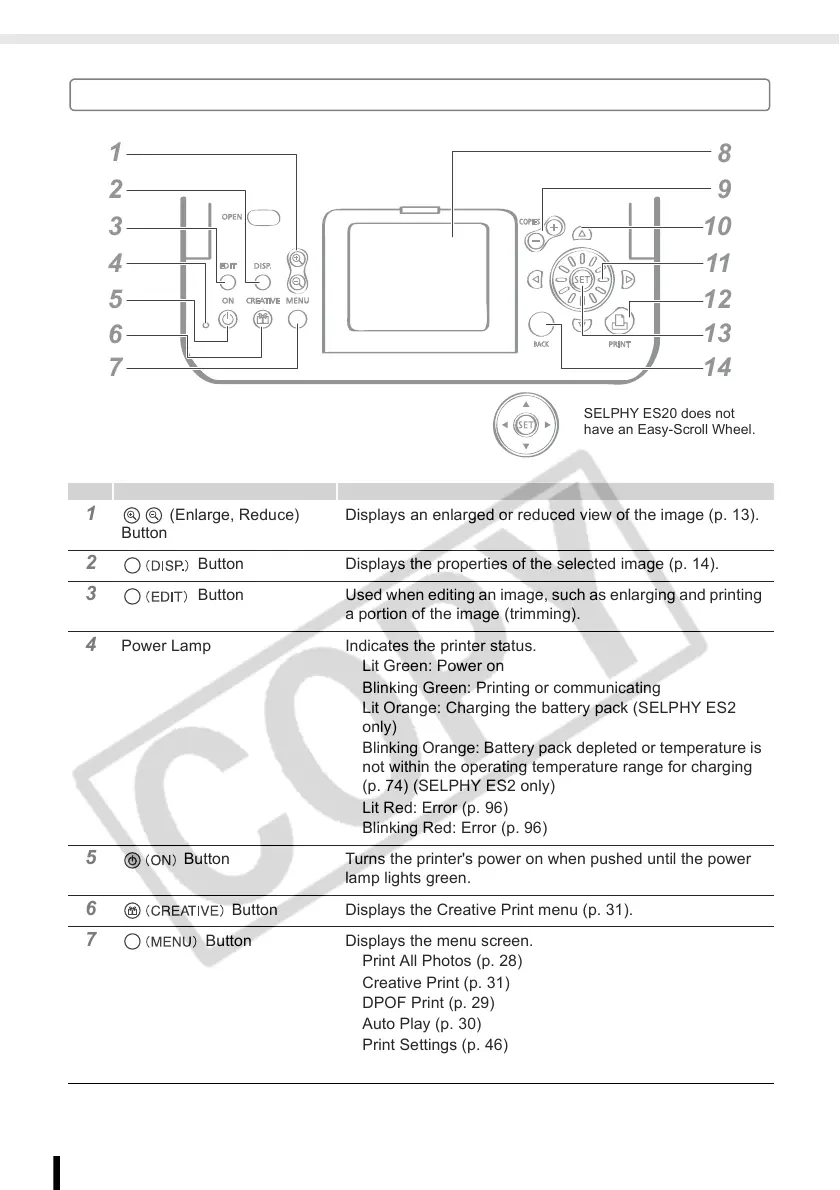
1 (Enlarge, Reduce)
Button
Displays an enlarged or reduced view of the image (p. 13).
2 Button Displays the properties of the selected image (p. 14).
3 Button Used when editing an image, such as enlarging and printing
a portion of the image (trimming).
4 Power Lamp Indicates the printer status.
Lit Green: Power on
Blinking Green: Printing or communicating
Lit Orange: Charging the battery pack (SELPHY ES2
only)
Blinking Orange: Battery pack depleted or temperature is
not within the operating temperature range for charging
(p. 74) (SELPHY ES2 only)
Lit Red: Error (p. 96)
Blinking Red: Error (p. 96)
5 Button Turns the printer's power on when pushed until the power
lamp lights green.
6 Button Displays the Creative Print menu (p. 31).
7 Button Displays the menu screen.
Print All Photos (p. 28)
Creative Print (p. 31)
DPOF Print (p. 29)
Auto Play (p. 30)
Print Settings (p. 46)
Printer Setup (p. 78)
1
2
3
4
5
6
7
1
11
1
1
1
SELPHY ES20 does not
have an Easy-Scroll Wheel.














 To Next Page