3-32
Setting Camera Control
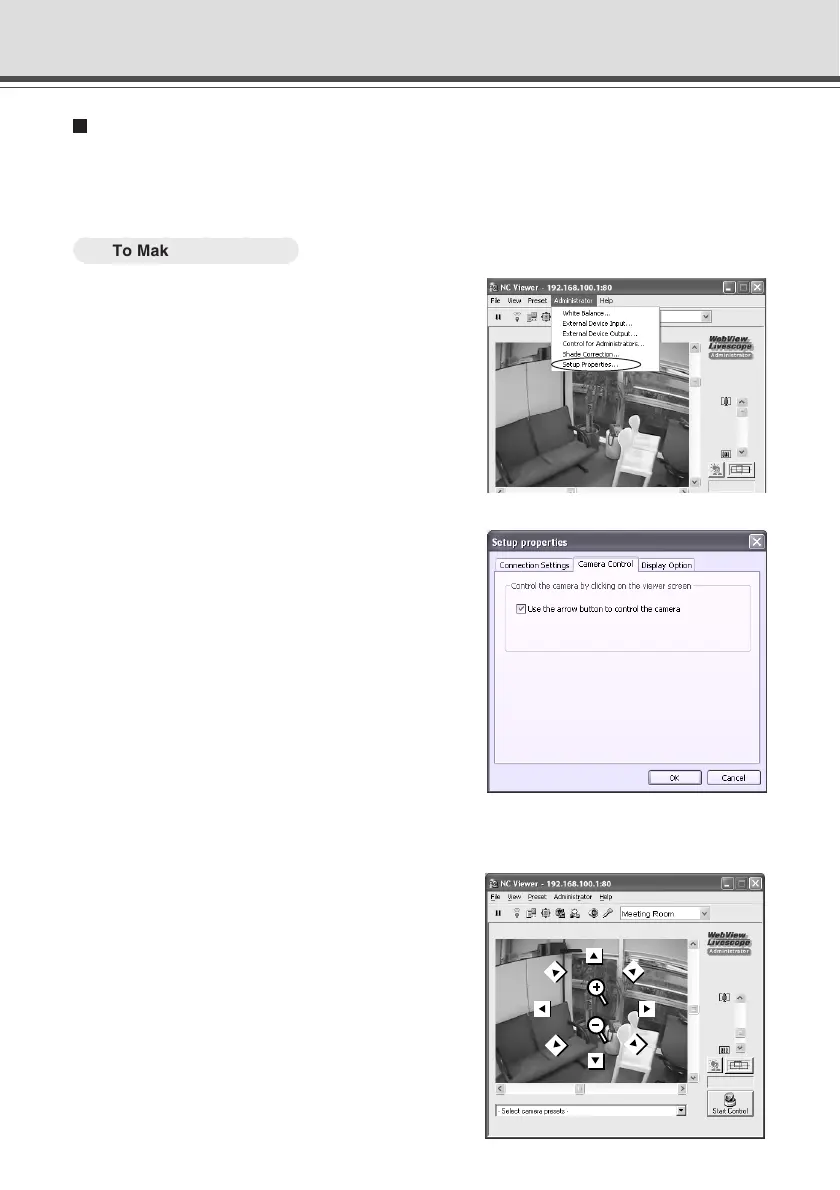
If you have connected to the camera as Administrator, you can control the pan, tilt and zoom
operations by clicking and holding the mouse in the viewer to start and releasing the mouse to
stop.
○○○○○○
To Make Settings...
1. Choose “Setup Properties” from the
Administrator menu bar.
2. Click the Cameral Control tab in the Setup
properties dialog.
Check the Use the arrow button to control the
camera option and click “OK”.
3. When the message “Try new property setting.” appears, click “OK”.
4. Placing the mouse cursor over the Viewer
window changes its shape into an 8-
direction arrow or a plus·minus icon.
Click on one of the icons and hold the mouse
button in the Viewer window to start panning, tilting
or zooming, and release the button to stop the
operation.
Operating and Setting Camera as Administrator





 To Next Page