lb-05046-03-EN Pag.30 22/01/2014
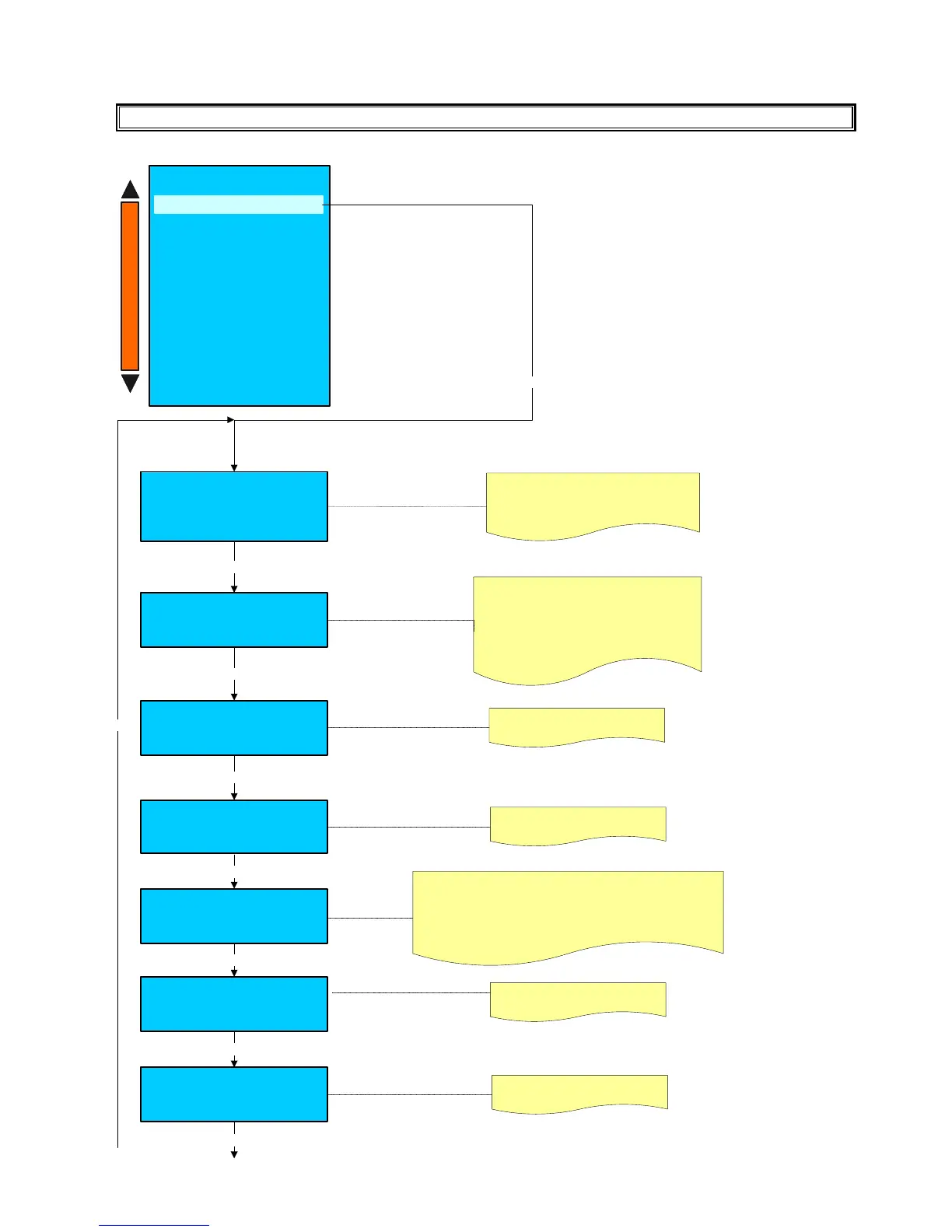
MACHINE CONFIGURATION
Enter
Machine configuration
Steam boiler
Enabled
Use: + / - keys to enable or disable
the steam boiler.
Machine configuration
N. of Dispenser – Mixer
1
Use: + / - keys to select 0 or 1
Dispenser - Mixer
Enter
Machine configuration
Water Tank
Disable/Enable
Use: + / - keys to enable or disable
the water tank .
System manager
- Machine parameter
- System clock programming
- Display regulation
- Service
- Smart card manager
- Change password
- Group manual movements
- Test actuactors
- Boiler draining
- Alarm history
- Preset configuration data
- System backup
Machine configuration
Enter
+
-
Enter
Machine configuration
N° of Grinders
2
Use: + / - keys to select the number
of grinders , 1 or 2.
Enter
Enter
Enter
Machine configuration
Tea Hot water sv.
From steam boiler
Use: + / - keys to select :
FROM STEAM BOILER : the hot water comes from the steam boiler.
FROM COFFEE BOILER : the hot water comes from the
coffee boiler. ( only for machines with custom hydraulic circuit ).
OPTIONAL COFFEE BOILER : ( not available )
Coffee boiler heater
1800 W / 2400 W
Use: + / - keys to select the heating element
power for coffee boiler.
- With 230-380-400 V Tri main power
the standard heating element is 2400W.
- With 200-240 V Mono main power
the standard heating element is 1800W.
Machine configuration
Main power
230-380-400 V Tri
200-240 V Mono
100-120 V Mono
Enter
Enter
Use: + / - keys to select the main power.
According to the main power selected, will be
programmed the proper temperature
control.(PID).











 To Next Page