lb-05046-03-EN Pag.63 22/01/2014
SPECIAL FUNCTIONS FOR MACHINE CALIBRATION
1) Calibrating the coffee dispensing pressure (pump pressure).
To calibrate the coffee dispensing pressure (8-9 Bars), rotate the “MP” pumping body screw (see hydraulic diagram)
clockwise to increase it, and anti-clockwise to decrease it.
The adjusting screw is reached through the special hole behind the coffee grounds bin.
The coffee dispensing pressure is displayed on pressure gauge , when the machine is in the coffee dispensing phase
2) Calibrating the coffee grinding degree.
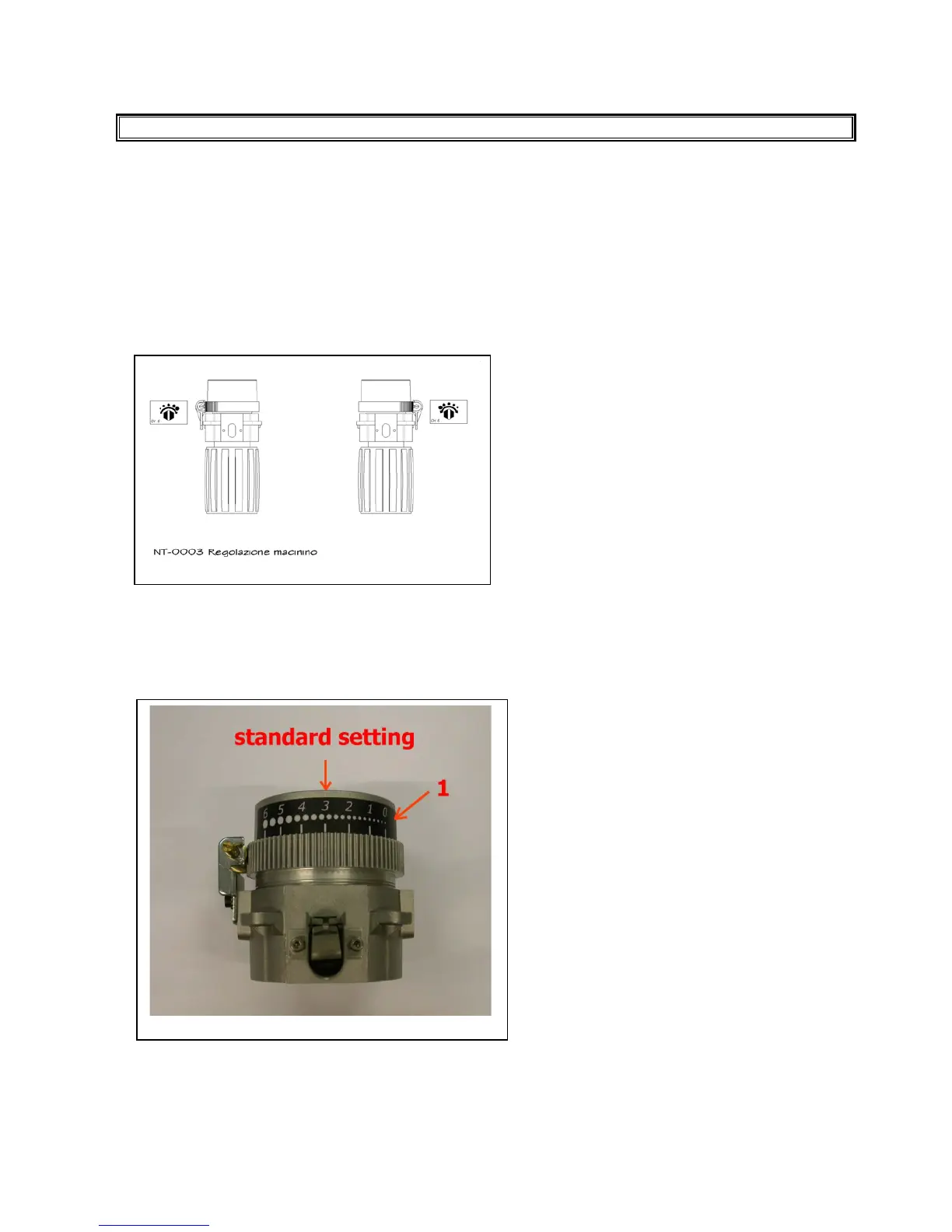
To calibrate the coffee grinding degree, rotate the grinder’s adjusting screw (see annex) clockwise to increase it, and anti-
clockwise to decrease it.
See the sticker “1” ( PICTURE A ) for a better setting of the grinder.
The setting position 3 refers to medium coarseness.
If you like to make it coarser turn the adj. screw 4 turns to reach the position 4 (coarse).
If you like to make it finer, turn the adj. screw 4 turns to reach the position 2 (fine).
Turn the adj. screw in the direction indicated by the sticker inside the machine.
PICTURE A
3) Calibrating the flow adjustment of the coffee outlet.
In order to calibrate the dispensing speed and change the amount of coffee cream, turn the screw of the coffee outlet
regulator on the upper piston (see hydraulic diagram) clockwise to decrease it and anti-clockwise to increase it
We recommend making the above adjustment while the coffee is being dispensed.











 To Next Page