lb-05046-03-EN Pag.38 22/01/2014
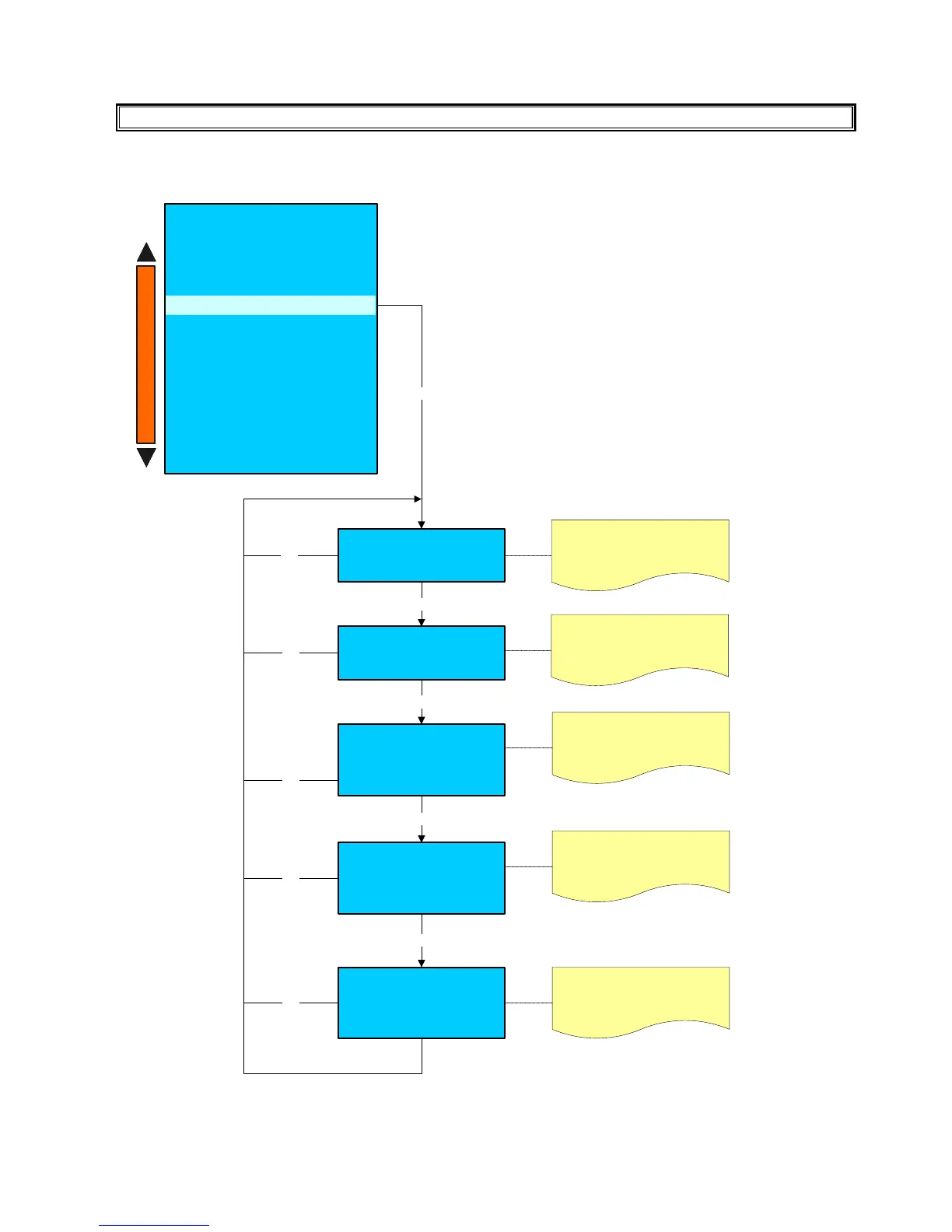
DISPLAY REGULATION
Press the key (+) and (-) to adjust
the display contrast.
Display regulation
contrast
xx
Enter
Display regulation
Display mode
Press + & -
Enter
Press the key (+) and (-) to change
the dsplay in normal mode or
reverse mode.
Display regulation
Default color
Press + & -
x
Press the key (+) and (-) to change
the display colour.
Enter
Esc
Esc
Esc
System manager
- Machine configuration
- Machine parameters
- System clock programmer
- Service
- Smart card manager
- Change password
- Group manual movements
- Test actuactors
- Boiler draining
- Alarm history
- Preset configuration data
- System backup
Display regulation
+
-
Display regulation
Color shift Menu 1
Press + & -
x
Press the key (+) and (-) to change
the display colour of the first shift
selection menu .
Enter
Enter
Esc
Esc
Display regulation
Color shift Menu 2
Press + & -
x
Press the key (+) and (-) to change
the display colour of the second shift
selection menu .











 To Next Page