lb-05046-03-EN Pag.51 22/01/2014
PRESET PARAMETERS
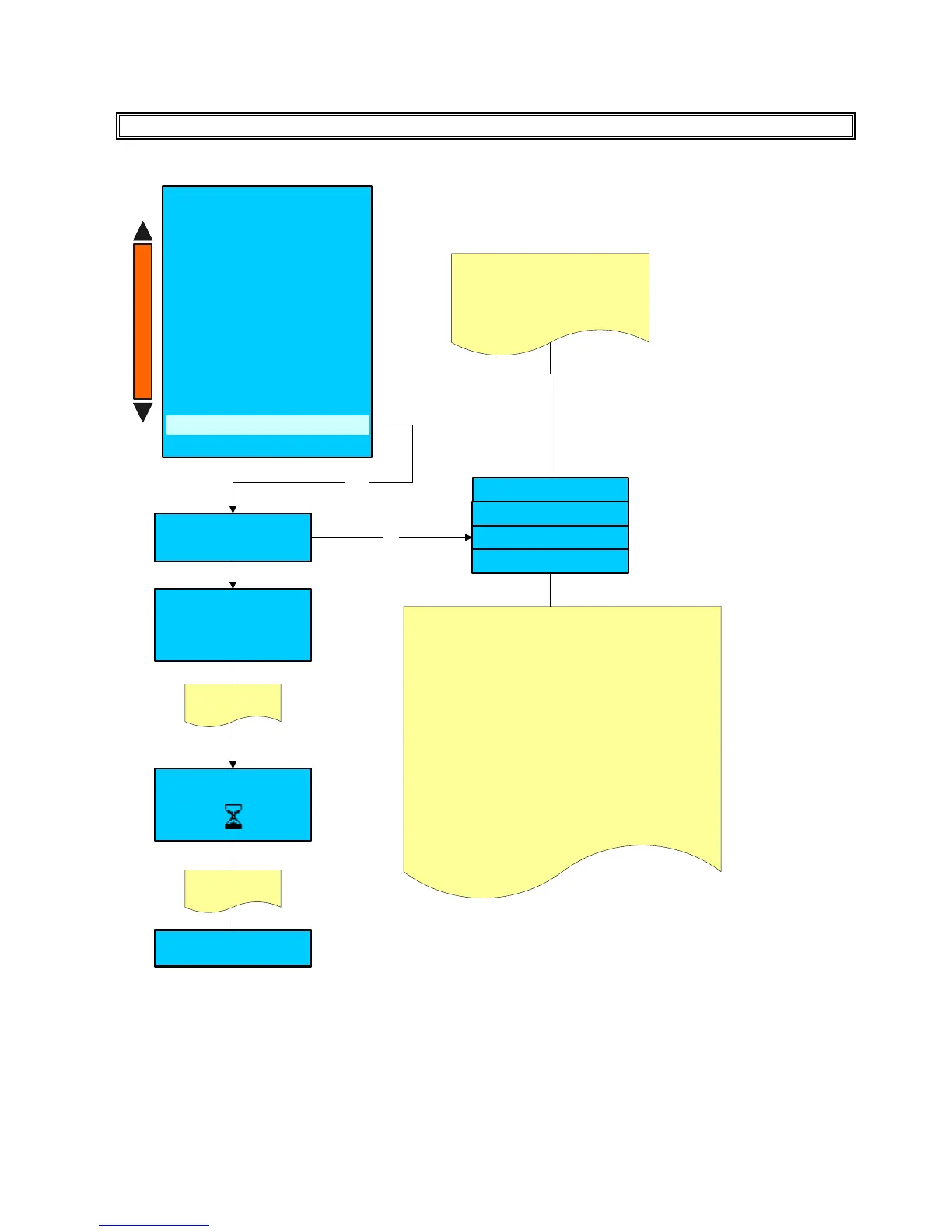
Preset configuration
Service
Enter
Power off and Power on
Enter
After 5 second the
display shows
Preset configuration
Technician
Factory
+/ -
Service
WARNING :
- For CUSTOM preset contact the Macco
technical service.
- With the SERVICE preset will be reseted only
the service accessible parameters.
- With the TECHNICIAN preset will be reseted all
parameters except the Machine Configuration
parameters.
- With the FACTORY preset will be reseted all
parameters included the Machine Configuration
parameters.
The Technician or Factory preset can be
carried out only with Technician
password or smart card .
With Service password or smart card
can be carried out only the Service
preset.
System manager
- Machine configuration
- Machine parameters
- System clock programming
- Display regulation
- Service
- Smart card manager
- Change password
- Group manual movements
- Test actuators
- Boiler draining
- Alarm history
- System backup
Preset configuration data
+
-
Custom
Preset configuration
Please confirm
Yes/No
Press +/- to select
YES
Enter
With this function, all the set up values, machine counters and passwords take the default values set up by the
manufacturer.
PLEASE NOTE:
A -By power OFF and power on, it is meant clearing and giving voltage to the machine.











 To Next Page