lb-05046-03-EN Pag.44 22/01/2014
CHANGE PASSWORD
System manager
- Machine configuration
- Machine parameters
- System clock programming
- Display regulation
- Service
- Smart card manager
- Group manual movements
- Test actuactors
- Boiler draining
- Alarm history
- Preset configuration data
- System backup
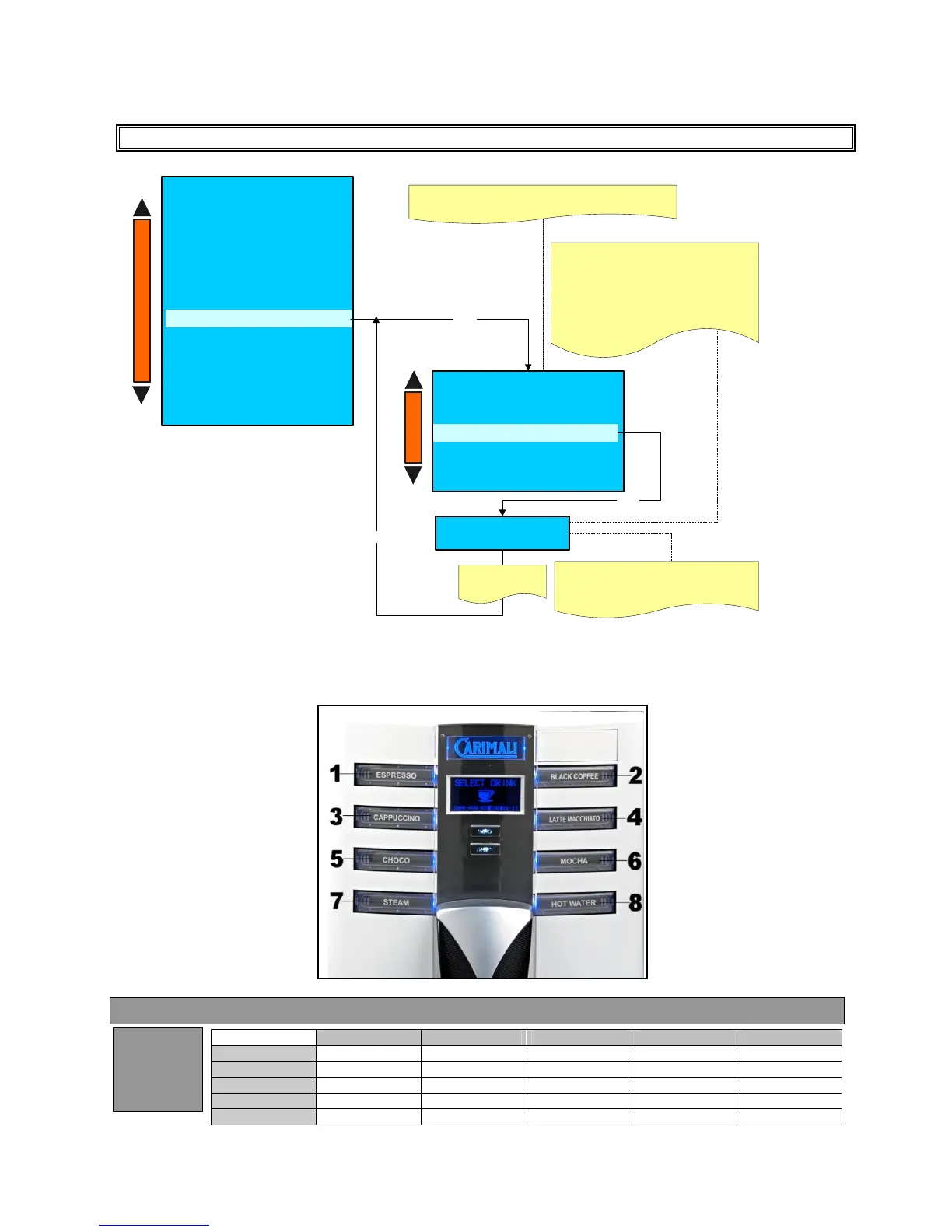
Change password
Enter
Change password
-Turn on password
-Owner
- Service
- Technician
PLEASE NOTE:
THE WAITER PASSWORD CAN NOT BE MODIFY
Roaster
XXXXXXX
Y 0 YYY
XXXXXX Indicate the user (Owner - Service -
Roaster - Technician) you want change the
password
YYYYY Indicate the password you want to
change
Use the dose key to modify the password
(see the drawing below)
Enter
Press Enter to
confirm
Enter
PLEASE NOTE :
THE FIRST DIGIT OF THE
PASSWORDS CAN NOT BE MODIFY
+
-
+
-
Please note :
If the TURN ON PASSWORD is enabled , to turn on the machine is necessary insert the password.
KEY REFERENCE FOR PASSWORD
Waiter Roaster Owner Service Technician
Waiter
Roaster X
Owner X X
Service X X X
Technician X X X X
Entered
Password
Followin











 To Next Page