lb-05046-03-EN Pag.36 22/01/2014
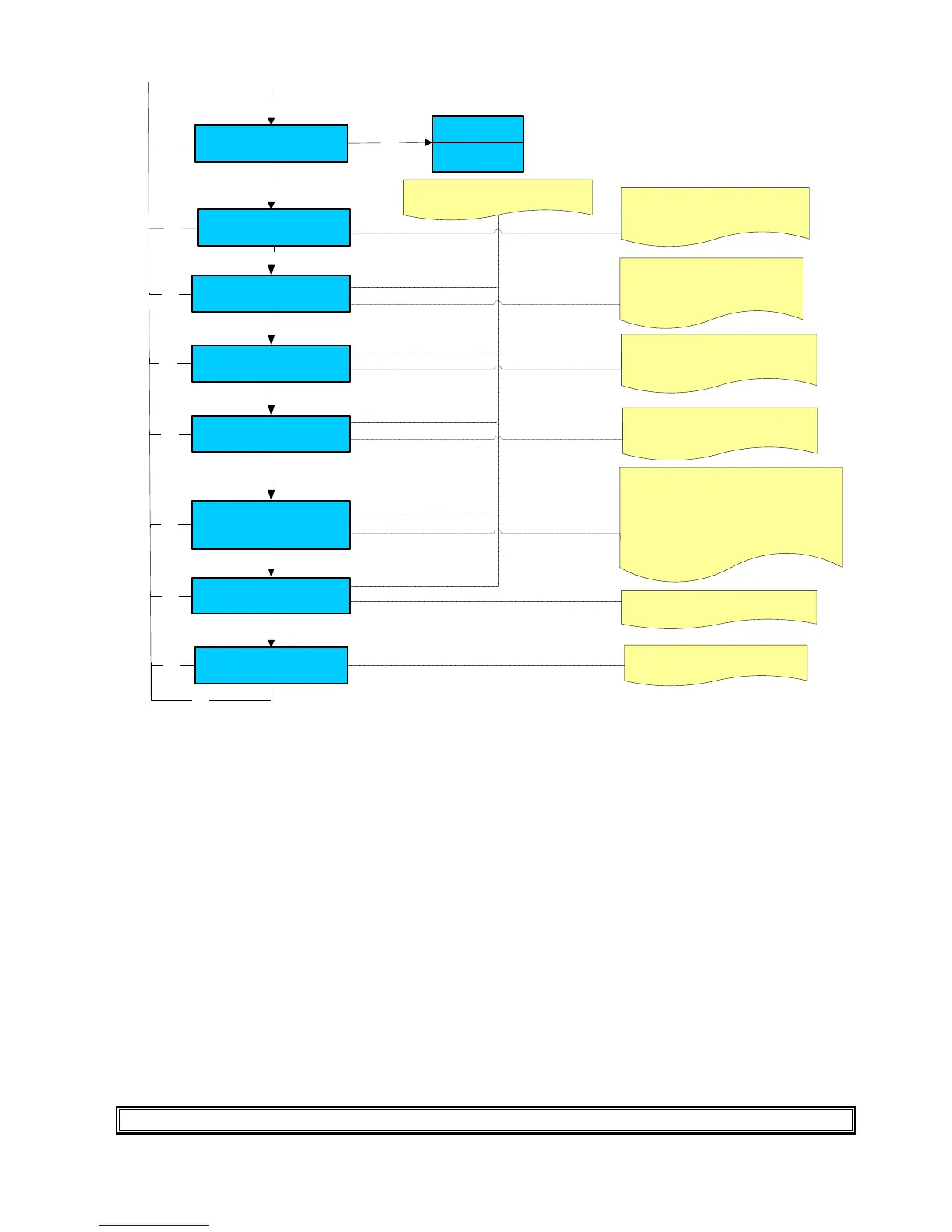
Installation date
YY / MM / DD
Press + / - to modify the machine
installation date
Esc
Enter
GSM: SIM CARD PIN
XXXX
Press + / - to modify the number and
press Enter to confirm the selection
GSM: Service phon number
XXXXXXXXX
Enter
MODEM Set-up parameters
ATX3;S0=2
Remote password
12345
Serial number
XXXXXX
Enter
Set the Pin code of the sim card
inserted in the GSM phone
Set the Phone number of the service
assistance . When the machine will
show an alarm the Gsm will send a
message at the service phone
Don’t change the default parameter for
MODEN (
ATX3;S0=2) is correct for
the GSM supplied from Carimali.
Set a remote password to be able to
connect to the machine from a remote
moden.
Set the serial number of the machine.
User message
Armonia
A-b-c-d-e-f-g-h-i-l-m-n-o-p-q-
The heart symbol (cursor) must be located on
the character you want to select.
To scroll the character use the keys (+ / - ).
Press Enter key to confirm the selection.
Use key T1 to skip at the end of the name.
Use key T2 to delete a letter.
Use key T3 to insert a space.
Enter
Enter
Enter
Enter
Esc
Esc
Esc
Esc
Esc
Esc
Esc
Manual cleaning sound
Disable
Enable
+ / -
Enter
Esc
Please note: for machines without GSM it is possible to carry out a Local data download by setting the Serial number and the
Remote password only. ( For more information see the Wizard manual
SYSTEM CLOCK SET-UP











 To Next Page