lb-05046-03-EN Pag.37 22/01/2014
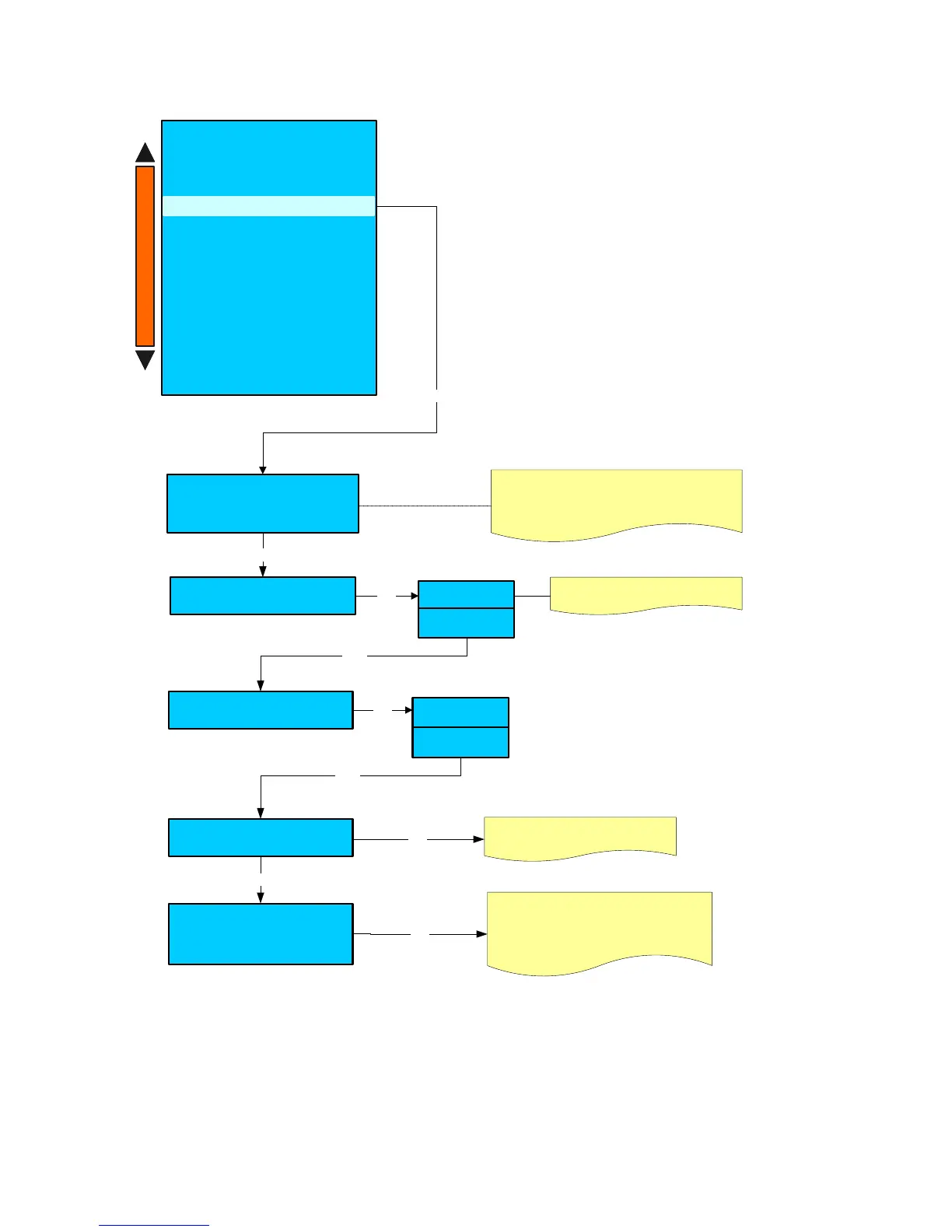
System clock programming
YY - MM - DD DAY HH:MM
-- / -- / -- --- / -- : --
Press the key +/- to program the date ( YY-MM-DD)
and the time ( DAY HH:MM )
Enter
Clock display Disable
Enable
+ / -
The Clock will not be dispayed
Auto Start-up
Enter
ON OFF
XX:XX XX:XX
Enter
Day Off
1- OFF
2- OFF
3- OFF
Enter
Press the keys + / - to program the machine
days off. ( Sunday – Monday etc. )
It is possible to program maximum 3 days off.
+ / -
Press the keys + / - to program the
automatic switch ON and OFF
+ / -
Disable
Enable
+ / -
Enter
System manager
- Machine configuration
- Machine parameters
- Display regulation
-Service
- Smart card manager
- Change password
- Group manual movements
- Test actuactors
- Boiler draining
- Alarm history
- Preset configuration data
- System backup
System clock programming
+
-











 To Next Page