20
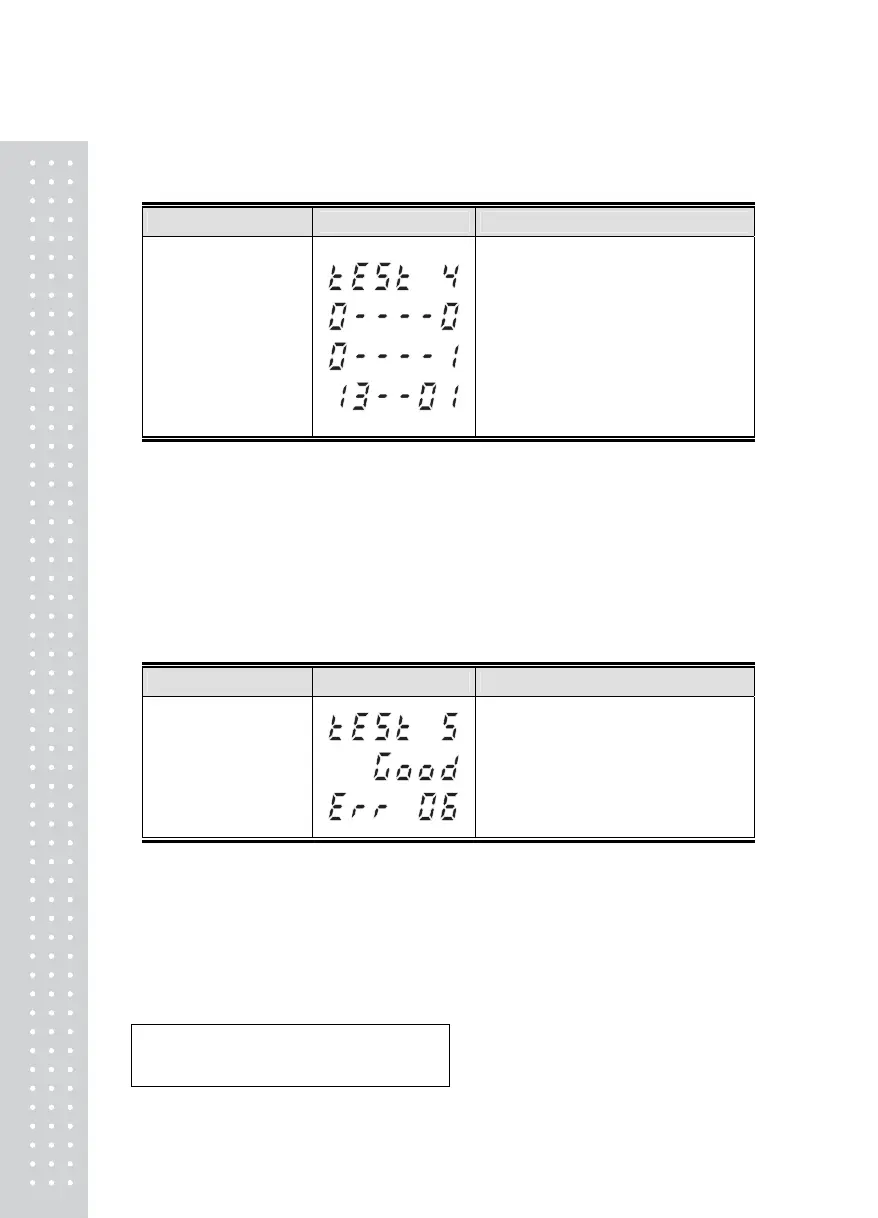
TEST 4
■ FUNCTION : RS-232 TEST With Computer.
KEY
DISPLAY DESCRIPTION
ZERO : Transmit '0'
TARE : Transmit '1'
G/N : Transmit '2'
kg/lb: Transmit '3'
* : Transmit '4'
LIGHT: Next menu
TEST 4 condition
Wait for transmission and reception
Receive: 1, Transmit: none
Receive: 1, Transmit: 13
REF 1. Do this test after the connection between serial port of computer and
and serial port of indicator.
REF 2. Send no.1 in computer keyboard and check if indicator receives no.1
Send no.1 in indicator keyboard and check if computer receives no.1
REF 3. Do this test after baud rate is specified in SET mode(F11).
TEST 5
■ FUNCTION : PRINT TEST
KEY
DISPLAY DESCRIPTION
ENTER(LIGHT) :
Next Menu
Other Keys :
Perform TEST
TEST 5 condition
No error in printer
Check printer connector
REF 1. Please confirm that F02(SET MODE) value is set as 1 before a test.
REF 2. "GOOD" message is displayed if the printer connection and specification is
done correctly. If not, "ERROR 06" message is displayed.
REF 3. The test output format of printer is like follows.
TEST OK



 To Next Page