`
29
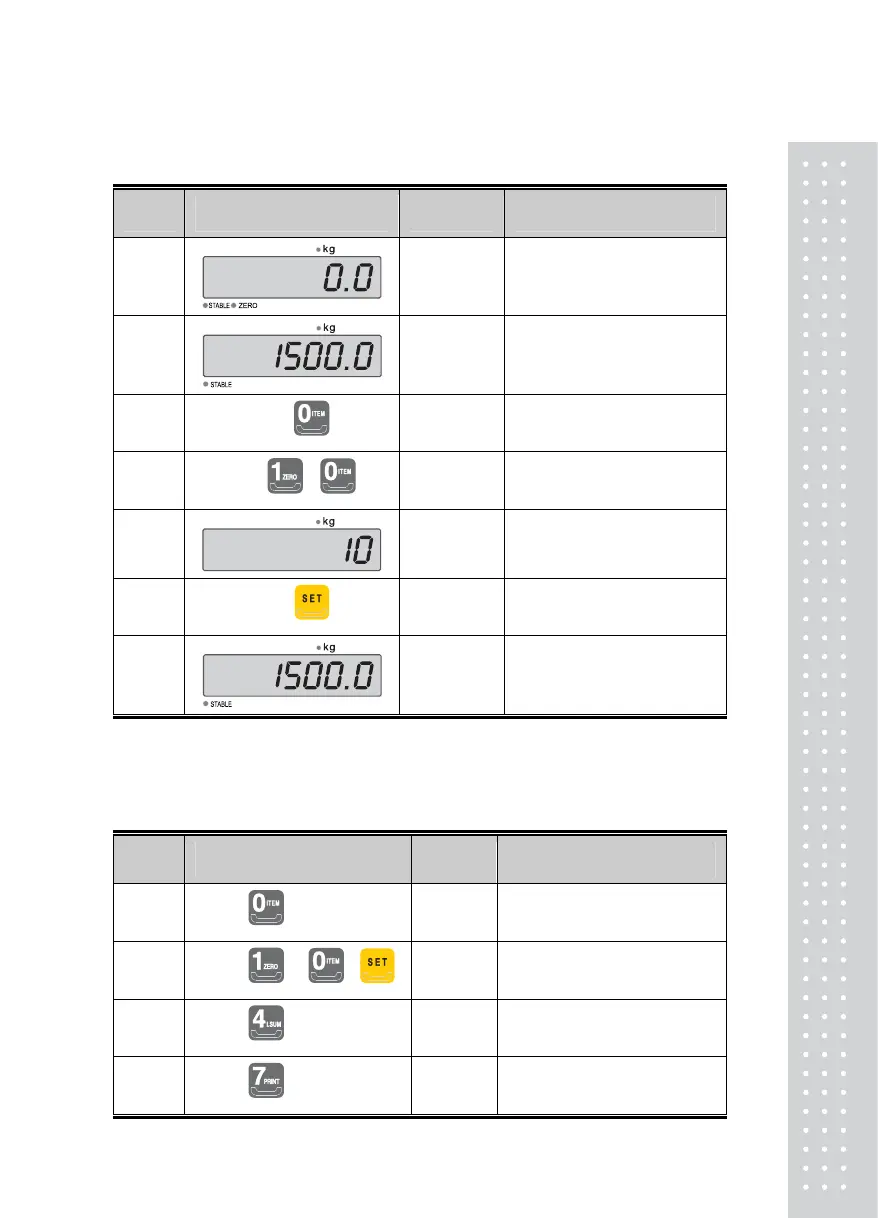
(4) ID Number Change
Display or Key Used Scale Description
1
st
Step
Empty
Tare : 5.00 kg
2
nd
Step
Item (Steel)
3
rd
Step
☞
4
th
Step
☞ ,
Enter ’10,’ the ID number for Steel
5
th
Step
Item (Steel)
6
th
Step
☞
ID number is saved.
7
th
Step
Item (Steel)
Move back to the Weighing Mode.
Note 1. ID number can be designated from 01~99.
(5) Print-out of the Sub-total
■ Suppose the ID number for Steel is '10.'
Display or Key Used Scale Description
1
st
Step
☞
Changes to the desired ID number
2
nd
Step
☞ , ,
Enter the ID number for Steel, ‘10’
3
rd
Step
☞
The sub-total for the specified ID
number is printed
4
th
Step
☞
The displayed value is printed out in
the designated print-out format.



 To Next Page