`
43
F15
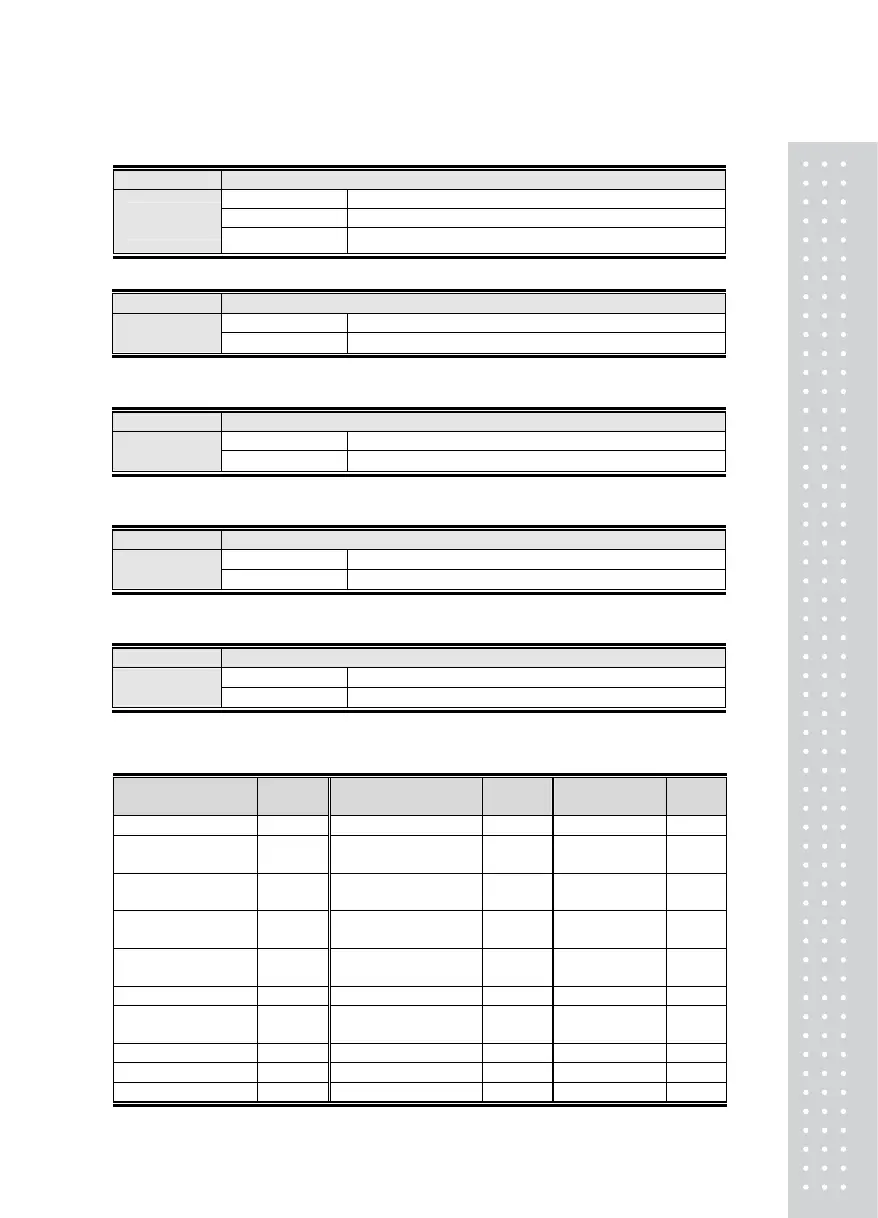
Function Set-up for allowing key input in the front of the indicator
Display Signification
F15. 0 Do not use (All Keys available for use)
Set-up Range
(0 ~ 1)
F15. 1 Use (Only Zero, F1, F2 Key are available for use)
F16
Function Set the purpose for Function key 1
Display Signification
Set-up Range
(0~29)
F16. 05 Tare
Note 1. Refer to <Table 1. Function Key Code> to select the desired function.
F17
Function Set the purpose for Function key 2 (F2 key)
Display Signification
Set-up Range
(0~29)
F17. 06 Clear Tare
Note 1. Refer to <Table 1. Function Key Code> to select the desired function.
F18
Function Set the purpose for key 4 (# 4 key)
Display Signification
Set-up Range
(0~29)
F18. 01 Set the Automatic / Manual Print
Note 1. Refer to <Table 1. Function Key Code> to select the desired function.
F19
Function Set the purpose for key 5 (# 5 key)
Display Signification
Set-up Range
(0~29)
F19. 01 Set the Automatic / Manual Print
Note 1. Refer to <Table 1. Function Key Code> to select the desired function.
Table 1) Function Key Code Table
Function
Name
Key
Code
Function Name
Key
Code
Function
Name
Key
Code
Empty : Do not use 00 Delete Grand-Total 10 Print 20
Print: Automatic /
Manual
01 Indicate Number of
Sub-total
11 Order 21
Code Input 02 Indicate Number of
Grand-Total
12 Hold / Remove
Hold
22
Hold 03 Indicate Sub-total
Weight
13 Unspecified 23
Remove Hold 04 Indicate Grand-Total
Weight
14 Unspecified 24
Tare 05 Zero 15 Unspecified 25
Clear Tare 06 Net Weight / Gross
Weight
16 Unspecified 26
Set Time 07 /Tare / Clear Tare 17 Unspecified 27
Set Date 08 Sub-total 18 Unspecified 28
Delete Sub-total 09 Grand-Total 19 Unspecified 29



 To Next Page