11
■ K.T Key (key tare key)
When you already know the tare weight, press K.T Key and input tare
weight using by numeric keys and memorize it by pressing ENTER key.
■ TIME Key
Used to check date and time.
■ CLR Key
Usage 1: Clear the number you are entering on the display.
Usage 2: Used to enter such floating point number as 0.2, 0.01 etc.
■ SET Key
Used to store current condition and exit in CALIBRATION, TEST, SET mode
8. INSTALLATION & CONNECTION
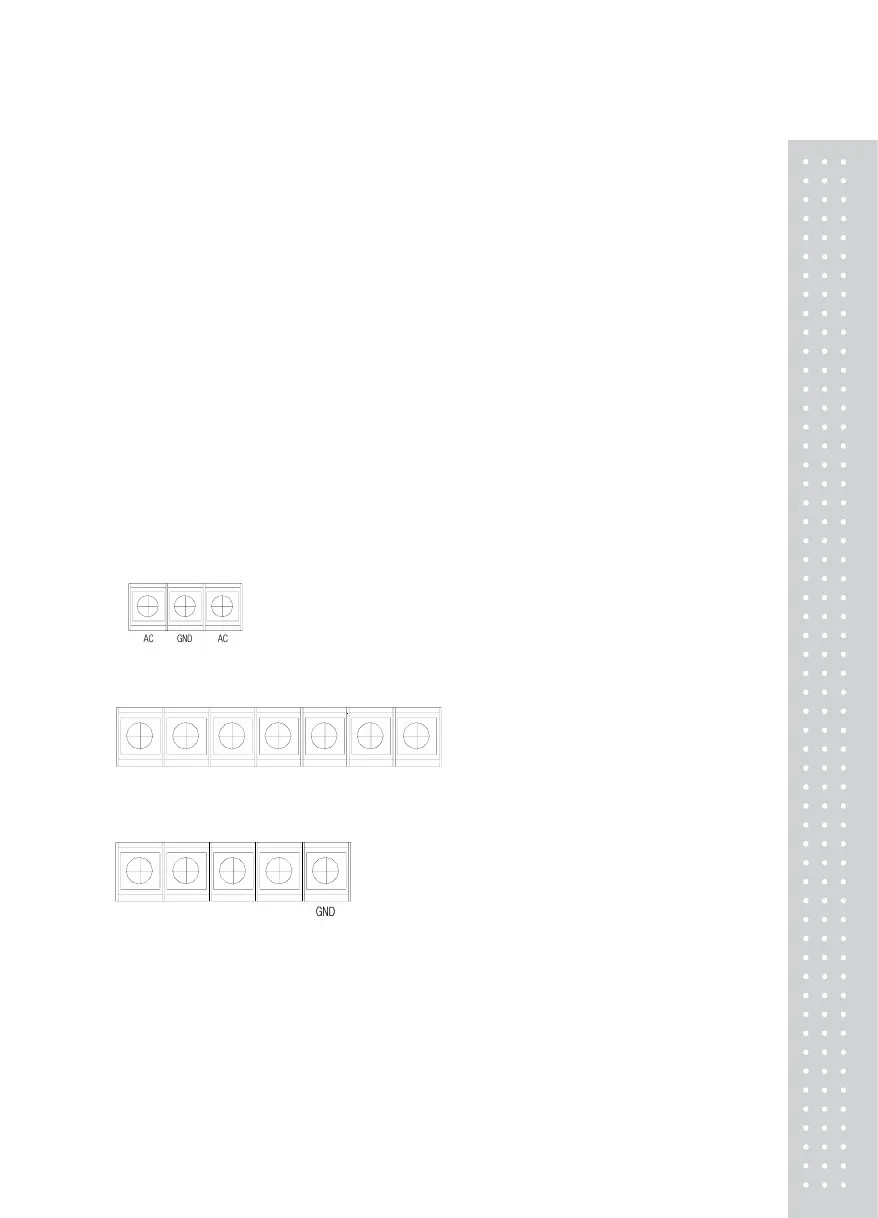
(1) Internal terminal connection
■ TB1 : AC POWER
- AC : 220V,50/60Hz (Optional : AC 110V, 50/60Hz)
A
C
A
C
G
N
D
- GND : Ground
■ TB2 : RS-232/RS-489(OPTION)
OUT+ OUT- IN- IN+
GND
TXD RXD
■ TB3 : Load cell.
EX+ EX- SIG+ SIG-
G
N
D
(2) Load cell connection
Connect load cell wire to terminal in the indicator.
* Must connect load cell wire to be through electro-pipe.
Note. Each load cell manufacturer's or model's wire color could be different.
In that case, please note the following diagram.
* Manufactures's wire color


 To Next Page