2
14. MAIN USAGE OF EXP-2000A
(1) HOLD FUNCTION
AUTO HOLD FUNCTION①
Press HOLD key wh▣ en display shows '0'.‘AH-on' will displayed and blinking.
In case of weighing moving thing, "HoLd" will appear after the weight is ▣
stable. After that, mean value will be displayed.
When you need to turn manual hold mode from the automatic hold m▣ ode, press
HOLD key when the display shows "0"
MANUAL HOLD FUNCTION②
Press HOLD key after weighing moving things. "HoLd" message sill appear and ▣
little while after mean value would be displayed.
To delete hold value, return to the normal ▣ mode by pressing HOLD key again.
Manual hold is automatically cancel When the display shows "0"▣
(2) TARE WEIGHT DEDUCTION
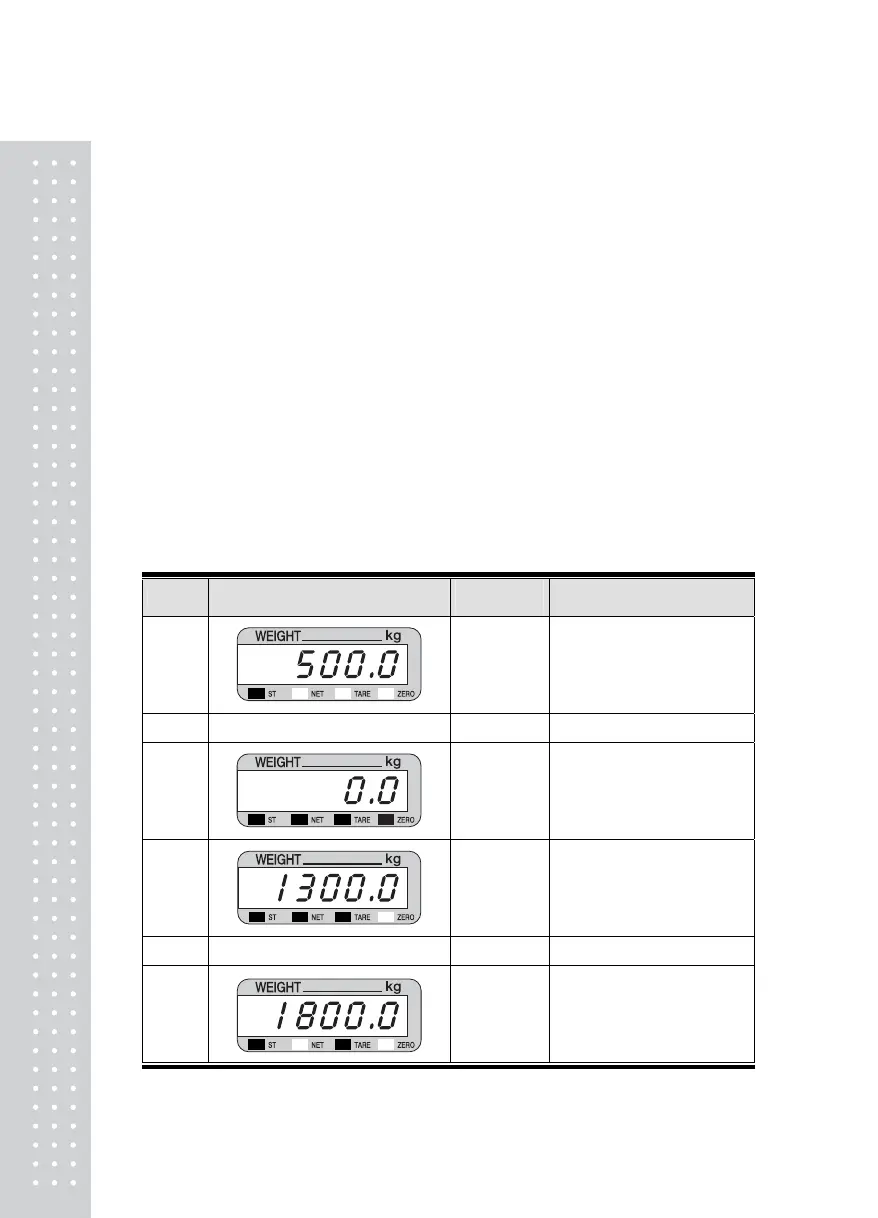
In case you don't know the tare weight①
LED DISPLAY or KEY
ON
PLATFORM
DESCRIPTION
STEP 1
Container
Tare weight (Container)
: 500.0 kg
STEP 2
TARE KEY ☞
STEP 3
Container
The indicator memorize the
tare weight.
STEP 4
Container
+
Content
Article weight
: 1300.0 kg
Net weight is displayed now
STEP 5
G/N KEY ☞
STEP 6
Container
+
Content
Gross weight
: 1800.0 kg


 To Next Page