186
CHAPTER
7
Convenient
DATA
BANK
Function
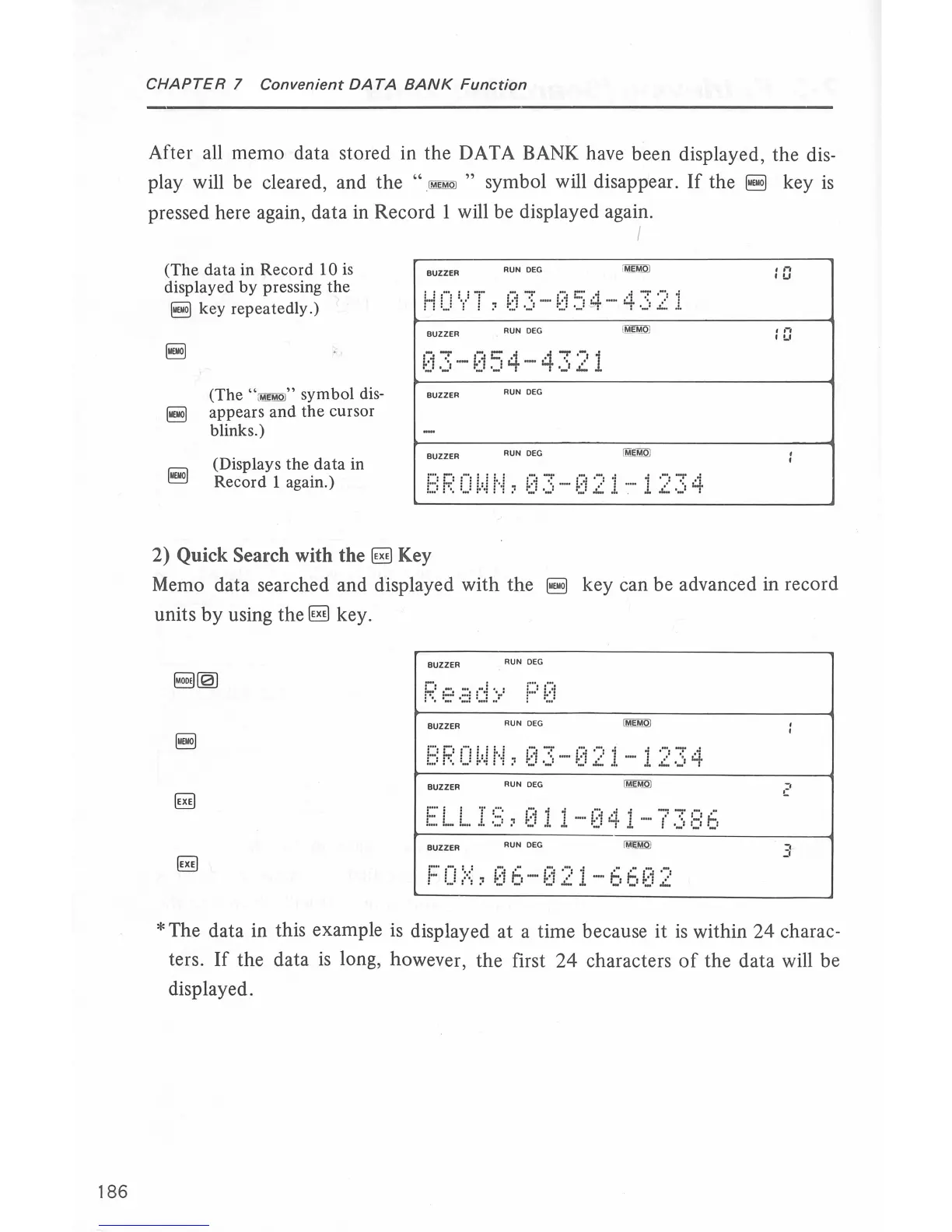
After all memo data stored in the DATA BANK have been displayed, the dis-
play will be cleared, and the
"
IM™QJ
" symbol will disappear.
If
the
~
key
is
pressed here again, data
in
Record 1 will be displayed again.
(The
data
in Record 10
is
displayed by pressing the
~key
repeatedly.)
(The
"i!ill!OI"
symbol dis-
~
appears
and
the cursor
blinks.)
(Displays the data in
Record 1 again.)
-
....
-
c::-4
4
.....
-,
1
~.:.i
.)
-
1::.1
._!
• - •
-~·
..::.
BUZZER
RUN
DEG
BUZZER
RUN
DEG
I
BROWN,03
-021-1234
2) Quick Search with
the~
Key
.n
•u
,,.,
''-'
Memo data searched and displayed with the
~
key can be advanced in record
units
by
using
the~
key.
BUZZER
RUN
DEG
BUZZER
RUN
DEG
ELLIS,011-041-7386
BUZZER
AUN
DEG
F0/,06-021-6602
-.
c
"
-'
*The
data in this example
is
displayed at a time because it
is
within
24
charac-
ters.
If
the data
is
long, however, the first
24
characters
of
the data will be
displayed.



 To Next Page