2 3
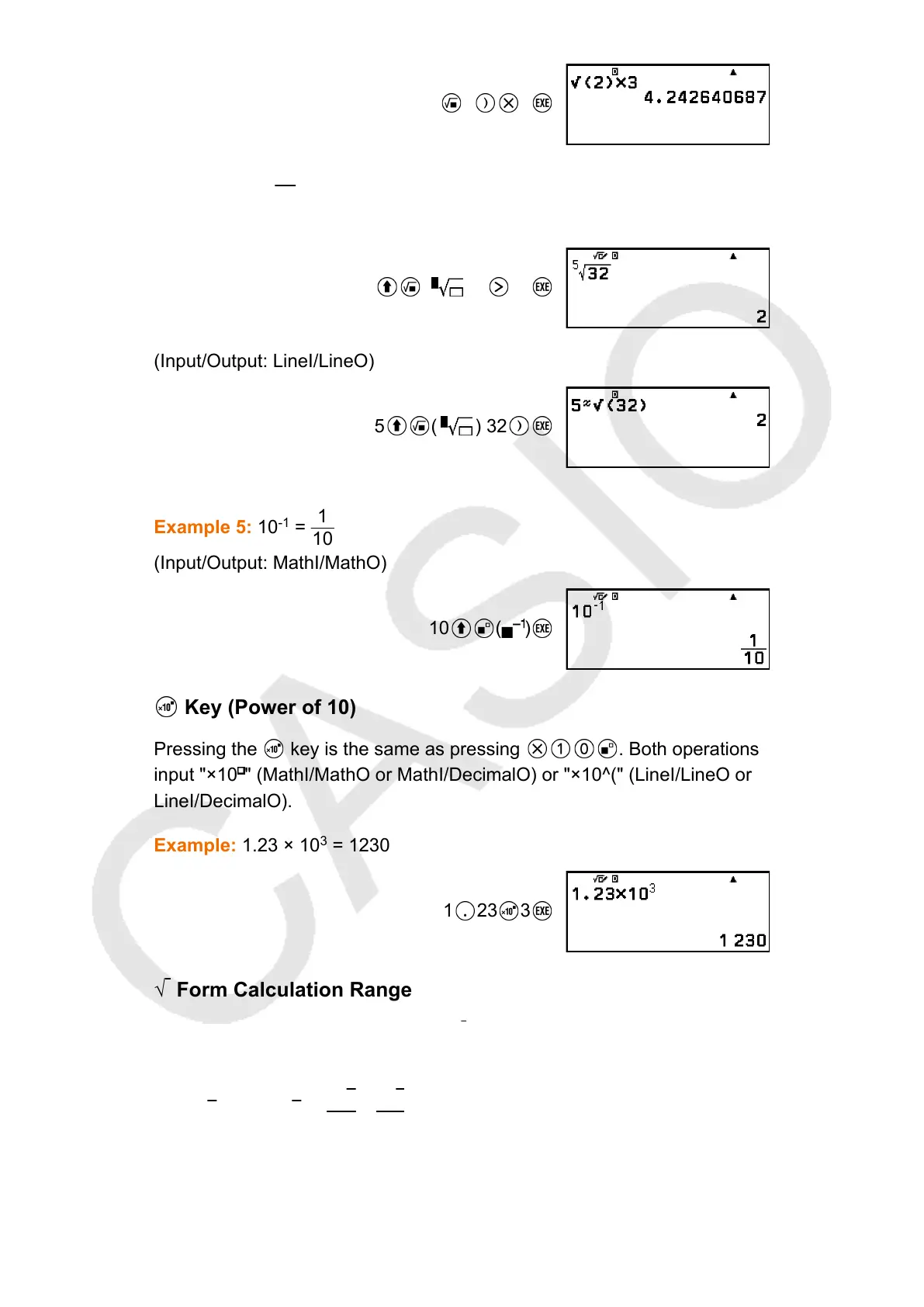
Example 4:
5
√32 = 2
(Input/Output: MathI/MathO)
( ) 5 32
(Input/Output: LineI/LineO)
5 ( ) 32
Example 5: 10
-1
=
1
10
(Input/Output: MathI/MathO)
10 ( )
Key (Power of 10)
Pressing the
key is the same as pressing . Both operations
input "×10 " (MathI/MathO or MathI/DecimalO) or "×10^(" (LineI/LineO or
LineI/DecimalO).
Example: 1.23 × 10
3
= 1230
1 23 3
√ Form Calculation Range
The allowable display ranges of the √
form calculation result are shown
below.
± a√
b, ± d ± a√b, ±
a√b
c
±
d√e
f
1 ≤ a < 100, 1 < b < 1000, 1 ≤ c < 100
0 ≤ d < 100, 0 ≤ e < 1000, 1 ≤ f < 100
31


 To Next Page