Using the F Button Set
EN-103
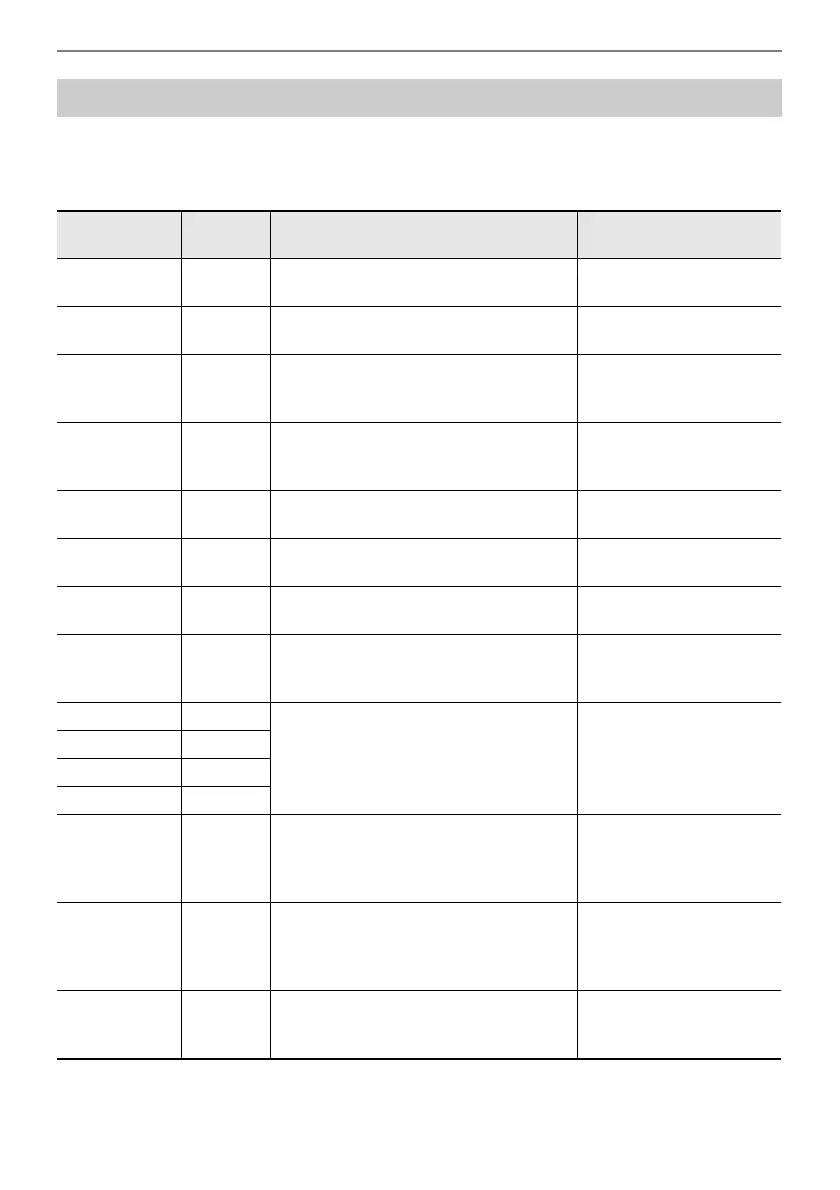
• The “Function Name” column indicates the value displayed on the “F BUTTON EDIT” screen.
• The “F Button Display” column is the text that appears in the F button menu.
• The “Function” column indicates the function to be performed when the F button is touched.
indicates the function to be performed when the F button is pressed and held.
F Button Function List
Function
Name
F Button
Display
Function Reference
Demo DEMO
The Digital Piano will wait for the demo
song to start.
“Listening to the Demo
Songs” (page EN-39)
Metronome METRO Displays the metronome setting screen.
“Using the Metronome”
(page EN-81)
Split SPLIT
Turns Split on and off.
Displays the Split Point setting screen.
“Splitting the Keyboard
Between Two Tones
(Split)” (page EN-46)
Layer LAYER Turns Layer on and off.
“Sounding Two Different
Tones at the Same Time
(Layer)” (page EN-44)
Bank BANK
Displays the Registration Bank selection
screen.
“Saving a Setup
Registration” (page EN-87)
Bank Name BNAME
Displays the Registration Bank name edit
screen.
“Changing a Registration
Bank Name” (page EN-88)
Store STORE
Displays the “REGIST STORE” screen
(for saving a setup registration).
“Saving a Setup
Registration” (page EN-87)
Freeze FREEZ
Turns Freeze function on/off.
Displays the Freeze function setting
screen.
“Freeze Function”
(page EN-90)
Registration 1 REG 1
Recalls registration area numbers 1
through 4.
“Recalling a Setup
Registration” (page EN-89)
Registration 2 REG 2
Registration 3 REG 3
Registration 4 REG 4
Adaptor ADPTR
Turns the Wireless MIDI & Audio Adaptor
on and off.
Displays the wireless setup screen.
“Enabling and Disabling
the Digital Piano’s
Wireless Function”
(page EN-149)
Sound Mode SMODE
Displays the Sound Mode selection
screen.
Displays the Sound Mode setting
screen.
“Enabling or Disabling the
Hall Simulator/Reverb and
Surround Effects”
(page EN-49)
Piano Position PPOSI
Displays the Piano Position setting
screen.
“Selecting the Piano
Position Setting”
(page EN-38)


 To Next Page
 Loading...