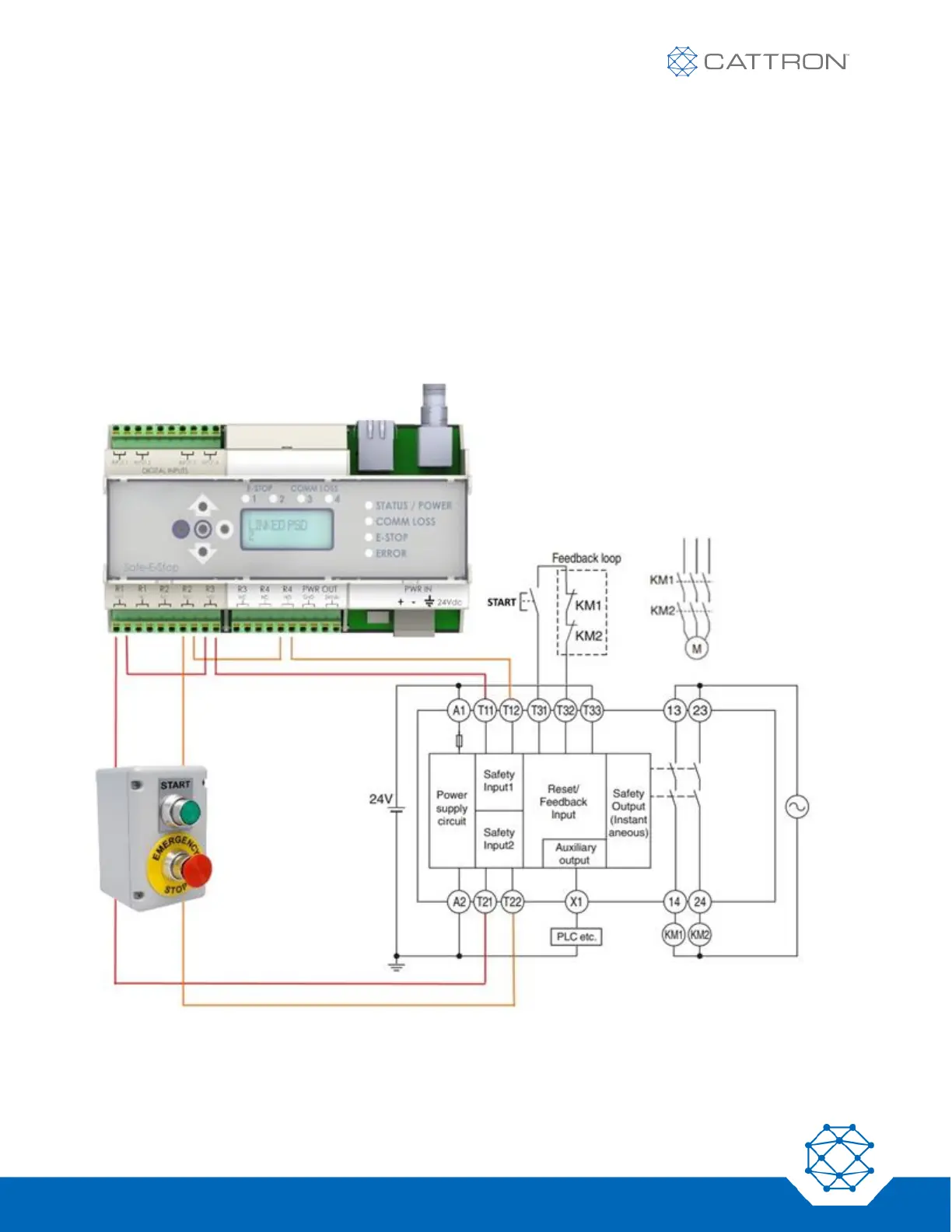
8.2.4 Dual-Channel Connection Example using E-Stop relays and the COMM LOSS relays
The following configuration combines the SIL3 function of the COMM LOSS relays with the systematic capability
of 3 provided by the E-Stop relays in a dual channel configuration.
The Ethernet bus may be used to give visual feedback of PSD status or total number of PSDs linked, or to allow
the green button to light a lamp, etc. This makes it possible to run the machine with the hard-wired E-Stop switch
in use and no PSD in use.
The dual-channel connection method below ensures a high level of reliability and monitoring is imposed; provided
the safety PLC inputs are OR’d, no single-channel wiring fault will be possible.
Additionally, if the machine is to be run without a PSD connected at times, this will not be possible without either
overriding or not using the COMM LOSS relays, because their state will be open without a PSD linked.
The COMM LOSS reset function is not shown but is still required, see Fig 12.
Figure 15: MSD Typical Dual Channel Connections When Using the COMM LOSS Relays
The COMM LOSS reset function is not shown but is still required, see Fig 12.



 To Next Page